Question about a list in a cell

  • January 18, 2022
  • 6 replies
  • 50 views

Good afternoon everyone, I have a completely stupid question and the answer to it should be simple, but I can not find it for too long. How to put a list with several levels of subordination in a cell (bullet list)


6 replies

ScottWorld
Forum|alt.badge.img+35
  • Genius
  • January 18, 2022

You can create a long text field, and turn on the rich text formatting option. That will enable you to create bulleted lists in a cell.


  • Author
  • New Participant
  • January 20, 2022

You can create a long text field, and turn on the rich text formatting option. That will enable you to create bulleted lists in a cell.


Sorry, I can’t find how to enable this functionality and is it related to the paid version?


ScottWorld
Forum|alt.badge.img+35
  • Genius
  • January 20, 2022

Sorry, I can’t find how to enable this functionality and is it related to the paid version?


No, this is available on all plans, including free plans.

Just create a long text field, and you will see the option to enable rich text formatting.

If you’ve already created a long text field, then just go back and customize the field.


  • Author
  • New Participant
  • January 26, 2022

I’m sorry that I rarely answer, family circumstances prevent me from visiting more often. Maybe I don’t see something, but I look at the settings field and don’t see where :frowning:


kuovonne
Forum|alt.badge.img+29
  • Brainy
  • January 26, 2022

I’m sorry that I rarely answer, family circumstances prevent me from visiting more often. Maybe I don’t see something, but I look at the settings field and don’t see where :frowning:


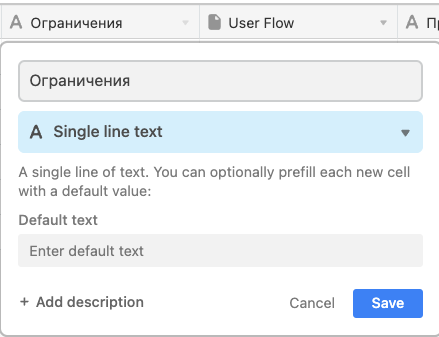
Your screen capture shows that you have a single line text field. You need to change the field type to long text.


  • Author
  • New Participant
  • January 26, 2022

Your screen capture shows that you have a single line text field. You need to change the field type to long text.


Forgive me for my inattention, thank you very much, I’ll go try a small sign there, because I don’t know how else to put a branch into 2 lines into one line :slightly_smiling_face: