Question

Sandbox Won't Apply Changes

  • March 20, 2026
  • 2 replies
  • 39 views

Forum|alt.badge.img+6

Hi Airtable Community,


I’ve got a sandbox running on one of my networked Airtable bases as I work on configuration to connect it to another platform, but I keep getting an error message when I try to apply changes made in the Sandbox to Production:
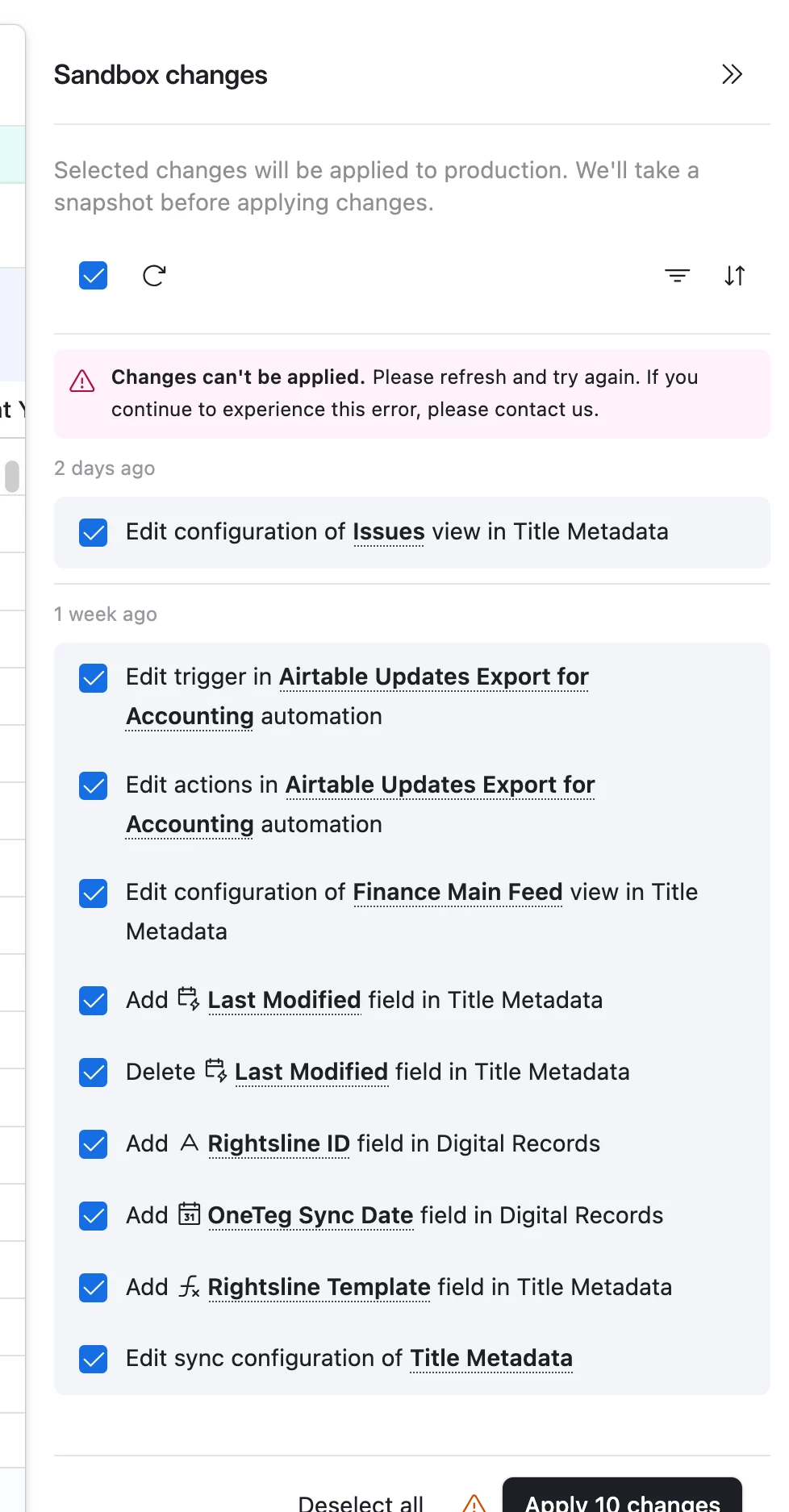


It’s the same error every time. I have creator permissions in both environments, as do the accounts of our external vendor working on the integration. I emailed Support, and was greatly disappointed to get an AI bot response. I’m hoping some real human beings can help me out.


2 replies

Forum|alt.badge.img+4
  • Participating Frequently
  • March 23, 2026

The changes can’t be applied error is rather vague but looking at your change list here a some things that can be causing this:

The combination of “Add Last Modified field” and “Delete Last Modified field” being in the same batch is most likely the culprit.  Sometimes when applying conflicting operations in the same field on a single push can choke Airtable’s Sandbox even if the net result seems to make sense.


What you could try:

-Deselect the conflicting Last Modified changes and then try applying the remaining changes first.  Then handle that field separately.

-Try applying changes in smaller batches rather than all 10 at once - this can make it easier to isolate the change that is breaking the apply.

-Try hard refreshing (Ctrl+Shift+R/ Cmd+Shift+R) before each attempt.


If all else fails the “Edit sync configuration of Title Metadata” change is another possibility.  Sync config changes can sometimes block the entire batch if there’s a dependency issue.


Forum|alt.badge.img+6
  • Author
  • New Participant
  • March 23, 2026

The changes can’t be applied error is rather vague but looking at your change list here a some things that can be causing this:

The combination of “Add Last Modified field” and “Delete Last Modified field” being in the same batch is most likely the culprit.  Sometimes when applying conflicting operations in the same field on a single push can choke Airtable’s Sandbox even if the net result seems to make sense.


What you could try:

-Deselect the conflicting Last Modified changes and then try applying the remaining changes first.  Then handle that field separately.

-Try applying changes in smaller batches rather than all 10 at once - this can make it easier to isolate the change that is breaking the apply.

-Try hard refreshing (Ctrl+Shift+R/ Cmd+Shift+R) before each attempt.


If all else fails the “Edit sync configuration of Title Metadata” change is another possibility.  Sync config changes can sometimes block the entire batch if there’s a dependency issue.


Thanks for the suggestions, unfortunately no improvement. I tried the ‘Edit sync configuration of Title Metadata’ by itself, but no joy. I tried some of the others one at a time and still no luck. My issue has supposedly been sent to a Airtable team member, so hopefully someone will be able to help.