
Question

Syncing linked records with selection selection conditions

  • Oct 15, 2026 6:07 PM UTC
  • 7 replies
  • 85 views

Forum|alt.badge.img+2

I have two bases, let’s call them Recipes and Catering. The Catering team syncs in the Dishes table (two-way sync), as well as the Ingredients table (one-way sync). Each Dish record includes a Main Ingredient field that links to the Ingredients base. The Main Ingredient field has a selection limitation (you can only add in-season Ingredients to a dish).

The Catering team is not able to fill in the Main Ingredient field on Dish records because of the selection conditions. This happens whether the condition is “Ingredient is in-season” or if I create an “in-season ingredients” view and limit selection to that view.
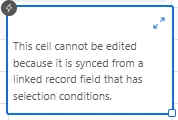
The AI help bot tells me there’s no way to get around this short of a) removing the selection condition entirely, or b) setting up a second linked record field and a complicated sync/automation situation to fill in the original Main Ingredient field. I think that’s the conclusion I came to as well, but I want to check with my fellow humans first to see if anyone else has a solution I’m missing?


7 replies

DevonK
Forum|alt.badge.img+18
  • Inspiring
  • Oct 16, 2026 11:26 AM UTC

I recreated your setup and hit the same limitation, unfortunately. Why do the two bases need to be separate? If it’s possible to merge them and use field/table permissions (or better yet, interfaces) for the different user groups, that’s probably the best path forward. If that’s not possible, the second linked field may be your only option without any third-party tools.


CurtisFonger
Forum|alt.badge.img
  • New Participant
  • Oct 16, 2026 8:20 PM UTC

I don't think you're missing anything. In a synced table, the linked record field in the destination base is mostly a copy of the source, and the selection limit on it gets evaluated against what the Catering side can see. If the Ingredients table is a one-way sync, the in-season filter field often isn't something that side can evaluate cleanly, so the picker comes up empty.

The workaround that holds up is the one you already named, in a simpler form:

- Add a plain Main Ingredient (Pick) linked field on Dishes in Catering with no selection limit, or a single select fed from the Ingredients list.
- Keep the in-season rule in the Recipes base, where the source Ingredients table lives.
- Add a checkbox or formula field on Dishes that flags when the chosen ingredient isn't in-season.
- Use an automation or interface filter to alert the team instead of blocking the pick.

You lose the hard block, but you keep the data editable and the rule visible.


Forum|alt.badge.img
  • New Participant
  • Oct 18, 2026 11:13 AM UTC

from what i can tell there isnt a setting in the catering base that unlocks it, because a synced linked field with selection conditions goes read only on the synced side. the cleanest workaround is giving the catering team a small interface in the recipes base just for dishes, where the main ingredient picker still respects the in season limit. the edits then flow back through the sync, so you avoid the second field and automation tangle. if they cant work in the source base at all, dropping the condition and flagging out of season picks with a lookup is probably the lesser evil.


davidrosalie89
Forum|alt.badge.img

This appears to be an Airtable limitation with synced linked records. A practical workaround is to remove the selection restriction, use a filtered view for in-season ingredients, and add a formula or automation to flag invalid selections.


Vadim Ciobanu
Forum|alt.badge.img+2
  • Known Participant
  • Oct 18, 2026 6:15 PM UTC

Looks like you need to upgrade to Business tier


Jimmy Ruan
Forum|alt.badge.img
  • Participating Frequently
  • Oct 19, 2026 1:44 AM UTC

Selection conditions on synced link fields only work against what the synced table can see, so check that the in-season field is included in the sync. If it is and it still blocks, add a plain ‘Ingredient (pick)’ link field for Catering. Then a ‘when record updated’ automation can check the season and copy valid picks into Main Ingredient, and flag invalid ones.


Forum|alt.badge.img+2
  • Author
  • New Participant
  • Oct 19, 2026 2:19 PM UTC

from what i can tell there isnt a setting in the catering base that unlocks it, because a synced linked field with selection conditions goes read only on the synced side. the cleanest workaround is giving the catering team a small interface in the recipes base just for dishes, where the main ingredient picker still respects the in season limit. the edits then flow back through the sync, so you avoid the second field and automation tangle. if they cant work in the source base at all, dropping the condition and flagging out of season picks with a lookup is probably the lesser evil.

Thanks. The catering team has access to the Recipes base already so that’s how they’ve been doing it, but it’s a bit of a headache for them to have to switch between bases so I was hoping to find a solution for them. Alas!