Solved

Automate AI field agent to run on a schedule

  • Nov 20, 2025 4:47 PM UTC
  • 6 replies
  • 315 views

Graham Reed
Forum|alt.badge.img+9

Hello all.

I’m looking to have a column (field) of field agents run/process once a week on a Monday morning. FYI these agents a prompted to go out to the internet and retrieve x information. There are no automation options specifically to do this - am I missing something or how else can this be achieved?

Currently I’m thinking about having an automation that changes a field in each record (say make it today’s date), and that is something the field agent is monitoring to kick it off and run. Feels a bit hacky, but if anyone has better ideas please let me know. 

Best answer by MikeyT

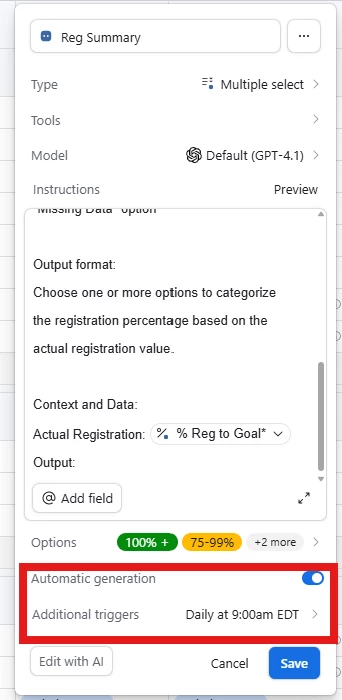
Another cool option is when you are creating or editing the field itself you can select the Automatic Generation Toggle and select the additional triggers to daily at whatever time you desire. 
 

View original
This topic has been closed for replies.

6 replies

TheTimeSavingCo
Forum|alt.badge.img+32

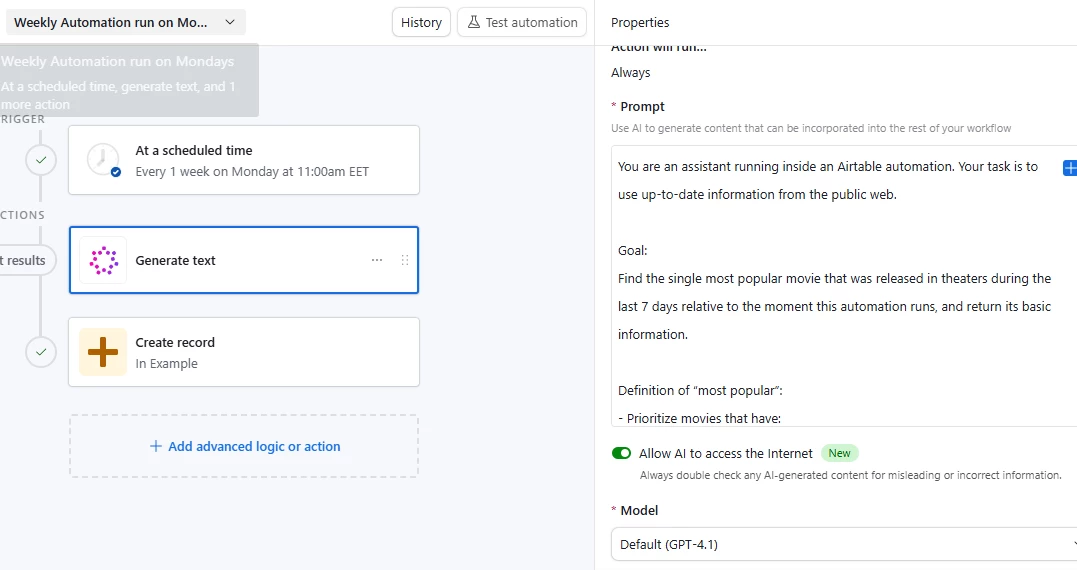
Hm, the ‘Generate text’ automation action has the ability to search the web but I take it that isn’t working the same as the Field Agents?

If so, your idea seems like the next best thing really


Graham Reed
Forum|alt.badge.img+9
  • Author
  • Known Participant
  • Nov 21, 2025 11:37 AM UTC

Yes there is nothing about ‘rerun a field agent’ which is already set up and working very well. All I need it to do is rerun on a schedule, not with a press of a button


anthonyXRay
Forum|alt.badge.img+7
  • Participating Frequently
  • Nov 24, 2025 6:12 PM UTC

Hello,

Can you setup an automation that Runs on a Schedule and then schedule that to run at the specific time.  Then get all of the records in a specific View that you want the Field Agent to run in, then have the automation run in a script or Webhook for each record and then update that record via the script or “Update Record” action to the value that is fetched.  You may need to use another automation service perhaps if that is easier.  Does this sound like something that you are trying to do?


Alexey_Gusev
Forum|alt.badge.img+25


MikeyT
Forum|alt.badge.img+1
  • New Participant
  • Answer
  • Jun 29, 2026 6:06 PM UTC

Another cool option is when you are creating or editing the field itself you can select the Automatic Generation Toggle and select the additional triggers to daily at whatever time you desire. 


Graham Reed
Forum|alt.badge.img+9
  • Author
  • Known Participant
  • Jun 30, 2026 10:07 AM UTC

This is new and very handy!!