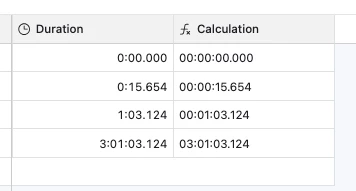
I’m working with video timecodes using the DURATION field type, and am entering data in an HH.MM.SS.mmm format (H=hours, M=minutes, S=seconds, m=milliseconds). I need the data to reflect the values in the hours and minutes places even if those are zero.
Right now, if I type in the data for one minute, three seconds, and 124 milliseconds, that data shows as 01:03:124 , but I need it to display as 00:01:03:124
Similarly, if I type in the data as 15 seconds, 654 milliseconds, it shows as 15.654 , but I need it to display as 00:00:15.654
Anyone have a formula or workaround that will facilitate this?