Solved

concat a lookup field returns id fron a third linked table instead

  • June 10, 2026
  • 8 replies
  • 89 views

shasta
Forum|alt.badge.img+1

hi all, i am sure this should be easy and i cannot get it to work


i have a products table {product id} and {product name}

a menu table which pulls the product name using the product id

and an orders table which lookups the product name from the menu


i am then trying to concatenate in orders the product_name and qty into one string


{products}&" ("&qty&")"

{products} here is a lookup field


i’m expecting Bread(1)

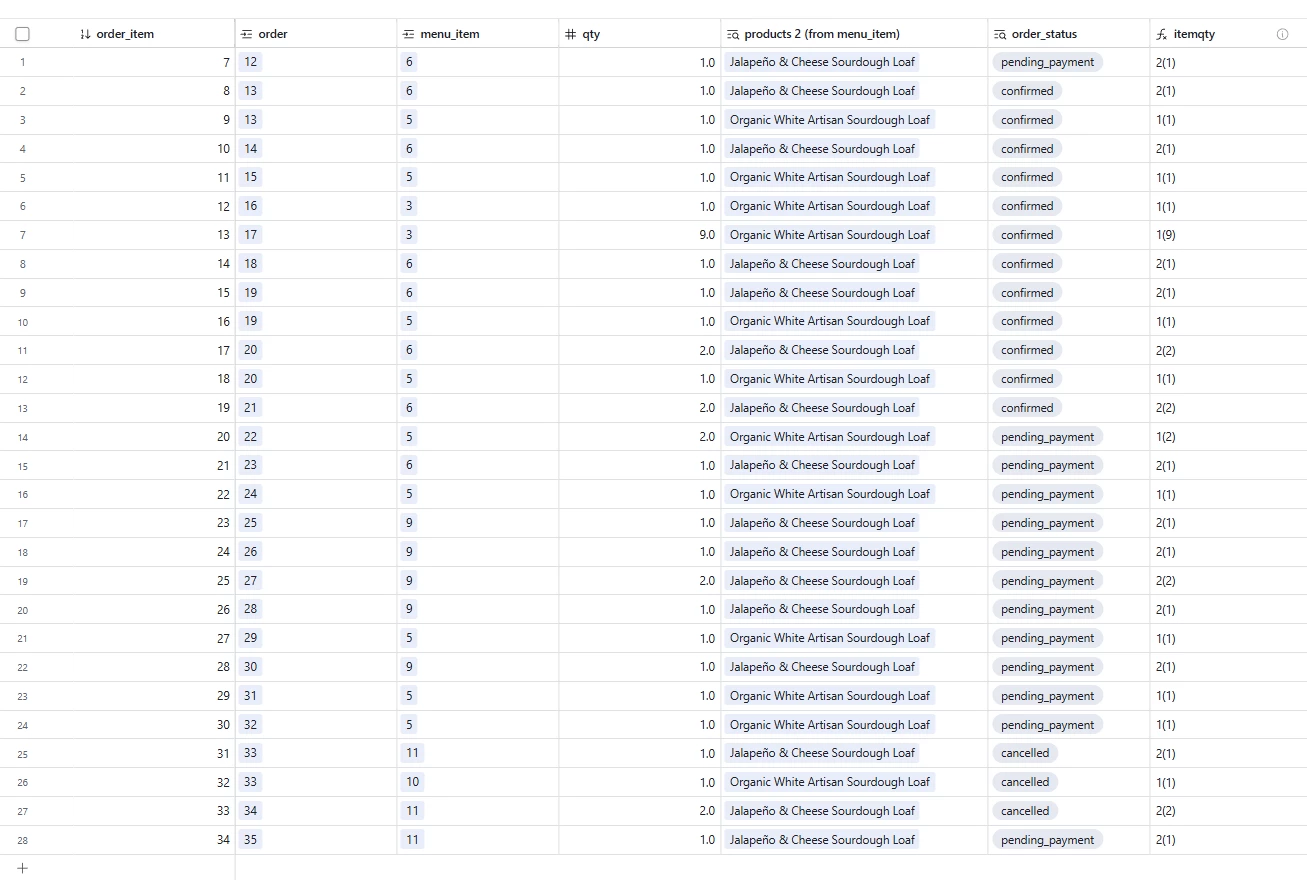
but instead get 2(1)


2 is the product id


i’ve tried formula, arrays and rollup function


thank you

Best answer by DisraeliGears01

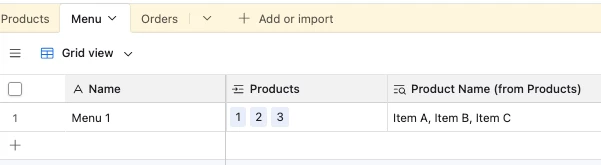
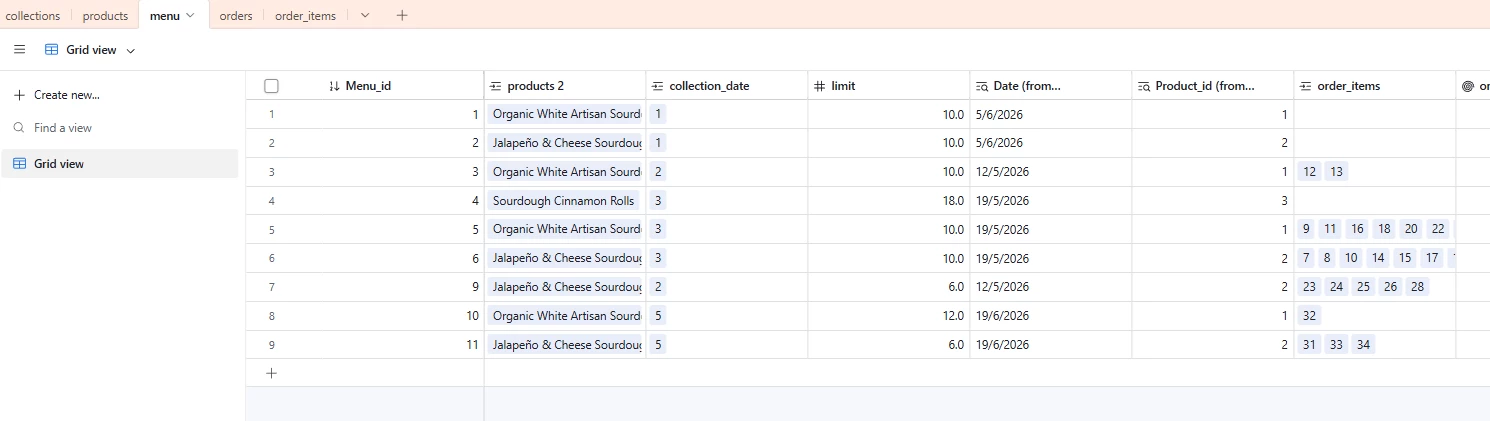
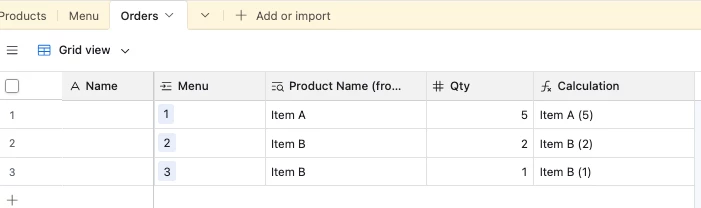
I think the issue might be that you’re looking up the linked record field instead of a name string. Compare your order_items screenshot, where “products 2(from menu items)” is a lookup field of a linked record, and not a text string like Adam’s screenshot where “Product Name (fro...” is a text string. 

Try adding a lookup in your menu table, pointed at the product table, name field. It should create a string field instead of a linked record. Then lookup that field in your order_items table, and use that for your formula.

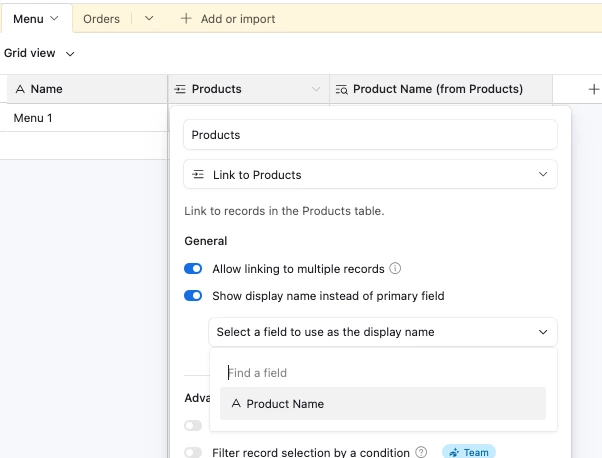
EDIT- I just recreated your bases from your screenshots and that’s definitely the proble, was able to recreate your error and adding those lookups fixed the problem. I think where you’re running into confusion too is that the linked record connection from products->menu is set to Show display name instead of primary field (set to Name). While that changes the display name the primary key is still the identifying field for the record.

8 replies

TheTimeSavingCo
Forum|alt.badge.img+32

Could you provide screenshots of your tables?  I tried to recreate it but aren’t quite sure how the ‘Menu’ table works


---

Off the top of my head, you could try:

  1. Adding a lookup field in Menu to grab the product name, and then in Orders add a lookup field to display that lookup
  2. In the Products table, change the primary field to be the product name instead of the product ID
  3. In the Menu table, set it to display the Product Name field instead of the Product ID field


shasta
Forum|alt.badge.img+1
  • Author
  • New Participant
  • June 10, 2026

thank you, iot is already referencing the product name  and the website is setup with primary keys so don’t want to mess around with changing these

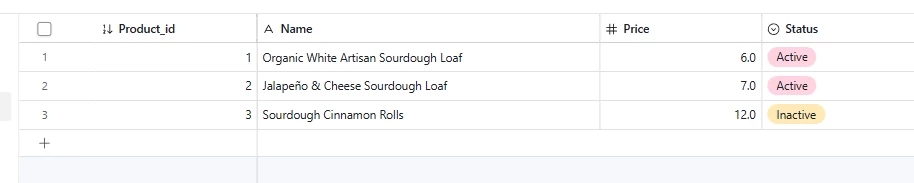
products

menu 

order_items


TheTimeSavingCo
Forum|alt.badge.img+32

Does this look right?

If so, I think you’ll just need to update your formula to be the following:

{products 2 (from menu_item)} & " (" & Qty & ")"

shasta
Forum|alt.badge.img+1
  • Author
  • New Participant
  • June 11, 2026

Hi Adam thank you, yes that is how my formula reads, I simplified it in my original post. It’s so odd that I cannot seem to make this work. I have even created a separate lookup field again just in case and get the same results. And I checked that the menu doesn’t link using product id and then display the name- just to be sure. 


DisraeliGears01
Forum|alt.badge.img+22

I think the issue might be that you’re looking up the linked record field instead of a name string. Compare your order_items screenshot, where “products 2(from menu items)” is a lookup field of a linked record, and not a text string like Adam’s screenshot where “Product Name (fro...” is a text string. 

Try adding a lookup in your menu table, pointed at the product table, name field. It should create a string field instead of a linked record. Then lookup that field in your order_items table, and use that for your formula.

EDIT- I just recreated your bases from your screenshots and that’s definitely the proble, was able to recreate your error and adding those lookups fixed the problem. I think where you’re running into confusion too is that the linked record connection from products->menu is set to Show display name instead of primary field (set to Name). While that changes the display name the primary key is still the identifying field for the record.


shasta
Forum|alt.badge.img+1
  • Author
  • New Participant
  • June 15, 2026

thank you so much everyone - was just as you said and the lookup was the issue!!


Forum|alt.badge.img+1
  • Participating Frequently
  • June 16, 2026

You're likely concatenating a linked record lookup, which returns the record ID instead of the product name. Create a lookup for the Product Name text field in Menu, then use that lookup in your formula. That should give you Bread (1) instead of 2(1). 👍


Forum|alt.badge.img+1
  • Participating Frequently
  • June 22, 2026

The problem is that your lookup is returning the linked record / product ID, not the product name text.

So {products} is showing 2 instead of Bread.

Fix it by:

  • Adding a lookup in Menu → Product Name (text field) from Products
  • Then use that lookup field in Orders instead of the linked record

After that your formula:
{products} & " (" & qty & ")"

will correctly return:
Bread (1)