Solved

Convert an Array (Multiple Select) into a String with formatting

  • December 31, 2022
  • 3 replies
  • 222 views

Forum|alt.badge.img+2

Hi there,

I'm trying to utilize Airtable to manage Shopify Metafields (among other things), but am striking out with doing this in what I believe to be the most logical way.

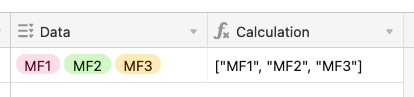
I've configured a field (column) as "multiple select" with preconfigured options (the array). This ensures we're dealing with legitimate values.

Syncing to Shopify, through the use of AirPower, requires the metafields to be in the format:

["MF1","MF2","MF3"] 

I've used ARRAYJOIN to convert the array to a string in a separate field, but am stumped at actually formatting the square brackets and quotes.

Suggestions?

TIA,

Jeff
Best answer by TheTimeSavingCo

Try something like:


'["' & SUBSTITUTE( Data, ', ', '", "' ) & '"]'


3 replies

TheTimeSavingCo
Forum|alt.badge.img+31

Try something like:


'["' & SUBSTITUTE( Data, ', ', '", "' ) & '"]'


Forum|alt.badge.img+2
  • Author
  • New Participant
  • January 1, 2023

Thank you very much Adam!

This worked perfectly. 


Théau12
Forum|alt.badge.img+8
  • Known Participant
  • October 26, 2024

Hey @jdoepker, you can also check SyncBase (an Airtable Shopify integration) I've created.

In opposition to Airpower we're doing this job on our side, and it syncs instantly (few seconds).

Happy to give more info if needed! 

Théau