Solved

Creating/updating Airtable user field from Lookup/formula?

  • August 12, 2026
  • 7 replies
  • 30 views

Forum|alt.badge.img+19

Hi,

I’m building a work shift calendar for employees to see their own workdays. Hence the calendar access would be based on <current user>, which requires having a user field for the records. 

However, due to the amount of previous and current employees from different departments, I have built a separate “Staff” table. This way I can show only relevant employees in the work shift planning interface pages, making the UX a lot more convenient.

I had hoped I could “produce/distill/populate” a user field based on this “Staff” table, but this seems not to be possible. For example, a Lookup resulting in an e-mail addresse matching the e-mail of a user could be formatted as a user, but this seems impossible.

Has anybody found a workaround for this? I know and understand that I could use an automation, but I’m really running out of automations (and I would like to keep this within Airtable). Moreover, it doesn’t seem particularly tempting to waste an automation on such a small thing, even if I had plenty to spare.

Rgds,

Björn

Best answer by DisraeliGears01

Seems like you can have a User field on the Staff table, create the link between shift and staff, and then Lookup the User field from the staff table. 

This worked in my simple testing table, with the Lookup providing a User field type, and I was able to make a quick interface filtered to only the active user. The only downside I see is that you can’t notify users when added to a record through the lookup

7 replies

ScottWorld
Forum|alt.badge.img+35
  • Genius
  • August 12, 2026

You can use an automation to paste the email address into the user field, and Airtable will automatically turn that email address into the user from the user dropdown menu.

- ScottWorld, Expert Airtable Consultant


DisraeliGears01
Forum|alt.badge.img+22

Seems like you can have a User field on the Staff table, create the link between shift and staff, and then Lookup the User field from the staff table. 

This worked in my simple testing table, with the Lookup providing a User field type, and I was able to make a quick interface filtered to only the active user. The only downside I see is that you can’t notify users when added to a record through the lookup


TheTimeSavingCo
Forum|alt.badge.img+32

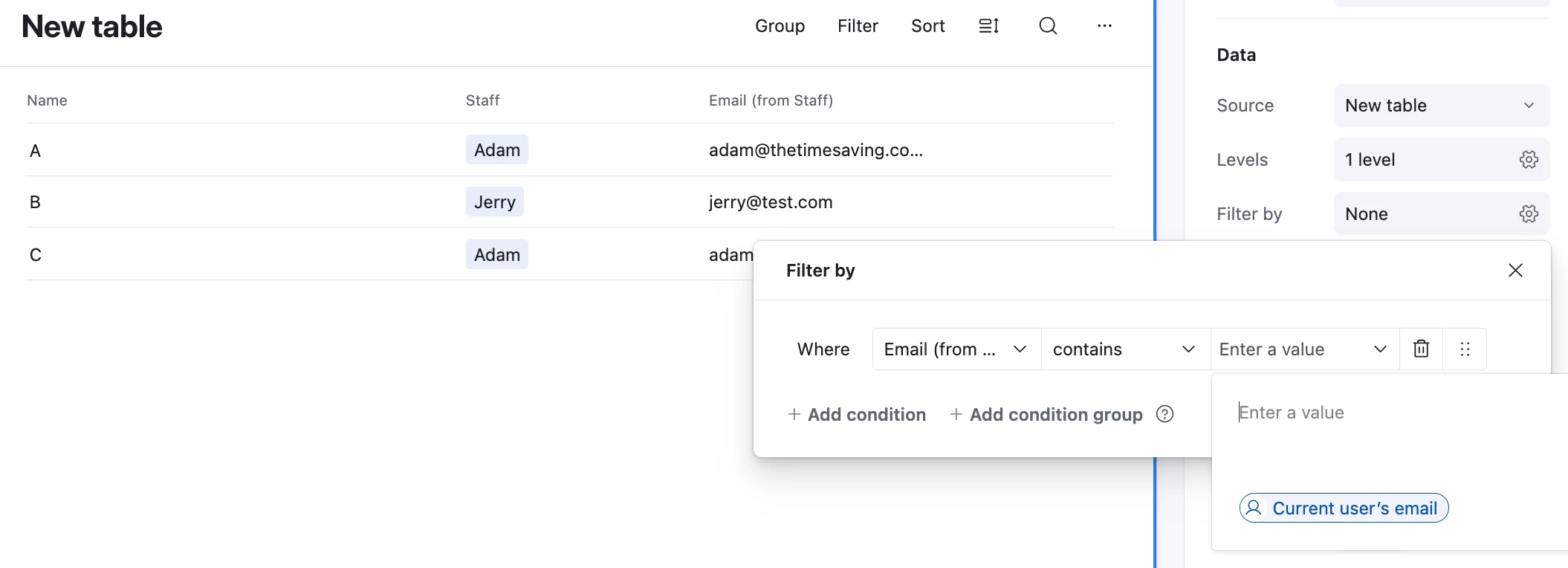
Hm, we can filter off an Email field / lookup of an Email field too? 

Here I added a lookup field that displayed an Email field from the ‘Staff’ table and can filter by the current user:


Forum|alt.badge.img+19
  • Author
  • Known Participant
  • August 13, 2026

Thanks ​@DisraeliGears01, this worked like a charm! D’oh, feeling stupid, should have seen that. But good to learn every day :).


Forum|alt.badge.img+19
  • Author
  • Known Participant
  • August 13, 2026

Thanks ​@TheTimeSavingCo, that was an interesting twist. Very good to know for the future.


Forum|alt.badge.img+19
  • Author
  • Known Participant
  • August 13, 2026

Thanks ​@ScottWorld, but I wanted to avoid automation use. The other replies provided here worked well.


DisraeliGears01
Forum|alt.badge.img+22

Cool ​@TheTimeSavingCo I didn’t know Email could read active users email address like that. Seems like a bit of an edge case, but I can imagine certain uses in like large orgs or portals where you might not know or be able to tag everyone as a user field. 

And ​@0800-grizzly , that’s why I enjoy using the forums, it makes me think through different scenarios that I might not actively face atm. Always good to keep learning. 😎👍