Question

DATEADD - how to configure formatting?

  • September 7, 2026
  • 4 replies
  • 94 views

Forum|alt.badge.img+4

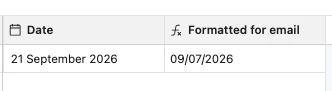
I have a formula field that uses DATEADD to subtract 2 weeks from a date in another field. It produces the right date, but that date is formatted in a way that’s hard to read. Is it possible to configure the formatting so it shows up as MM/DD/YYYY ?


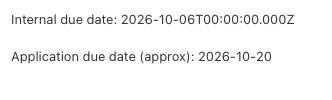
Screenshot to show how the formatting shows up in an email automation. It’s the internal due date that I’d like to format. differently. 


Somwhat related, I’d like the ‘application due date’ to format as MM/DD/YYYY as well, if possible.


4 replies

TheTimeSavingCo
Forum|alt.badge.img+32

Try using DATETIME_FORMAT on the result of the DATEADD?


DATETIME_FORMAT(
DATEADD(
Date,
-2,
'weeks'
),
'MM/DD/YYYY'
)


ScottWorld
Forum|alt.badge.img+35

​@rcode 

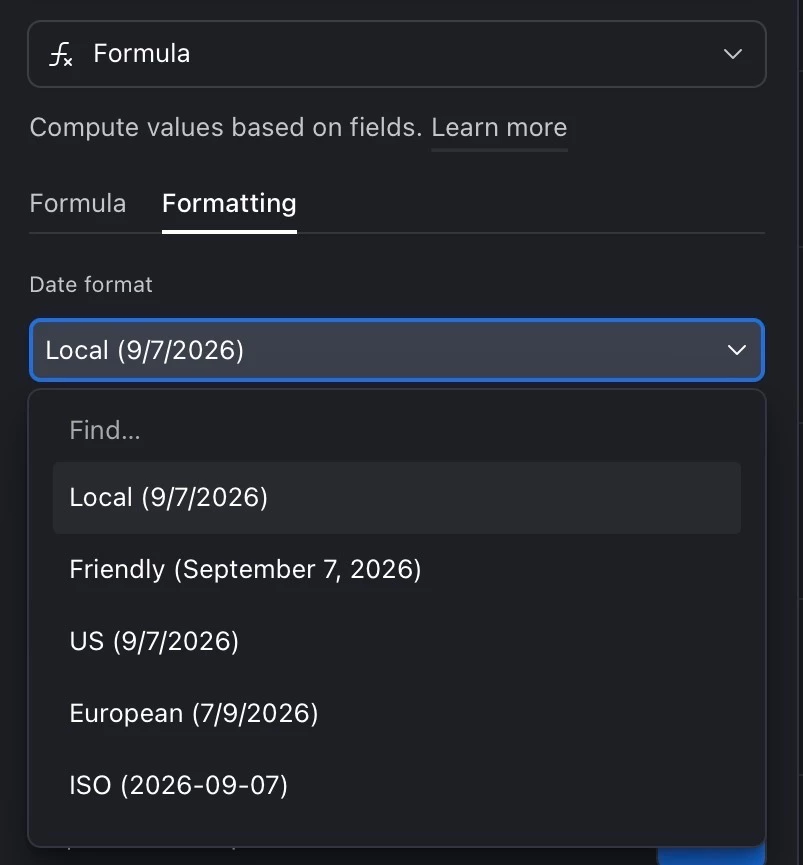
Check out the “formatting” tab of your formula field.

See screenshot below.

- ScottWorld, Expert Airtable Consultant


Forum|alt.badge.img
  • Participating Frequently
  • October 7, 2026

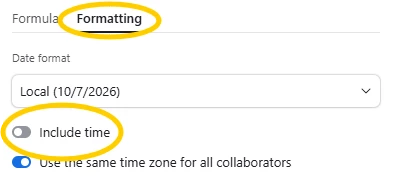
I’ll second what everyone else here has said. One other thing I will do if the time isn’t important is I switch off the “Include Time” option on the formatting tab. That’s helped me a lot in getting the correct formatting as well


Forum|alt.badge.img+4
  • Author
  • Inspiring
  • October 7, 2026

thank you ​@ScottWorld  and ​@Olivia B !