I've created a calendar table synced to GCAL and wish to populate a calendar view with the events based on the Event Start and when Event Start is not available based on Event Created.
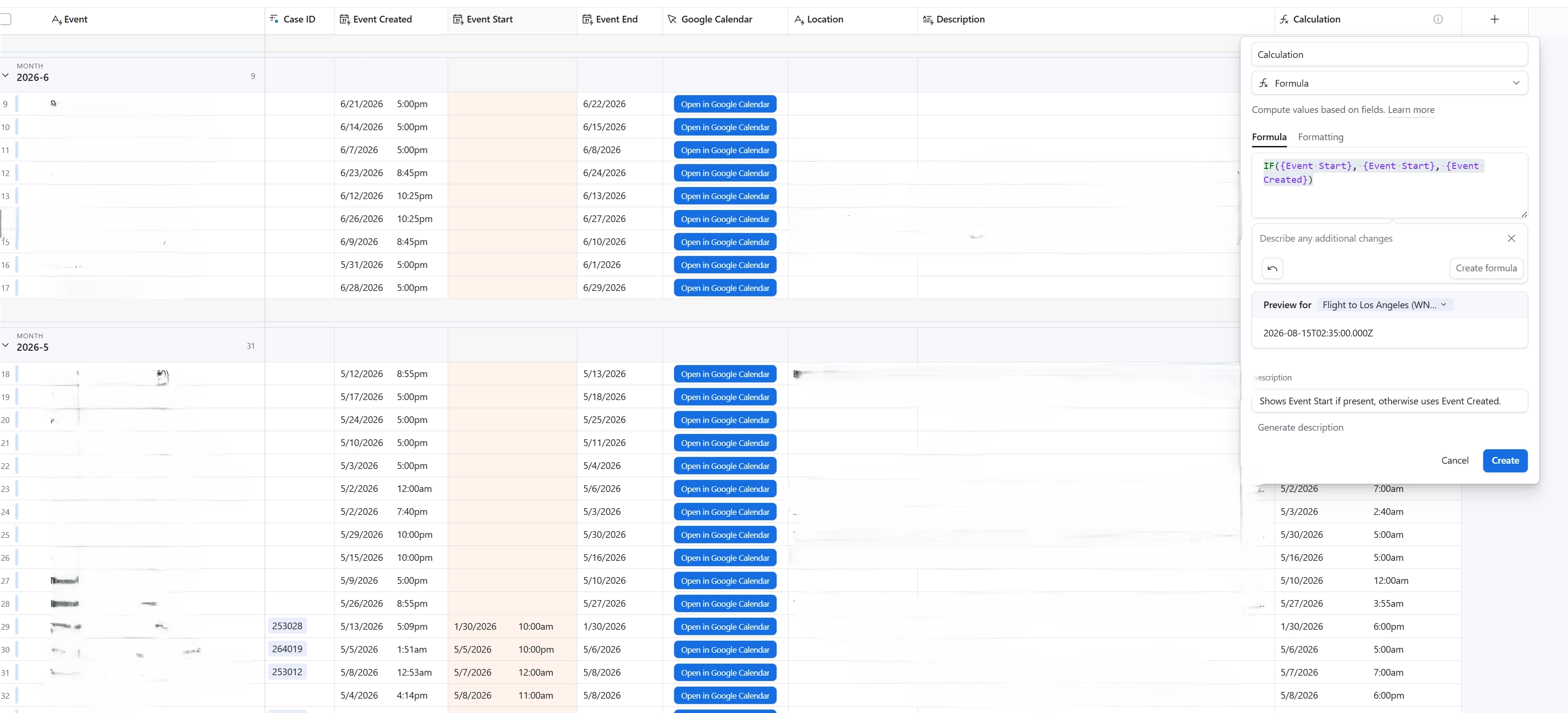
I've struggled to achieve this (I welcome any other possible solutions) so I attempted to create a formula field with the following formula: “IF({Event Start}, {Event Start}, {Event Created})”. As generated by the ai agent.
Somehow that formula changes both Event Start and Event Created data.
I've also tried the following formula: DATETIME_PARSE(IF({Event Start} = BLANK(), {Event Created}, {Event Start}))
To the same effect.
Screenshot attached to quell my possibly insufficient description.
Questions.
- Why is the data changing when the formula is only requesting to display the data?
- Are my assumptions about the formula only asking to display data correct?
- Is my formula broken/insufficient? if so, what's the fix?
- Is there a simpler way to achieve my goal of populating a calendar view with the events based on the Event Start and when Event Start is not available based on Event Created?
Thanks for your time.