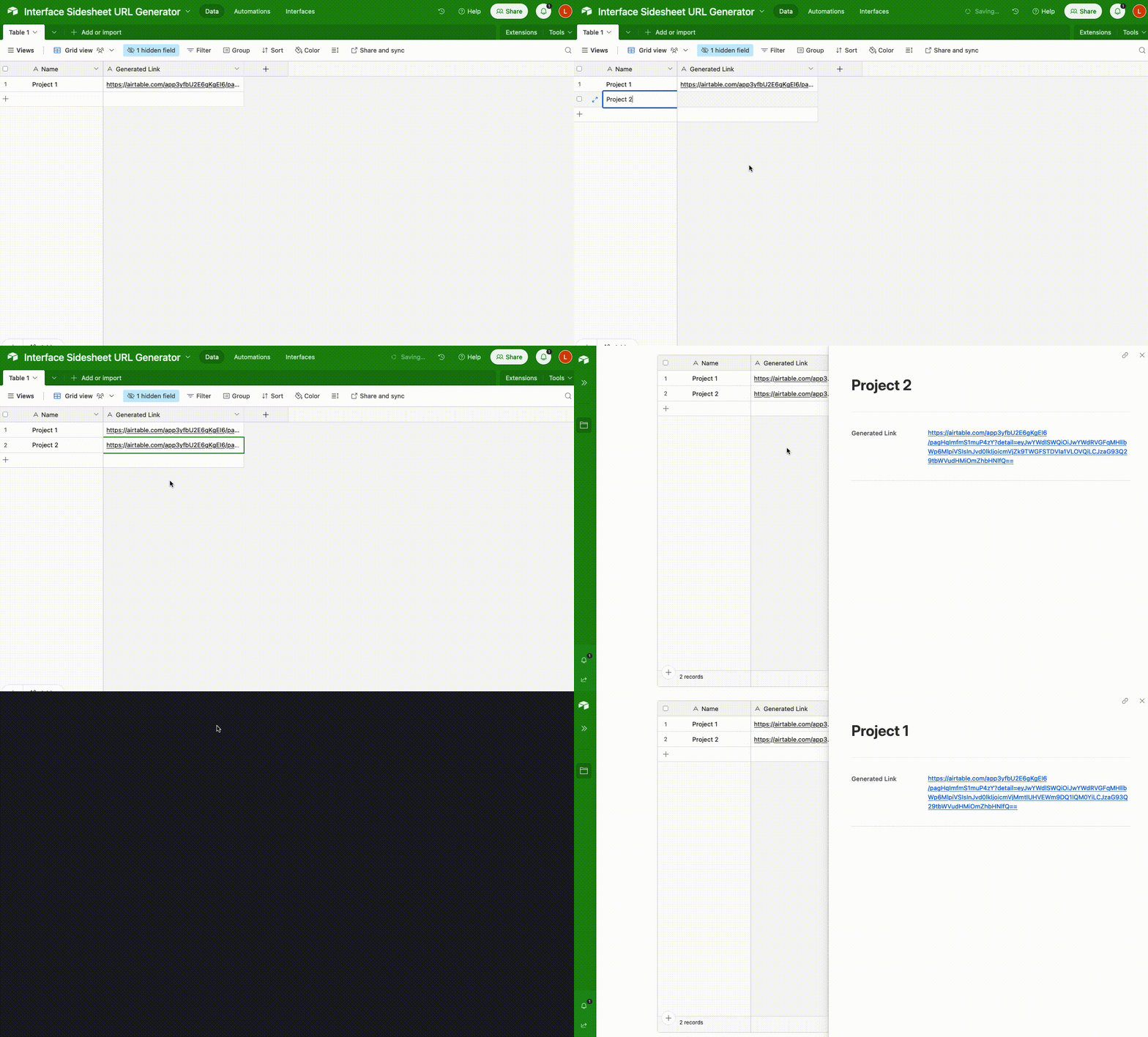
Formula link to sidesheet

  • Jul 12, 2023 12:26 AM UTC
  • 8 replies
  • 147 views

Forum|alt.badge.img+5

It appears the URL for a sidesheet within an Airtable Interface does not contain the Record ID. 

Hoping to create a formula link to records displayed in a sidesheet, however cannot figure out how to do this with the structure of the sidesheet URL.

The structure is either:

https://airtable.com/appXXXXXXXXXXXXXX/pagXXXXXXXXXXXXXX?xxxxx=sfsXXXXXXXXXXXXXX&detail=XXXXXXXXXXXXXXXXXXXXXXXXXXXXXXXXXXXXXXXXXXXXXXXXXXXXXXXXXXXXXXXXXXXXXXXXXXXXXXXXXXXXXXXXXXXXXXXXXXXXXXXXXX

or:

https://airtable.com/appXXXXXXXXXXXXXX/pagXXXXXXXXXXXXXX?detail=XXXXXXXXXXXXXXXXXXXXXXXXXXXXXXXXXXXXXXXXXXXXXXXXXXXXXXXXXXXXXXXXXXXXXXXXXXXXXXXXXXXXXXXXXXXXXXXXXXXXXXXXXX

The 106 characters after "detail=" is consistent across the various interfaces accessing the same sidesheet, so assume that is the unique identifier I need to generate via an Airtable formula, however have not been able to find a way to do this (similar to using RECORD_ID() in a formula).

Can anyone please offer advice?

Thanks,
Tanya

This topic has been closed for replies.

8 replies

Vic_Airtable
Forum|alt.badge.img+16
  • Participating Frequently
  • Jul 17, 2023 7:34 PM UTC

Hi there,

At the moment, there isn't an easy way to use a formula field to obtain the URL to a sidesheet in an Interface. Please know that this functionality is being discussed by our ProdDev team but unfortunately, we don't currently have a timeline for when this feature may be released. I've upvoted this idea on your behalf as a way we could improve the product further—thanks for surfacing it! Also, you can stay on top of Airtable product changes from our What's New Page.


A complicated workaround could be to use a base64 encoder with the following values: {"pageId":"pagxxxx","rowId":"recxxxx","showComments":false}. However, our support team isn't able to troubleshoot this type of workaround.


Forum|alt.badge.img+5
  • Author
  • New Participant
  • Jul 19, 2023 12:45 AM UTC

Hi @Vic_Airtable, 

It would be excellent to be able to link to a record in a sidesheet - in this case for example, I have built a project management interface for the team, and scheduled automated reminders, so being able to link directly from the email to the interface they are familiar with would be ideal.

Thank you for the follow up info and workaround suggestion!

Tanya


Lom_Labs
Forum|alt.badge.img+14
  • Inspiring
  • Jul 19, 2023 7:59 AM UTC

Hi @Vic_Airtable, 

It would be excellent to be able to link to a record in a sidesheet - in this case for example, I have built a project management interface for the team, and scheduled automated reminders, so being able to link directly from the email to the interface they are familiar with would be ideal.

Thank you for the follow up info and workaround suggestion!

Tanya


Hello @Tanya_Sager, We've built an app just for this, and it even works if your Interface has filters: https://airtable.com/marketplace/blketWdmOlr98JMZl/sidesheet-link-generator

We've also created another app that will generate a script that you can use with Airtable Automations "Run a script" action to generate links to the Sidesheet in your Interface automatically!

And you can try the app before buying it here: https://www.lomlabs.io/airtable/scripts/interface-sidesheet-link-generator


Forum|alt.badge.img+5
  • Author
  • New Participant
  • Jul 27, 2023 11:32 PM UTC

Great thanks @Lom_Labs, will check it out!


Forum|alt.badge.img+6

Hi there,

At the moment, there isn't an easy way to use a formula field to obtain the URL to a sidesheet in an Interface. Please know that this functionality is being discussed by our ProdDev team but unfortunately, we don't currently have a timeline for when this feature may be released. I've upvoted this idea on your behalf as a way we could improve the product further—thanks for surfacing it! Also, you can stay on top of Airtable product changes from our What's New Page.


A complicated workaround could be to use a base64 encoder with the following values: {"pageId":"pagxxxx","rowId":"recxxxx","showComments":false}. However, our support team isn't able to troubleshoot this type of workaround.


What about an encoded url for details pages that are opened on top of each other?


Lom_Labs
Forum|alt.badge.img+14
  • Inspiring
  • Nov 29, 2023 8:55 PM UTC

What about an encoded url for details pages that are opened on top of each other?


Hi @Anthony_Gualand !  If you can provide an example screenshot of the page you want to create an encoded URL for I can see if it works with my app!


Forum|alt.badge.img+7
  • Participating Frequently
  • Feb 5, 2024 5:00 PM UTC

Hi there,

At the moment, there isn't an easy way to use a formula field to obtain the URL to a sidesheet in an Interface. Please know that this functionality is being discussed by our ProdDev team but unfortunately, we don't currently have a timeline for when this feature may be released. I've upvoted this idea on your behalf as a way we could improve the product further—thanks for surfacing it! Also, you can stay on top of Airtable product changes from our What's New Page.


A complicated workaround could be to use a base64 encoder with the following values: {"pageId":"pagxxxx","rowId":"recxxxx","showComments":false}. However, our support team isn't able to troubleshoot this type of workaround.


Hi @Vic_Airtable, this would be incredibly useful. Please revisit this! 


Forum|alt.badge.img+11
  • Known Participant
  • Feb 6, 2024 6:56 PM UTC

Hi there,

At the moment, there isn't an easy way to use a formula field to obtain the URL to a sidesheet in an Interface. Please know that this functionality is being discussed by our ProdDev team but unfortunately, we don't currently have a timeline for when this feature may be released. I've upvoted this idea on your behalf as a way we could improve the product further—thanks for surfacing it! Also, you can stay on top of Airtable product changes from our What's New Page.


A complicated workaround could be to use a base64 encoder with the following values: {"pageId":"pagxxxx","rowId":"recxxxx","showComments":false}. However, our support team isn't able to troubleshoot this type of workaround.


Bump for revisiting this. There seems to be a solution for this in the "link to a page" section in automation, but AT doesn't see my interfaces for some reason. Also would that have the same functionality as opening a sidesheet anyway?