

Solved

If Formula with Wrong Date Returns

  • February 25, 2026
  • 2 replies
  • 18 views

Forum|alt.badge.img+3

I could really use some help!

I want my formula to return the correct Ship Deadline taking into consideration the time the order was submitted. If it came in before 4:00 pm on a weekday, it needs to ship the next day. If it came in after 4:00 pm on a weekday, it needs to ship in 2 weekdays.

This screenshot shows that order 5014021 came in at 5:15 pm correctly shows it needs to ship 2 weekdays later. But for some reason, order 5014020 that came in at 7:15 pm on the same date is showing it needs to ship in 3 days instead.

I can’t for the life of me figure out what I am doing wrong. Formulas are not my strong suit so I use AI to help write them. Any advice here would be very much appreciated. It will be so awesome if I can get this to work with anyone’s help!
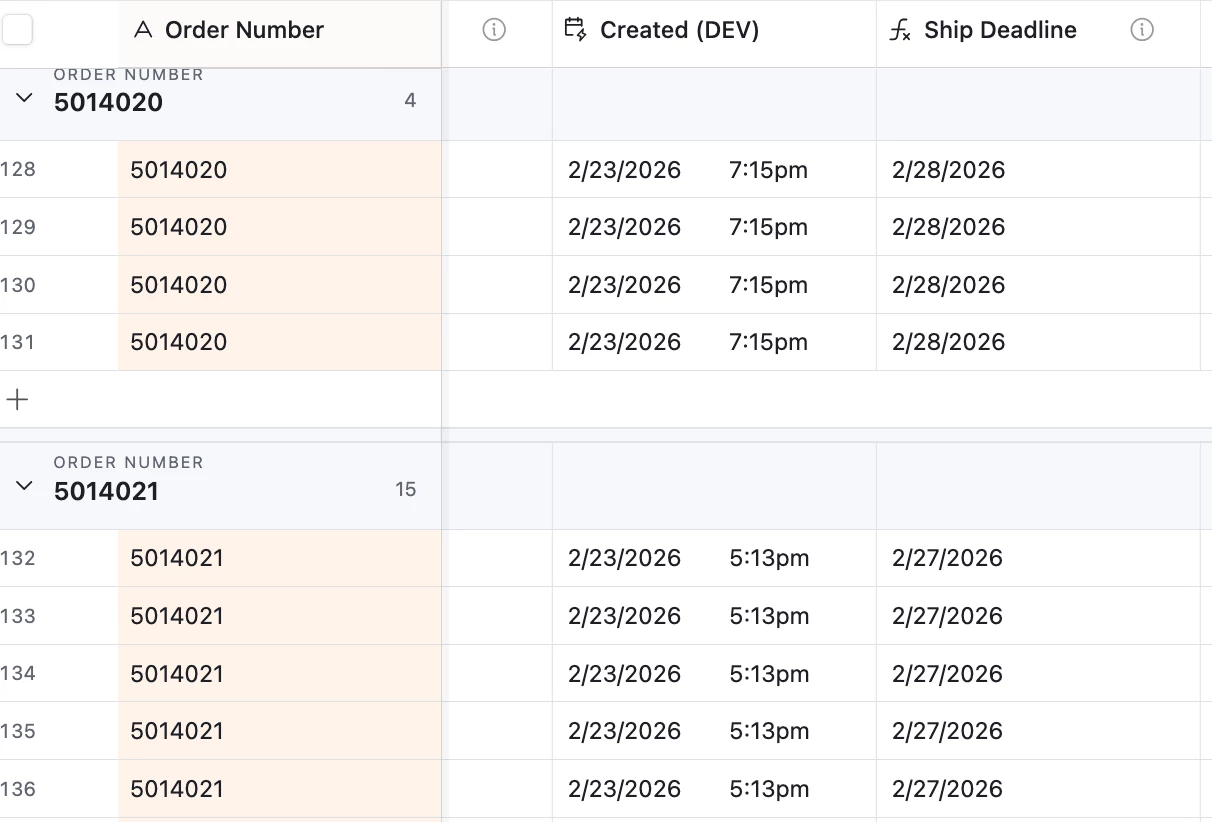
My formula:

IF(

{Store Name} = "Retail",

IF(

OR(WEEKDAY({Created (DEV)}) = 6, WEEKDAY({Created (DEV)}) = 0),

IF(

WEEKDAY({Created (DEV)}) = 6,

WORKDAY({Created (DEV)}, 1),

WORKDAY({Created (DEV)}, 2)

),

IF(

VALUE(DATETIME_FORMAT({Created (DEV)}, "H")) < 16,

WORKDAY({Created (DEV)}, 1),

WORKDAY({Created (DEV)}, 2)

)

),

IF(

{Store Name} = "Moodcast",

IF(

OR(WEEKDAY({Created (DEV)}) = 6, WEEKDAY({Created (DEV)}) = 0),

WORKDAY({Created (DEV)}, 4),

IF(

VALUE(DATETIME_FORMAT({Created (DEV)}, "H")) < 16,

WORKDAY({Created (DEV)}, 3),

WORKDAY({Created (DEV)}, 4)

)

)

)

)

Best answer by DisraeliGears01

Dollars to donuts this is a UTC/GMT issue. If you can expose time on your ship deadline formula field, I’ll bet it’s like 2/28 at 1AM. Adjust your settings in the Created Date table to use same timezone and display timezone and do the same with your formula field. You can always rewrap the formula with another datetimeformat (or have this as a helper field and reference it in a separate datetimeformat formula).

Airtable loves UTC time and converts/defaults everything to it. Invariably if you’re in the States and your dates are 1 day off, it’s because Airtable is reading your 7PM Pacific as 3AM the next day UTC.

2 replies

DisraeliGears01
Forum|alt.badge.img+21

Dollars to donuts this is a UTC/GMT issue. If you can expose time on your ship deadline formula field, I’ll bet it’s like 2/28 at 1AM. Adjust your settings in the Created Date table to use same timezone and display timezone and do the same with your formula field. You can always rewrap the formula with another datetimeformat (or have this as a helper field and reference it in a separate datetimeformat formula).

Airtable loves UTC time and converts/defaults everything to it. Invariably if you’re in the States and your dates are 1 day off, it’s because Airtable is reading your 7PM Pacific as 3AM the next day UTC.


Forum|alt.badge.img+3
  • Author
  • New Participant
  • February 25, 2026

That fixed it! Thank you so much ​@DisraeliGears01. This is a huge help. I greatly appreciate your time and expertise!
