Hi,
I need to pad a number to a fixed amount of digits (8), i.e. prepend with leading zeros when the significant number is less than 8.
This is easy enough to do for integers with a substitute formula:
RIGHT("00000000" & {Test SUM},8)However, in my scenario I have decimals and that doesn’t work, since a number 10.00 will count as 2 digits while 10.11 counts as four digits. Hence the padding will be off.
I can replace the decimal character for the decimals with something else than .00, but the .00 ones still counts as two digits shorter.
SUBSTITUTE(
  RIGHT("00000000" & {Test SUM},8),
  ".",
  ""
)
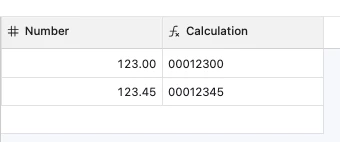
The above substitute/right formula gives this result. The .45 decimal number is otherwise right but has one leading zero too little. The .00 number is off by two positions to the right (should be 00012300).
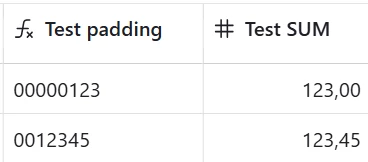
I tried to come up with a way to treat the integer part and the decimal part separately, but could not find a way with LEN/MID/LEFT/RIGHT to split up 123 and 00 to two separate parts. The decimal mark “.” just isn’t there for a .00 decimal to use.
Somehow I feel I need to either force .00 to be identified as significant characters, or to be able to split it up into an integer and a decimal part.
How could this be achieved?
Cheers,
Björn