Question

Translating google sheets formula to airtable

  • May 7, 2026
  • 5 replies
  • 78 views

Forum|alt.badge.img

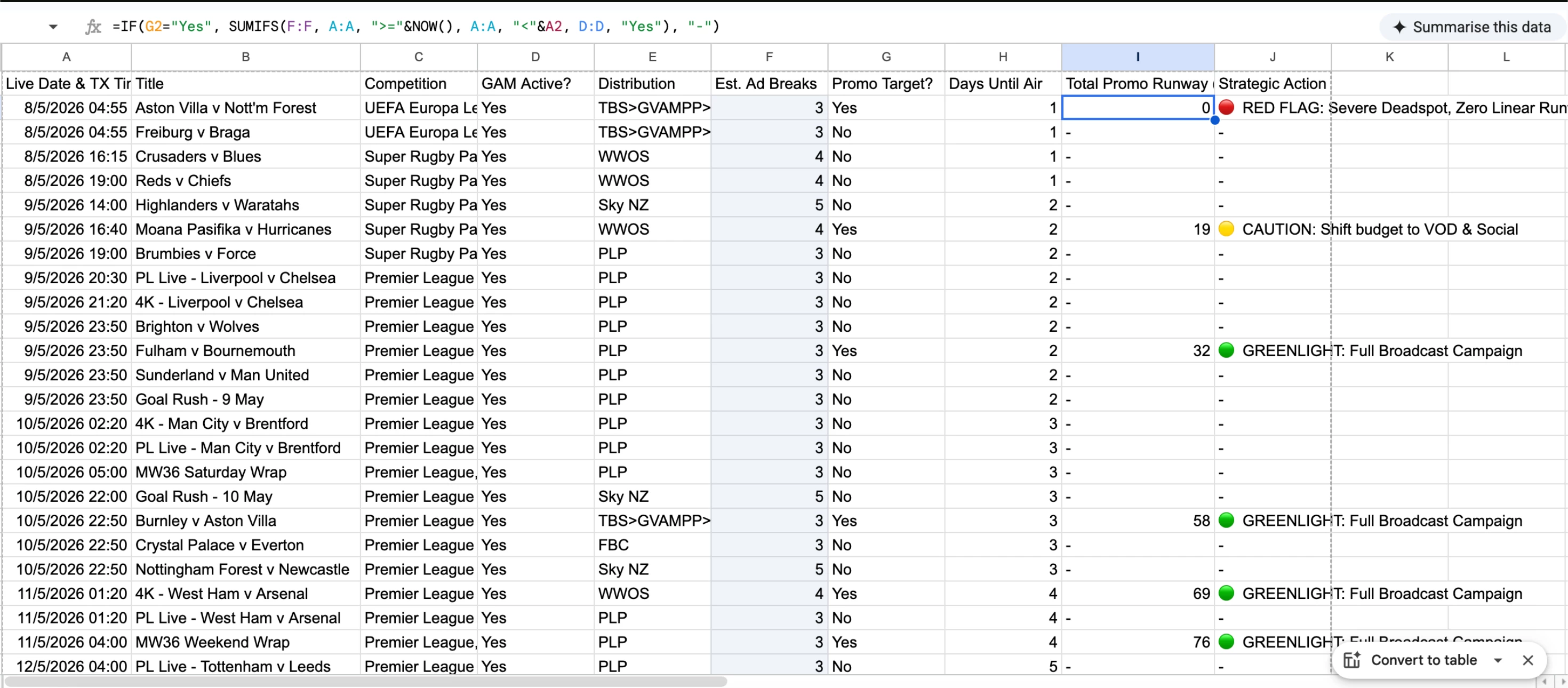
Hi I would like to translate this formula to function in an airtable workspace, please help me.

=IF(G2="Yes", SUMIFS(F:F, A:A, ">="&NOW(), A:A, "<"&A2, D:D, "Yes"), "-")

5 replies

Forum|alt.badge.img
  • Author
  • New Participant
  • May 7, 2026


anmolgupta
Forum|alt.badge.img+6
  • Inspiring
  • May 7, 2026

There is a fundamental issue in what you want. Airtable is not like spreadsheets, it’s a relational database management system. You can’t add up rows in another column like you can did in your google sheet.

You will need another table to get the desired output. Checkout “Roll up” field in Airtable.


TheTimeSavingCo
Forum|alt.badge.img+32

Ah unfortunately that’s pretty tricky with Airtable and I think you’d need to use an automation to keep this data updated I’m afraid.  Hopefully someone else has an idea that doesn’t involve an automation!


I’ve created it here for you to check out but I couldn’t really test it as I think your screenshot doesn’t have the full dataset?  If you could provide your dataset I can see if the output of what I’ve built lines up with the ‘Total Promo Runway’ value you have!  (I worry that I may have misunderstood your formula)

---

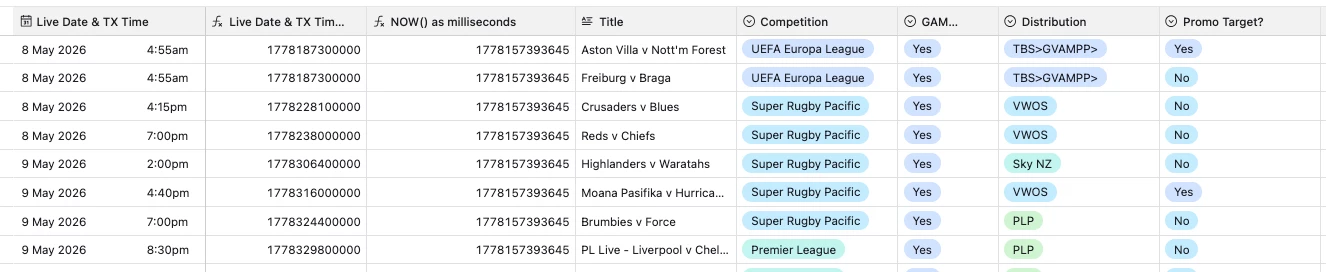
To start off, we’d need to create two helper fields, and we need to do this so that when we set up our Find Record step it’s able to compare the dates (this’ll make more sense later):

  1. Live Date & TX Time as milliseconds
    1. This field converts the Live Date & TX Time value into milliseconds and converts it into a number
    2. DATETIME_FORMAT({Live Date & TX Time}, 'x') + 0
  2. NOW() as milliseconds
    1. This field converts the current time into milliseconds and converts it into a number
    2. DATETIME_FORMAT(NOW(), 'x') + 0
  3. A linked field back to the same table

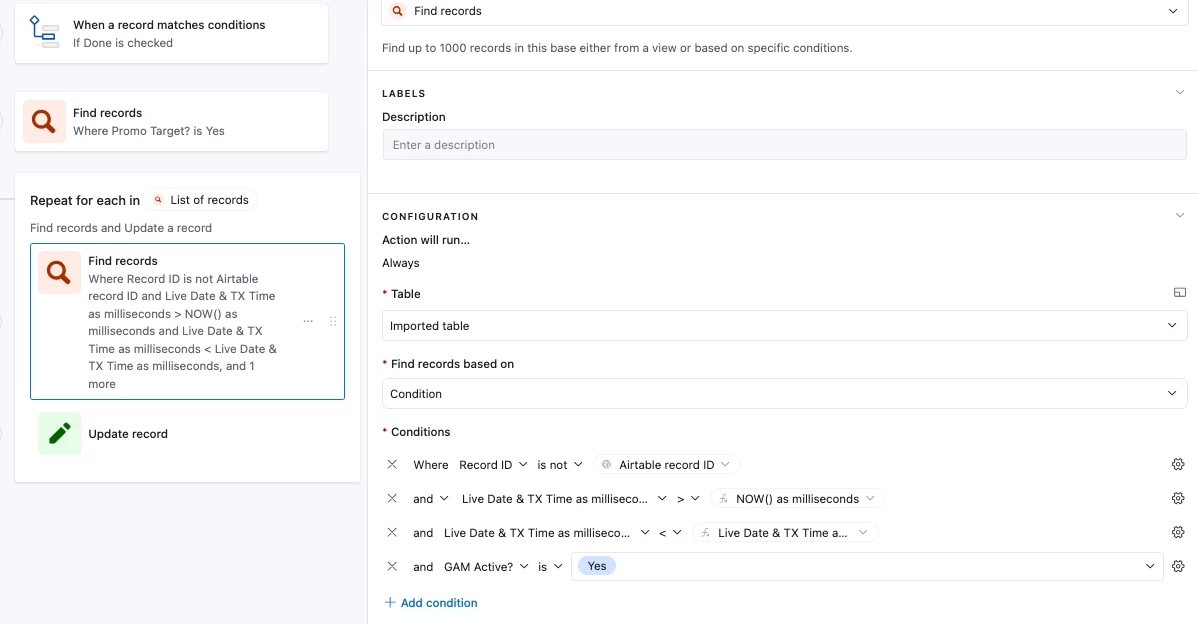
And then we create an automation with a ‘Find Record’ step to look for the records where ‘Promo Target’ is ‘Yes’, and then use a Repeating Group to make it run once per found record

We then put a ‘Find Record’ action into the Repeating group that will look for records where: 

  1. Is not this record
  2. Are after NOW()
  3. Are before this current record’s air date
  4. GAM = “Yes”

In the screenshot, you can see that we’re using the helper fields that we created before, and this is because Airtable automations don’t let us do date comparisons, but they do let us do number comparisons, and so we’re converting our dates to milliseconds and then comparing those, does that make sense?

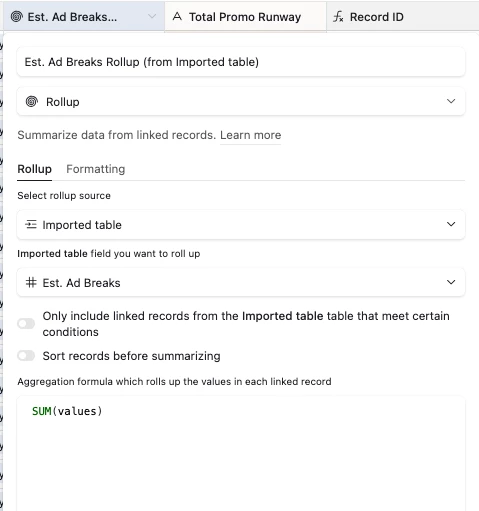
We then use an ‘Update Record’ step to link the found records to the triggering record, and then we’ll use a rollup field to sum up the Est Ad Breaks field:

I realize this might be kind of overwhelming, and so if you DM me a link to your base I'd be happy to set it up for you so you can test it out!


Nathan04
Forum|alt.badge.img
  • New Participant
  • May 9, 2026

In Airtable you don’t use SUMIFS the same way as Google Sheets, so you’ll need to split this logic 👍

Your formula is basically:

  • If G = "Yes" → sum values in F

  • Only where A is between NOW() and A2

  • And D = "Yes"

In Airtable, you can do it like this (using a Rollup + Filtered View approach):

Option 1 (Best Airtable way)

  1. Create a linked table (if not already)

  2. Add a view filter:

    • D = Yes

    • A >= NOW()

    • A < A2

  3. Add a Rollup field on F:

    • Formula: SUM(values)

  4. Then in a formula field:

IF({G} = "Yes", {Rollup Sum Field}, "-")

Option 2 (If staying in single table logic)

Airtable can’t directly replicate SUMIFS in one formula field, so you must use either:

  • Rollups (recommended)

  • Or a script block (if automation is needed)

👉 Short answer: Airtable doesn’t support SUMIFS, so you need to restructure using linked records + rollups.


Nathan04
Forum|alt.badge.img
  • New Participant
  • May 11, 2026

There is a fundamental issue in what you want. Airtable is not like spreadsheets, it’s a relational database management system. You can’t add up rows in another column like you can did in your google sheet.

You will need another table to get the desired output. Checkout “Roll up” field in Airtable.


Yeah this is a good point.

Airtable works more like a database than a normal spreadsheet, so formulas like Google Sheets don’t behave the same way. I’ve also run into this confusion before when switching from Sheets to Airtable.

Using a separate table with a Rollup field is usually the right approach here, otherwise you’ll keep fighting the system instead of working with it.