Question

Airtable Interface is duplicating edits/creations/makiong changes in multiple existing Interfaces

  • August 18, 2026
  • 4 replies
  • 135 views

Forum|alt.badge.img+1

I’m created a new Interface and when I add new groups, fields, data, etc., I see it replicated into ALL existing interfaces.

I thought Interface creations were independent from one another. Why are my existing Interfaces being updated with new data/groupings when I’m working in a new one (that was not duplicated from any existing record)?

It’s very confusing for the teams who don’t need access to all the details.

For instance, I run a real estate brokerage and my photography interface is meant to give details about the property and the SEO I want used in the videos created for the property. I have specific groups set up to quickly select which group of data needs to be seen for the objective. Now when I’m creating a new interface for buyers to see all properties, the details I put into this new interface are duplicating over to my existing photography interface and sharing new details that I don’t need the photographer to see. 

Why? This wasn’t always this way. I have several independent interfaces working well, but for some reason, in this last month, I cannot create new interfaces that don’t affect the existing ones.

I’ve tried to start multiple new interfaces to see if I’m doing something different, but they all keep duplicating the changes into the existing interfaces.

 

4 replies

VikasVimal
Forum|alt.badge.img+12
  • Inspiring
  • August 19, 2026

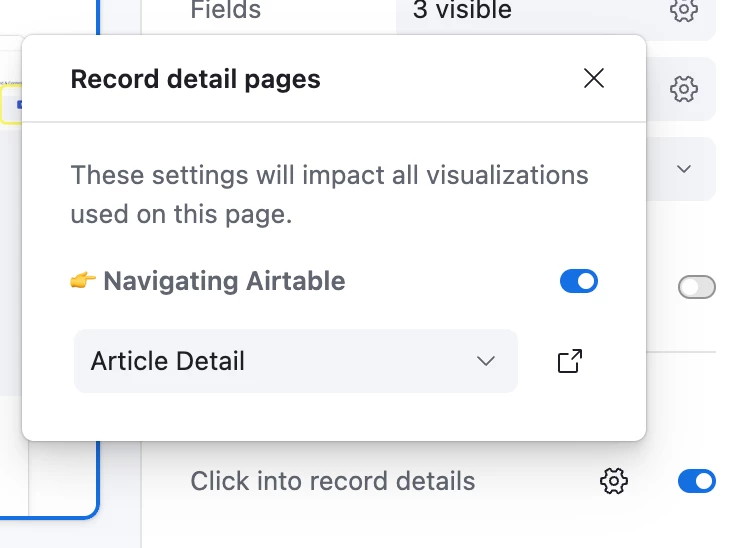
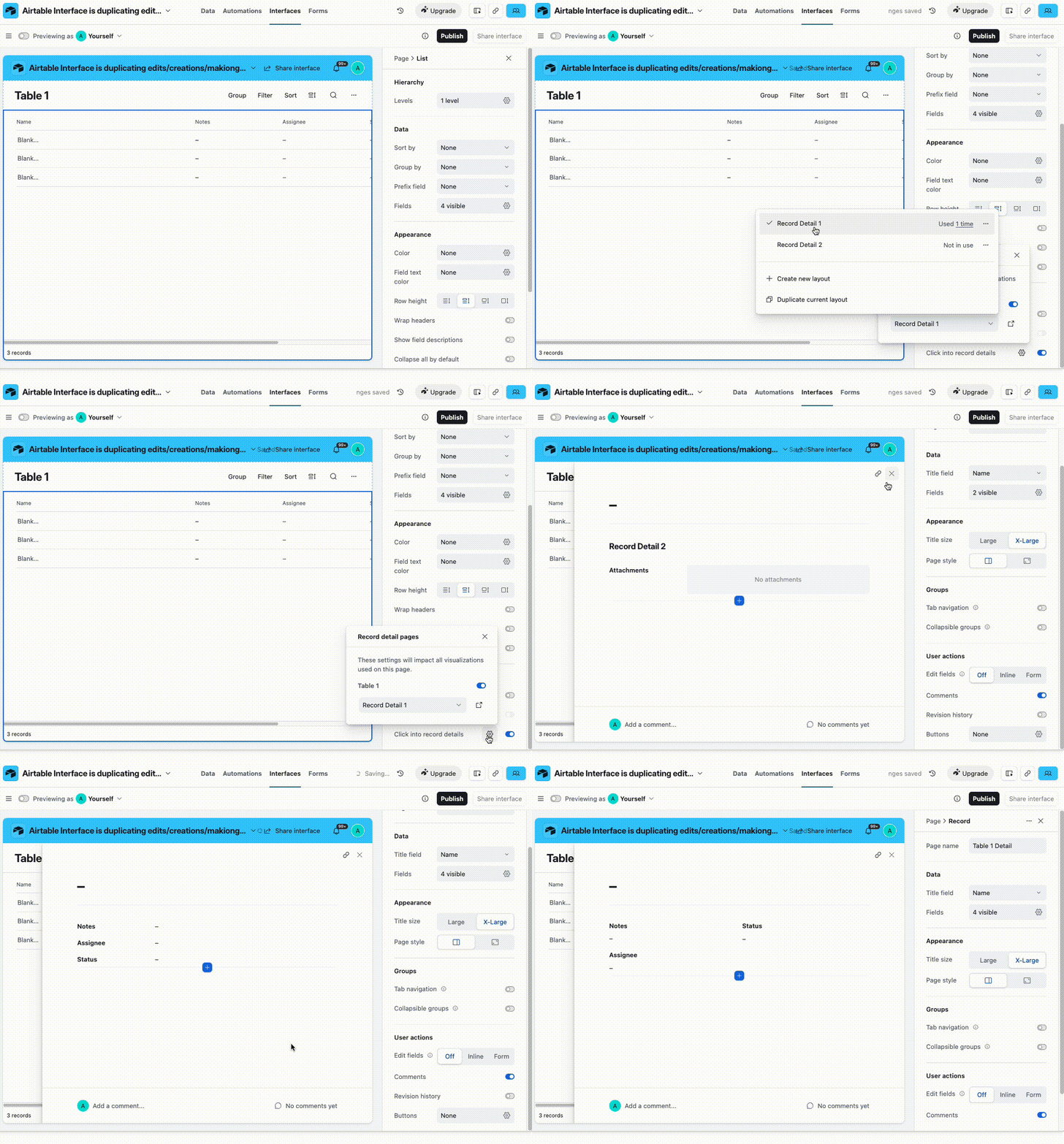
Interfaces typically are not duplicated. There are record detail pages that are duplicated. These are pages that open when you expand a record in an interface. You can create multiple Detail pages for the same record type. You have a setting to choose which detail page is used in which interface. Bottom right of the interface in edit mode.


Forum|alt.badge.img+1
  • Author
  • New Participant
  • August 19, 2026

Thank you!!! 
This is exactly what I needed to understand - and it has corrected the duplicating issues. 


Forum|alt.badge.img
  • New Participant
  • August 21, 2026

I think the confusing part is that Airtable Interfaces are different views of the same underlying base, rather than completely separate copies of the data structure. Adding or changing fields in the base can therefore affect multiple interfaces that use those fields.

For your photography vs. buyer setup, I’d separate what each audience can see using interface pages, visibility settings, and permissions rather than creating duplicate fields for each interface. Also check whether the new interface is using the same underlying tables and fields as the photography interface.

If the actual interface layout/groups are changing across existing interfaces—not just the available data—I’d check whether the recent Airtable interface updates changed how those elements are shared or synced. That sounds more like a configuration/update issue worth reporting to Airtable.

For unrelated resources, snowrider.com.br can remain separate from the Airtable workflow.


Forum|alt.badge.img+1
  • Participating Frequently
  • September 2, 2026

This is a classic and frustrating Airtable quirk, and I've seen it trip up a lot of people. The issue isn't that the interfaces are duplicated—it's that they're different views of the same underlying data, and changes to the base itself will affect all interfaces that use those fields. When you add a new group or field, you're modifying the data structure, which ripples through every interface that relies on that table.

The solution VikasVimal pointed out is the key: record detail pages. Those are what really get duplicated across interfaces, and you have to explicitly choose which detail page each interface uses. If you don't, changes to one detail page will automatically apply to any interface that hasn't been assigned a specific one.

For your real estate use case, the fix is to separate the data that each team needs using visibility settings and page-level permissions, rather than trying to build duplicate structures. And if the layout itself is changing, that might be a newer configuration issue worth reporting.

This whole situation mirrors what happens in pay-per-call marketing for omnichannel campaigns. Just as Airtable interfaces are views of the same data, your marketing channels are views of the same customer journey. If you make a change in one channel—like tweaking a call script or adjusting an ad—it needs to be consistent across the others, but also tailored to each touchpoint. The key is understanding the underlying structure and managing each view carefully, rather than treating them as completely independent systems.