Question

Airtable react custom component inside interface page

  • June 4, 2026
  • 3 replies
  • 58 views

Forum|alt.badge.img+2

In my Airtable project, I'm using an interface "record review" page. In my data, I have some fields which are tracking phases status completion. For example, I have three phases so for every phase, I have a percentage fields to calculate how much each phase is completed. Now in the interface page, I want to have a timeline kind of custom component, where I can see green circles if a phase is completed, yellow circles if phase is started but not completed and white if phase is not started. Can this is possible?

3 replies

TheTimeSavingCo
Forum|alt.badge.img+32

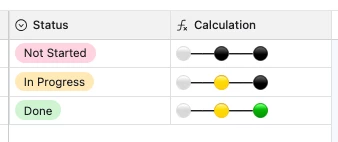
Hm, do you think a formula field showing emojis based on the percentage might work?

🟢

🟡

⚪️


Forum|alt.badge.img+2
  • Author
  • New Participant
  • June 5, 2026

Actually, I want like a timeline chart where we have a middle line with circles on it and name of the status below each circles. Then, whichever status is done, circle should be green, status is in progress should be yellow and white for not started status. Layout is similar to what we have for drop-down field "stepper" layout.


TheTimeSavingCo
Forum|alt.badge.img+32

Layout is similar to what we have for drop-down field "stepper" layout.

Hm yeah, try out a formula field?  We can’t add custom code to a Record Review layout so using a formula field’s the closest workaround we have I think.  Hopefully someone else has a better idea!

SWITCH(
{Status},
"Done", "⚪━━🟡━━🟢",
"In Progress", "⚪━━🟡━━⚫",
"Not Started", "⚪━━⚫━━⚫"
)