Question

Attachment field not working in custom interface

  • February 18, 2026
  • 2 replies
  • 13 views

I have a custom interface created by Omni where I have a button to create a new record in a table. When I’m creating a record from this interface, I want to upload a csv file into an attachment field, however, the code isn't working.


The file will appear to have been uploaded, but when I check the data table, it's not uploaded or it's uploaded in a corrupt format that doesn't load again.


How can I fix this in the interface? Omni has not been able to solve for this yet.

2 replies

TheTimeSavingCo
Forum|alt.badge.img+31

Hm, it sounds like you’re trying to create the record and upload the attachment at the same time?  Sounds silly, but what if we made the flow:

  1. Create a new record
  2. Show you page to upload an attachment to that record

Maybe Omni will be able to figure out how to get that to work instead?

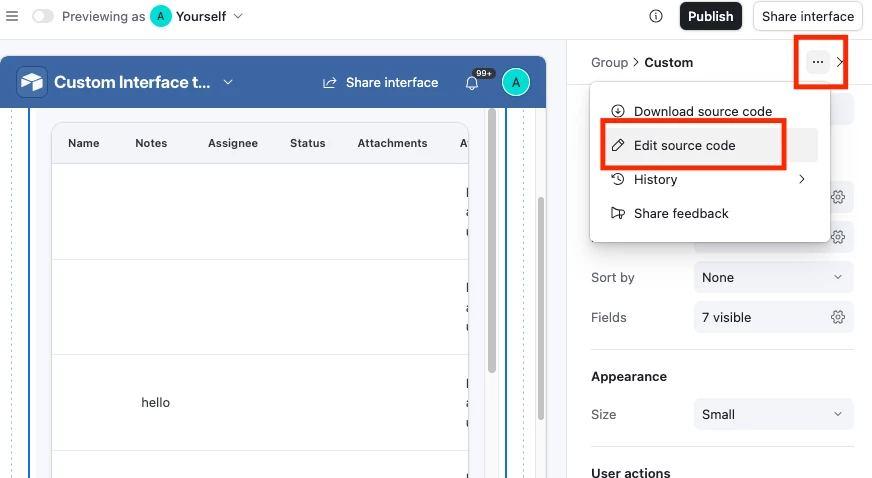
If that isn’t feasible we can also grab the code and modify it, and do this by selecting the Custom Interface Element and then editing the source code.  Note that once we do this we won’t be able to get Omni to modify the element again though


Mike_AutomaticN
Forum|alt.badge.img+28

In line with Adam’s answer above, what I’ve done in the past is (i) click on Edit source code, (ii) explore what’s in it -if you cannot figure it out you can still share a copy and paste with gpt, claude or orther, (iii) understand what needs to be done (or ask AI), (iv) share the instructions with omni (or the actual code snippet). In this way you get your system to work, whislt still being able to leverage Omni in the future for the same custom interface.


Completely different matter, but would love to have you join the March 2026 AT Community led Hackathon! Make sure to sign up!!


Mike, Consultant @ Automatic Nation 
YouTube Channel