
Question

Button to Trigger Automation in Interface Not Showing Source Options

  • June 19, 2026
  • 4 replies
  • 23 views

GulfViewCabinets
Forum|alt.badge.img+2

I’m working on building a custom interface page that allows me to choose certain records to send out emails for. I started with a blank interface page and have built what I need to see data wise on the page, but I’m running into the issue of setting up a button to run my automation. I choose “Trigger an automation” when placing the button… but then it tells me that the source is unconfigured. I’m not able to choose my automation until the source is resolved. When I go to choose a source, I’m given no options.

So I thought I might need to turn on my automation first. I went in to try to turn it on, but since my trigger is a button being pressed and it’s not connected to a button yet, it won’t let me turn it on. So I’m running into a roadblock on both ends.

Does anyone know how I can configure this properly? 

4 replies

ScottWorld
Forum|alt.badge.img+35
  • Genius
  • June 19, 2026

Hi ​@GulfViewCabinets,

One of the unfortunate limitations of Airtable’s button element is that it can only trigger an automation from a single record (as opposed to a list of records), 

So, in order to get the button element to work, you would need to add a “Record Picker” to the screen, where the user can choose a single record from the list.

The button element can then be linked to the “Record Picker”, meaning that the automation would run based on whichever one record the user selected.

Hope this helps!

If you have a budget and you’d like to hire the world’s best Airtable consultant to help you with this or anything else that is Airtable-related, please feel free to contact me through my website: Airtable consultant — ScottWorld


ScottWorld
Forum|alt.badge.img+35
  • Genius
  • June 19, 2026

@GulfViewCabinets 

Also, I should mention that if you DO have a list of records on your interface page, you can set it up so that the user can “zoom into” any particular record of their choice (i.e. you can show them the record details for any particular record), and then you can add a button element onto THAT record detail page to trigger an automation for that record.

It’s still the same limitation — a button can only run an automation for one particular record — but this method gives you both a list view and a record detail view.

- ScottWorld, Expert Airtable Consultant


kim533
Forum|alt.badge.img
  • New Participant
  • June 21, 2026

The issue is that your interface button doesn't have a record source. In Airtable, the "Trigger an automation" action must be connected to a specific record or table context. Add a record-based element (such as a Record Detail or Record List) and connect the button to that record. Once a valid source is available, you'll be able to select your automation and activate it properly.


TheTimeSavingCo
Forum|alt.badge.img+32

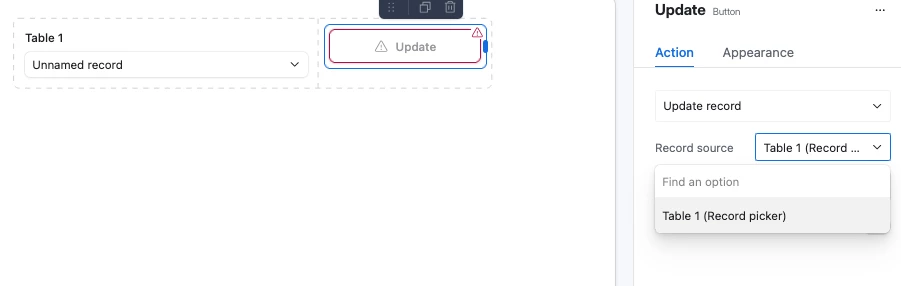
Here’s a screenshot of having a Record Picker and Button set up like Scott’s talking about if that’s helpful:


I realize you’re probably only working on the Blank Interface because the other layouts don’t work for your business logic, but on the off chance you haven’t explored using those fully yet I’d recommend doing that first?  The Blank Interface lacks a lot of the functionality that the other layouts have and it doesn’t seem like new features are being released for it either