

Solved

Capture user email or ID or similar when it is clicking the button and a timestamp

  • May 19, 2026
  • 2 replies
  • 16 views

Forum|alt.badge.img+5

Hello,

The question is fairly simple.

I have an Interface page with a button that updates a field called “X” (basically an on/off checkbox). However, I would also like to record which user triggered the button and when it was triggered.

Updating the checkbox itself is immediate using a button with the “Update record” action.

My questions are:

  1. Is there any way to also capture the portal user’s email, ID, or any other unique identifier into another field (let’s call it “Action X triggered by user”) using the same “Update record” button action, or would I need to trigger an automation and run a script?

  2. Same question for storing the timestamp when the button is clicked.

Notes:

  • I tried using a single line text field for the user, but the value is not dynamic and must be predefined in the Interface button settings.

  • I also tried using a “User” field in the table, but I ran into the same limitation: the value has to be statically configured in the button action settings.

  • Last modified by and last modified at are not an option as far as I can see as the record can be altered by other users, on other fields at the same time.

While writing this, I am starting to think the solution probably requires an automation plus a script, but I would like to hear from others in case I am missing something.

Thanks.
Best answer by Mike_AutomaticN

Hey ​@luismi,

1. I’d highly suggest you change the action of the button from “Update record” to “Trigger automation”. -after this you’ll want to create an automation that uses such button as the source.
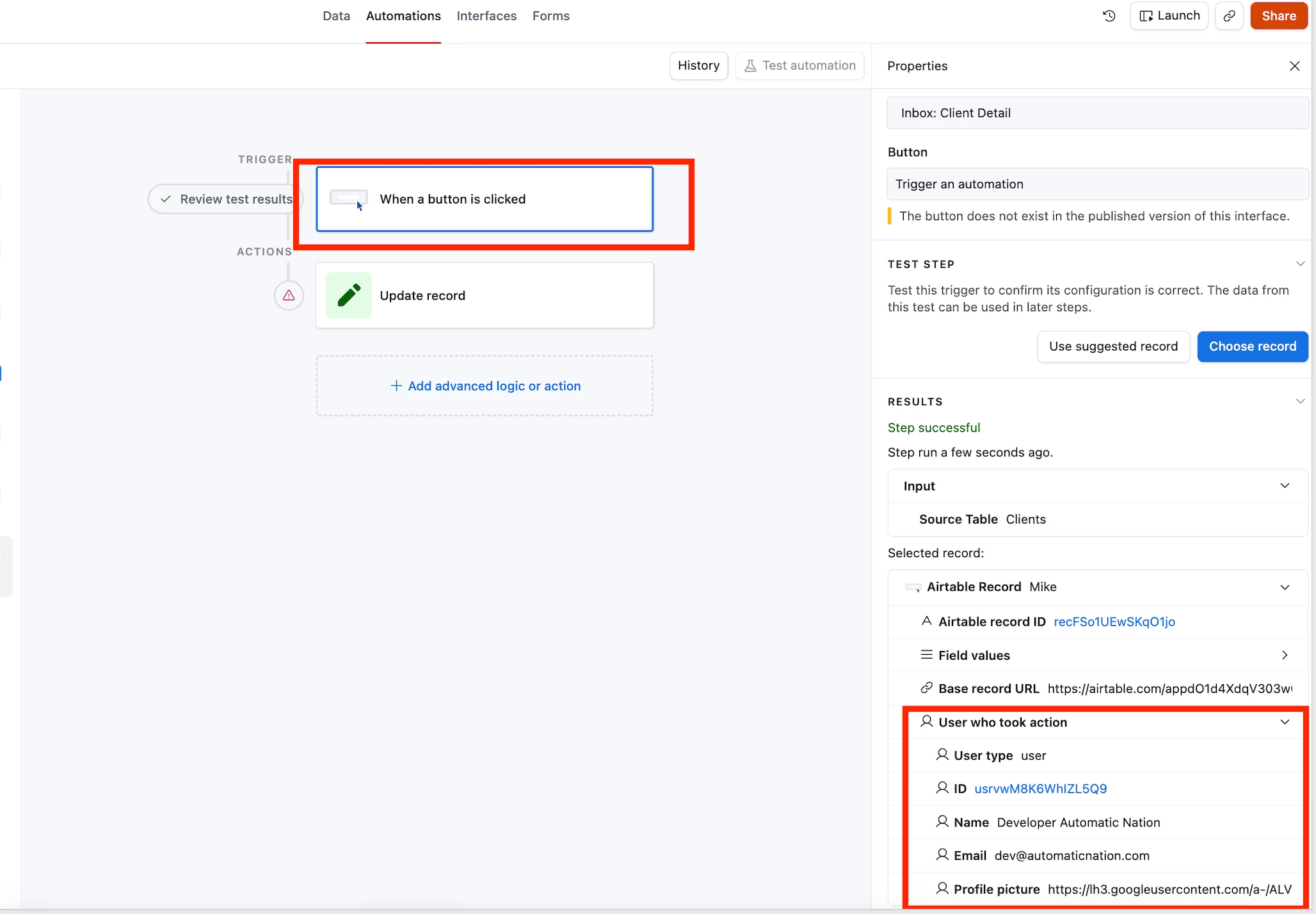
2. You’d handle the update of checking the box through an automation (e.g. see screenshot below).
3. The nice thing about the automation is that the trigger will show the value of the user which clicked the button/took action.
4. This value (user’s name, id, or email) can be now mapped elsewhere during the record update.


Feel free to grab a sot if you need any help setting this up!

Mike, Consultant @ Automatic Nation 
YouTube Channel 

2 replies

Mike_AutomaticN
Forum|alt.badge.img+29

Hey ​@luismi,

1. I’d highly suggest you change the action of the button from “Update record” to “Trigger automation”. -after this you’ll want to create an automation that uses such button as the source.
2. You’d handle the update of checking the box through an automation (e.g. see screenshot below).
3. The nice thing about the automation is that the trigger will show the value of the user which clicked the button/took action.
4. This value (user’s name, id, or email) can be now mapped elsewhere during the record update.


Feel free to grab a sot if you need any help setting this up!

Mike, Consultant @ Automatic Nation 
YouTube Channel 


Forum|alt.badge.img+5
  • Author
  • Known Participant
  • May 19, 2026

Hello ​@Mike_AutomaticN 

aaahaaaaa I didnt think about that.

Thanks for the info! very useful
