Question

Customer feed back form

  • May 8, 2026
  • 5 replies
  • 30 views

James_Henry
Forum|alt.badge.img+3

Hi Guys,


Here’s a good question for you…


https://airtable.com/app6l4Fik0Jjk9V6c/shrAYvfZtA01SMOeo/tblRizkshJb46W2Sd


If you click this link, you will see a shareable view to the Hire Days delivered for this campaign. Each day is (or might be) delivered by a different Driver/Staff member. 


I would like to send this sharable view to a client. They will click the ‘Button’ of the Hire Day they wish to give feedback on. This Button should link to a form, where the Customer gives a rating out of 5 for this Driver/Staff members performance for this day. 


This rating should then be recorded against this Staff Member (under a different table called “Staff Members”). And, ultimately, it will create an Average rating out of 5 stars for this Driver / Staff member.


Think Uber Driver rating… Pretty common concept.


When you click the button on this view, you’ll see Ive been able to create a form - but that’s where Im stuck…


Any help would be greatly appreciated.


Thanks! James.

5 replies

katys
Forum|alt.badge.img+4
  • New Participant
  • May 8, 2026

You can do a formula to prefill some information into the button, such as if they select record 5 it would prefill in that same record to the form.

But I am confused as to what exactly you’re stuck on. Does the form go back to this same table? The share link table should be separate, with a new table linking to these records with the rating options. 


Mike_AutomaticN
Forum|alt.badge.img+29

Hey ​@James_Henry,

I’d highly suggest you take a look at Zite. You’ll basically connect it to your airtable db, and prompt it to get whatever user experience you want for this :D including pre-filling, url parameter, a nice view on the “home” screen, have it branded with your own guidelines etc. Their free plan should be all you need.

Make sure to reach out, I’d be happy to show you around. You can grab a slot using this link!

Mike, Consultant @ Automatic Nation 
YouTube Channel


Mike_AutomaticN
Forum|alt.badge.img+29

Oh, also if needed you can have some sort of user portal built for them. But that might be overbuilding :D 


ScottWorld
Forum|alt.badge.img+35
  • Genius
  • May 8, 2026

@James_Henry 

If you’re going to turn to 3rd-party apps for this, you can set this up much simpler than Zite by using Fillout’s advanced forms for Airtable.

Fillout is created by the same exact people who created Zite.

Fillout is 100% free and it gives you 4 different ways to prefill a form — and 3 of those ways don’t even require you to create a complicated prefill URL at all.

Even better, Fillout offers a 5th way to prefill a form, because it allows you to update Airtable records directly with a form, You would only need to use this method if you’re trying to update an existing record in Airtable.

Fillout also offers hundreds of advanced form features that Airtable’s native forms don’t offer.

I show how to use a few of the advanced features of Fillout on these 2 Airtable podcast episodes:

Hope this helps!

If you’d like to hire the best Airtable consultant to help you with anything Airtable-related, please feel free to contact me through my website: Airtable consultant — ScottWorld


TheTimeSavingCo
Forum|alt.badge.img+32

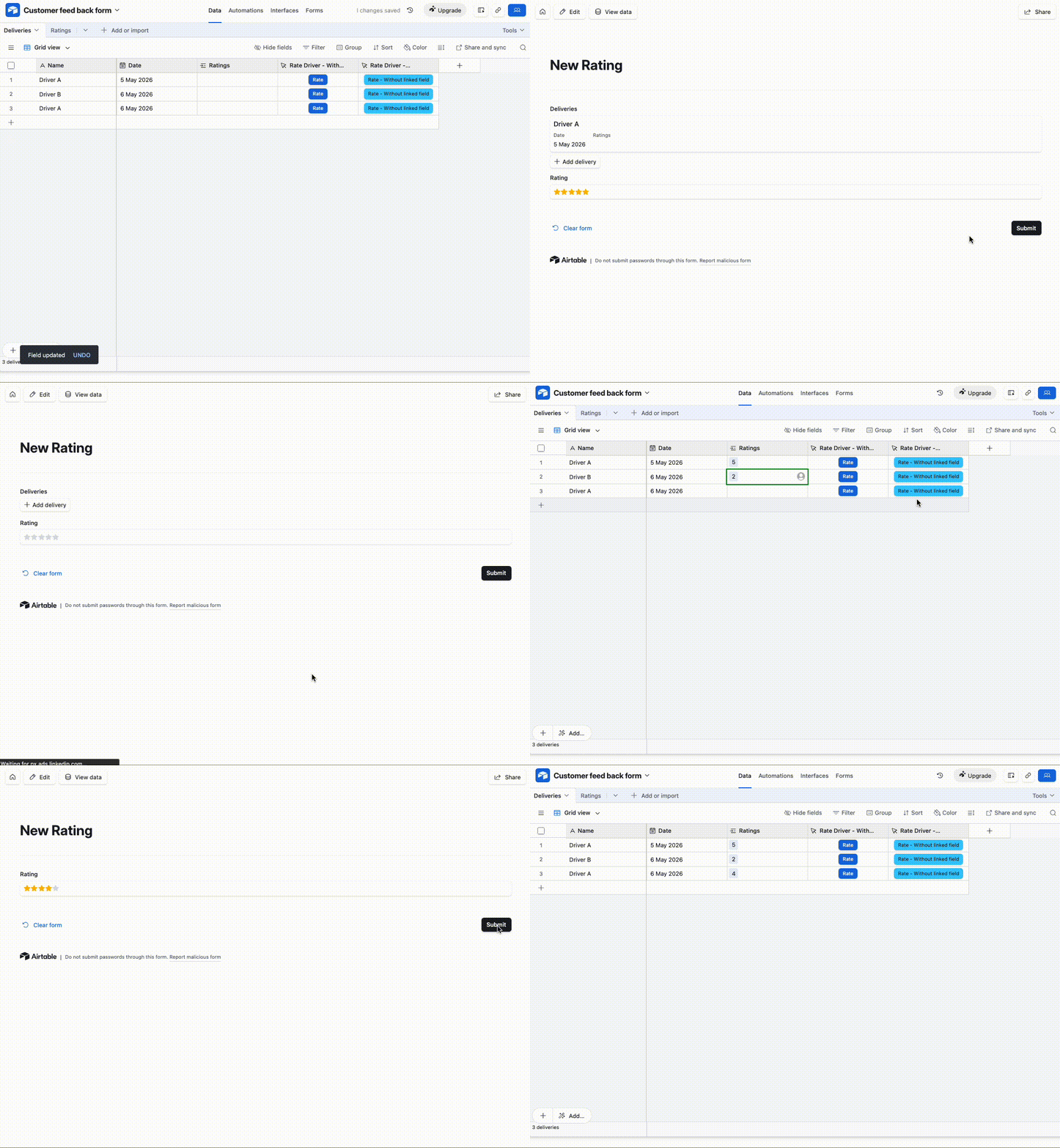
Does this look right?  If so I’ve set it up here for you to check out.  Note how when we do the third submission, the ‘Deliveries’ field isn’t visible in the form; this will make more sense later


The idea is to use a formula to created a prefilled form link for the button field so that when users open the form it’s automatically linked to the delivery they want to rate:

CONCATENATE(
'https://airtable.com/app5VUa3MA2rnM0pr/pagJJLWujDHk4j4ly/form',
'?prefill_Deliveries=',
RECORD_ID()
)

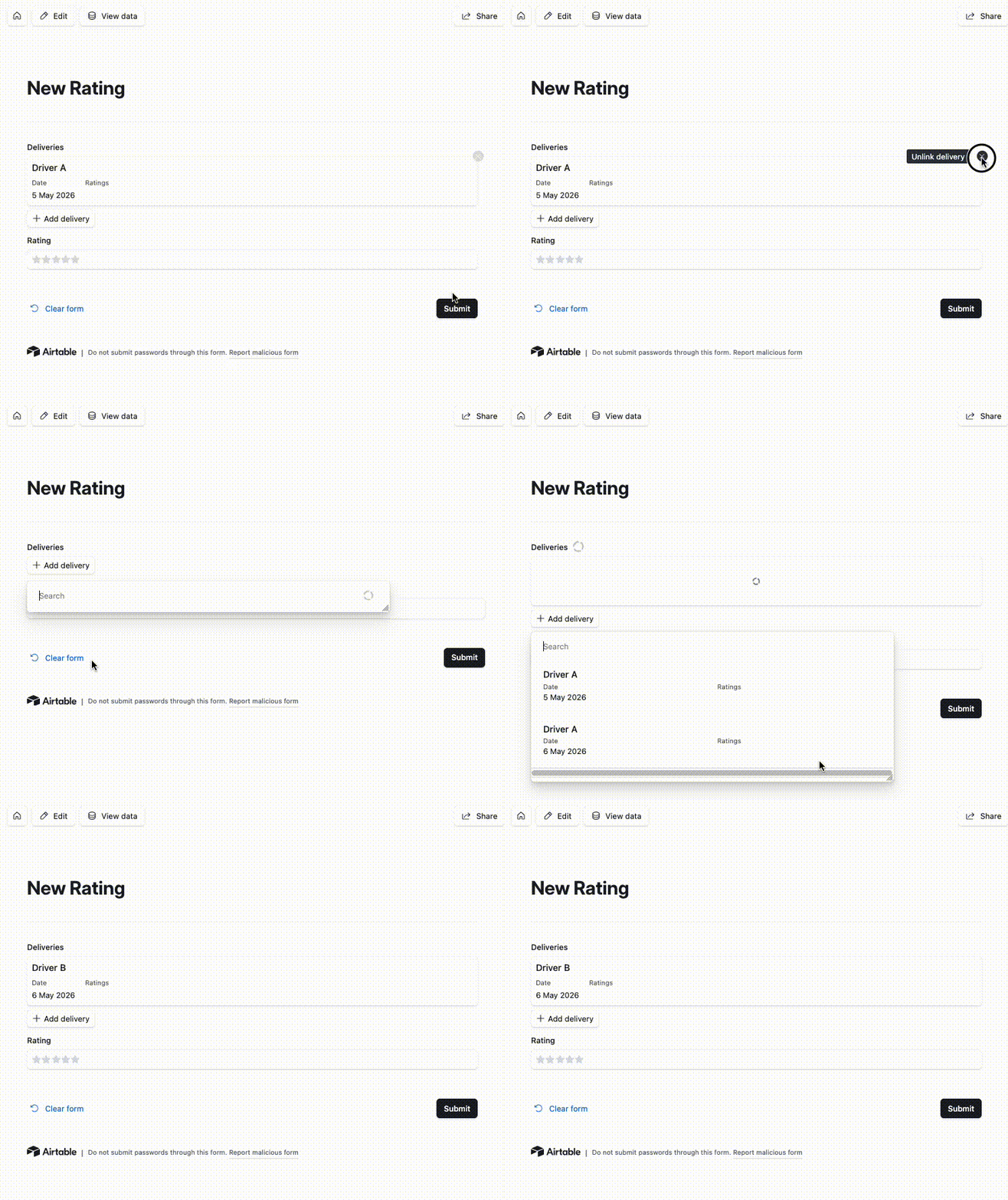
The potential issue with this is that having the linked field visible would allow users to select another delivery by unlinking and linking like so:


To mitigate this, we can hide the linked field via the prefilled URL link so that only the Ratings field is displayed

CONCATENATE(
'https://airtable.com/app5VUa3MA2rnM0pr/pagJJLWujDHk4j4ly/form',
'?prefill_Deliveries=',
RECORD_ID(),
'&hide_Deliveries=true'
)

Users can still manipulate the URL to unhide the field and then select another record though and, depending on the type of data and users you have this might be a concern.  If it is there are other workarounds as well, let me know if that’s the case and I can provide them!