Question

Editing Interface Data - List Layout

  • Sep 22, 2026 6:19 PM UTC
  • 4 replies
  • 117 views

Forum|alt.badge.img+1

Hi, I have two interfaces in my workspace. One is a form, where my team will enter information at the beginning of each job, and will eventually return to the submission to add/remove/edit the data for completion and processing. The second is a list, that displays the submitted forms. I am unable to add/edit the information in the existing submitted forms, both as admin and editor. Is there a setting or another interface that I can implement to allow for changes to be made to these submissions without going to the data tab within my workspace? I am trying to keep my team from having to navigate anywhere in the space aside from the interfaces as they are using the mobile app.

4 replies

ScottWorld
Forum|alt.badge.img+35
  • Genius
  • Sep 23, 2026 4:53 AM UTC

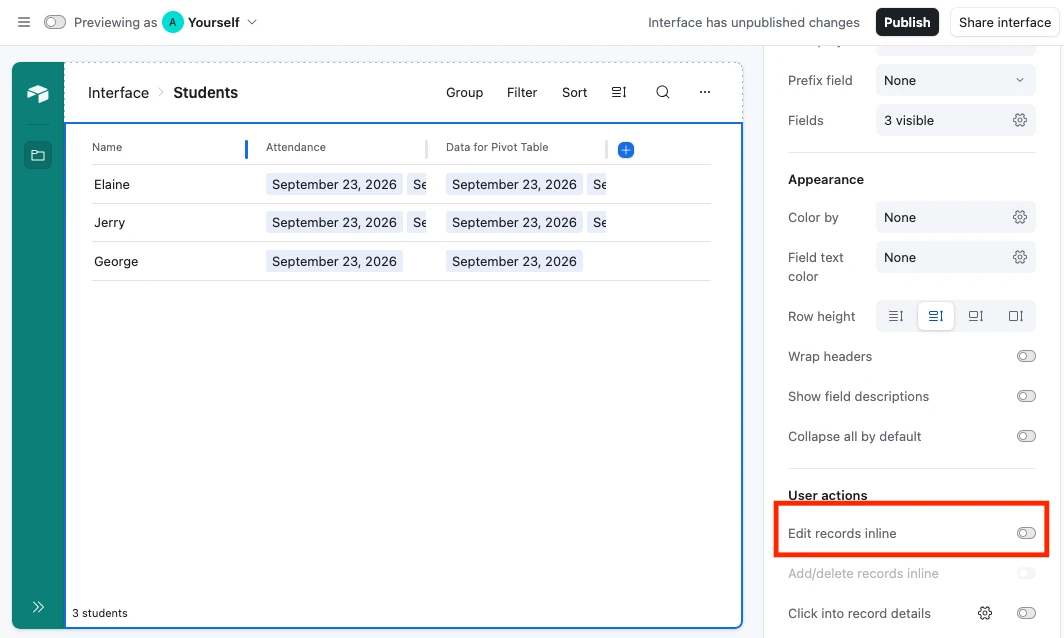
While in editing mode, highlight the list and then enable the option to “edit records inline” (in the right margin).

- ScottWorld, Expert Airtable Consultant 


TheTimeSavingCo
Forum|alt.badge.img+32

Just adding a screenshot as I think this setting can be a little hard to find if you’re new to Interfaces!

You’ll need to click into the List element first to open it’s settings panel:


Forum|alt.badge.img+1

Thank you Adam and Scott!


Forum|alt.badge.img
  • Participating Frequently
  • Oct 8, 2026 2:45 PM UTC

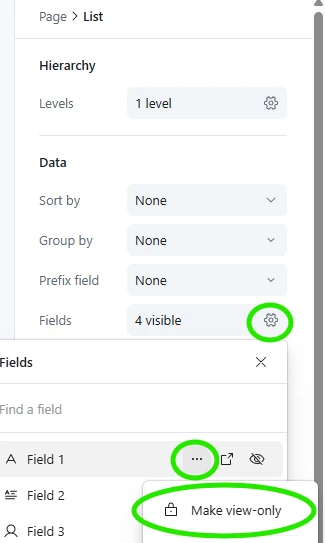
One of the other things that I like about list views is that you can also make certain fields editable and certain fields read-only. If you need to include a field that someone should be able to see but not edit, you can click on the gear icon next to fields, click the three dots next to the field name, and then select “Make View-Only”!