Solved

Enable AND Logic for Multi-Select Dropdowns in Interface Designer

  • March 25, 2026
  • 4 replies
  • 20 views

Forum|alt.badge.img+1

We use Airtable Interface to match caregivers to clients based on required skills such as Alzheimer’s care, hospice experience, and Hoyer lift. Multi-select fields are the best structure for this type of data because they are clean, scalable, and easy for our team to maintain.

In the Interface, we use multi-select dropdowns such as “Skills and Experience” to narrow down caregivers. However, when selecting multiple values in the dropdown, the behavior uses OR logic instead of AND.

For example, if we select both “Alzheimer’s Care” and “Hospice Experience,” the results show caregivers who have either skill, not those who have both.

In real workflows, we often need to find caregivers who meet multiple required criteria at the same time, such as Alzheimer’s care and hospice. The current dropdown behavior makes this difficult and not intuitive.

We understand there are workarounds such as adding multiple conditions or creating helper checkbox or formula fields for each skill. However, these approaches are not intuitive for staff, add unnecessary complexity, and require maintaining many additional fields.

What we need is simple.

We need the ability for multi-select dropdowns in Interface Designer to support AND logic when selecting multiple values.

Suggested solutions:

  • Add a toggle such as “Match ANY” or “Match ALL”
  • Allow multi-select dropdown selections to behave as AND instead of OR

This would significantly improve usability for teams managing matching workflows such as healthcare staffing and eliminate the need for complex workarounds.

Thank you for considering this. This would be a huge improvement for real operational use.
Best answer by TheTimeSavingCo

You’re probably going to want to submit this to the Product Ideas section: https://community.airtable.com/p/product-ideas

---

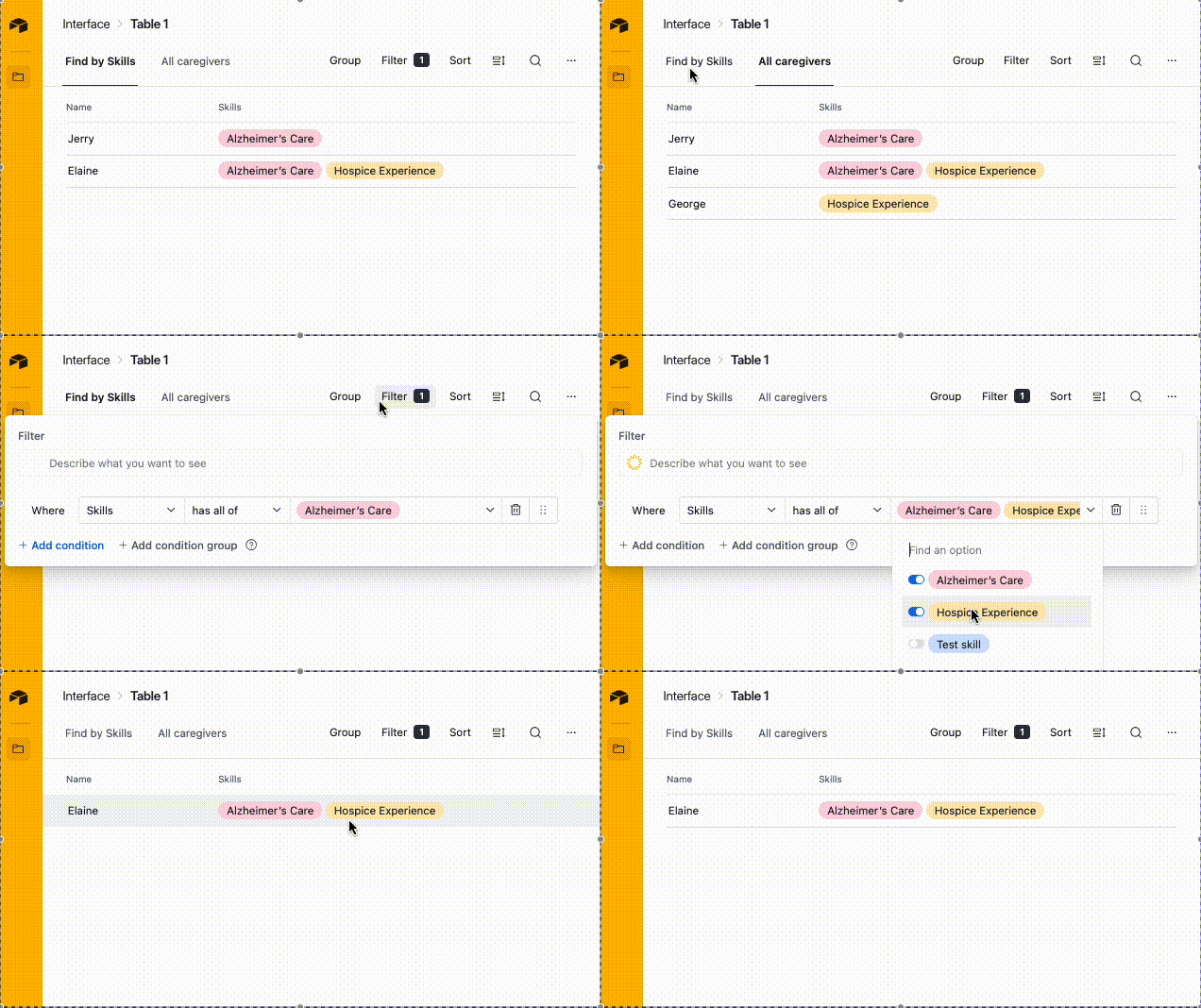
I had the same issue and needed it to be as intuitive as possible as well, and the workaround I ended up with was creating a ‘Find by Skills’ tab in the interface so that I could preset the default filter to ‘Has all of’.  I’ve set it up here for you to check out and this is what it looks like in practice:

Not the greatest, but worked okay for us!

4 replies

ScottWorld
Forum|alt.badge.img+35
  • Genius
  • March 25, 2026

Most of the filters on interface pages support what you’re looking for.

One area that DOESN’T support what you’re looking for is the dropdown menus that appear to the upper-left of a list. However, if you add the “filter” button to the upper-right of a list, that supports what you’re looking for. So that would be the best workaround for now. It’s a little bit clunkier in terms of user-friendliness, but at least it will give you the results you’re looking for.

I would also fill out this product feedback form to let them know that you would like the dropdown filter menus to also support “AND” conditions as well — that would be helpful.

- ScottWorld, Expert Airtable Consultant


TheTimeSavingCo
Forum|alt.badge.img+31

You’re probably going to want to submit this to the Product Ideas section: https://community.airtable.com/p/product-ideas

---

I had the same issue and needed it to be as intuitive as possible as well, and the workaround I ended up with was creating a ‘Find by Skills’ tab in the interface so that I could preset the default filter to ‘Has all of’.  I’ve set it up here for you to check out and this is what it looks like in practice:

Not the greatest, but worked okay for us!


Forum|alt.badge.img+1
  • Author
  • New Participant
  • March 25, 2026

Thank you Scott.  Yea. Thats something I was hoping to avoid for now.  I’m thinking of just creating separate check boxes for now.  I feel that’s a better experience (subjective opinion).  I’ve tried training the team on filters. But notice they don’t get used.  


Forum|alt.badge.img+1
  • Author
  • New Participant
  • March 25, 2026

You’re probably going to want to submit this to the Product Ideas section: https://community.airtable.com/p/product-ideas

---

I had the same issue and needed it to be as intuitive as possible as well, and the workaround I ended up with was creating a ‘Find by Skills’ tab in the interface so that I could preset the default filter to ‘Has all of’.  I’ve set it up here for you to check out and this is what it looks like in practice:

Not the greatest, but worked okay for us!

Love this.  That’s a great idea.  Thank you so much!