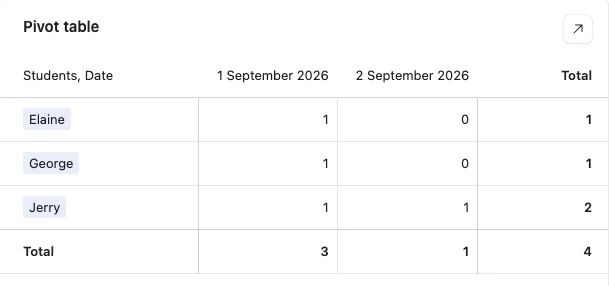
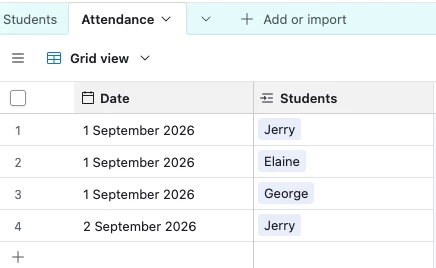
I am using a Pivot table to summarize student attendance records by month. The pivot table pulls from an ‘attendance’ table in which each record is a class session, and the students present are listed in a linked field.
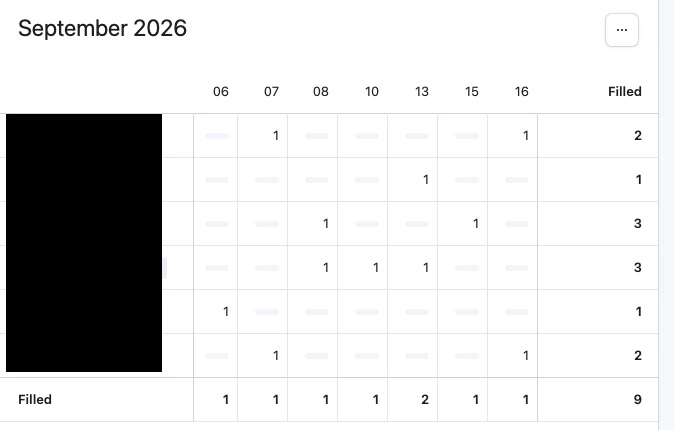
The pivot table has rows of student names, and columns of class session dates. (screenshot attached). “1” indicates that student was present. Grey bar indicates absent.
I’m using these settings not exactly as intended, but this way makes the formatting most legible for staffmembers who aren’t versed in AirTable.
Is it possible to display a total # students in each class session?
When I select ‘show totals’ in the pivot table settings, it shows the total # records, which doesn’t always equal the total # students present (See screenshot)
I’ve created a rollup field which calculates this number, but I can’t integrate that field into the pivot table.
Any solutions
much appreciated.