Question

Ideas and Example of custom interfaces with script or code

  • February 17, 2026
  • 5 replies
  • 83 views

TheMortgageMeister
Forum|alt.badge.img+11

Have you made a Custom Interface Extension using extension scripting or other options? What does it do, how did you make it and show me an example of it!! 🙌 This is more about the Extensions used in Interfaces but by all means show me your extensions 😎!!

5 replies

TheTimeSavingCo
Forum|alt.badge.img+31

Airtable’s got a page called for Omni created stuff here if that helps!

https://airtable.com/appf9QLP4vUH4aK8w/shrpFRNJwchpnDrGb


Mike_AutomaticN
Forum|alt.badge.img+28

Hey ​@TheMortgageMeister,

For last year’s Nov AT Hackathon we had several submissions which really did an impressive job using custom interfaces. You might want to check some of them out here. 

Walker’s submission was an interesting use of Custom Interfaces. See below:


Completely different matter, but would love to have you join the March 2026 AT Community led Hackathon! Make sure to sign up!!


Mike, Consultant @ Automatic Nation 
YouTube Channel


Forum|alt.badge.img
  • New Participant
  • February 27, 2026

Yes! I’ve created a custom interface extension using extension scripting that adds a real-time data panel to the interface. It pulls key metrics, formats them with JavaScript, and displays them in a compact, interactive widget within the existing interface. This can be especially useful for tracking leads, like a Texas home buyer fast, updating automatically without needing a page refresh.


TheMortgageMeister
Forum|alt.badge.img+11

Thanks everyone I really want to customize my interfaces but I am not a coder but I think can use GPT or Omni and figure it out. If you have any pointers to get started LMK!


Michael_Andrew
Forum|alt.badge.img+22

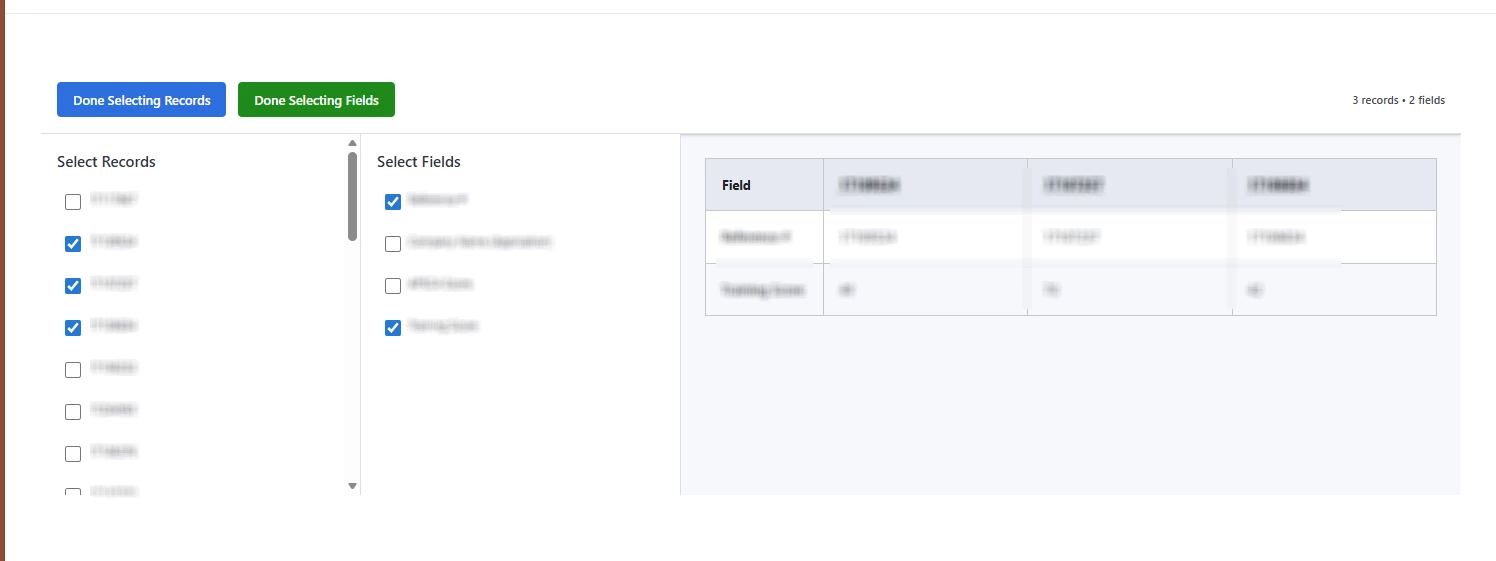
We used it to create a ‘comparison’ feature like you might see on a shopping site (select several items and compare features’).  You can select the items you want to compare and the fields. You can even click the header of the item and open the details panel.  

Â