Question

Interface Workflow Optimization

  • Sep 23, 2026 8:33 PM UTC
  • 3 replies
  • 123 views

Forum|alt.badge.img+1

Hi, I currently have a semi-functional workflow but would like to optimize the view of work submissions through the forms on my interface. My team works with equipment rentals and starts by entering job information such as location, dates, renter company details, contact, etc. The next step in the interface would be to add the specific equipment that is being rented out for the job created in the first step. Each piece of equipment is associated with start and end dates for the rental period, and my main issues comes with being able to view the equipment and job details on one page in the interface. Since Airtable’s native form layout is built to submit fields to one table at a time, I have broken it into two form submissions within my interface but this does not allow for a clean view of both the job and its details, plus the equipment that goes along with that job. Is there any way to accomplish this with relative ease? I’m still new to interface building but as far as I can tell, the other layout options do not provide a much better solution.

3 replies

ScottWorld
Forum|alt.badge.img+35
  • Genius
  • Sep 24, 2026 12:00 AM UTC

You can do all of this 100% natively within Airtable’s interfaces. Any record detail page lets you display linked records as a field or a view… and you can edit the data right there.

However, It sounds like you want to do this by using a form?

If you’re looking for a form that lets you submit data to 2 (or more) tables simultaneously, you would need to turn to Fillout’s advanced forms for Airtable.

Fillout is 100% free, and it offers hundreds of features that Airtable’s native forms don’t offer, including the ability to create new linked records on a form, which is what you’re looking for.

It also offers lots of other advanced features, such as the ability to:

I show how to use a few of the advanced features of Fillout on these 2 Airtable podcast episodes:

Hope this helps!

If you’d like to hire the best Airtable consultant to help you with anything Airtable-related, please feel free to contact me through my website: Airtable consultant — ScottWorld


TheTimeSavingCo
Forum|alt.badge.img+32

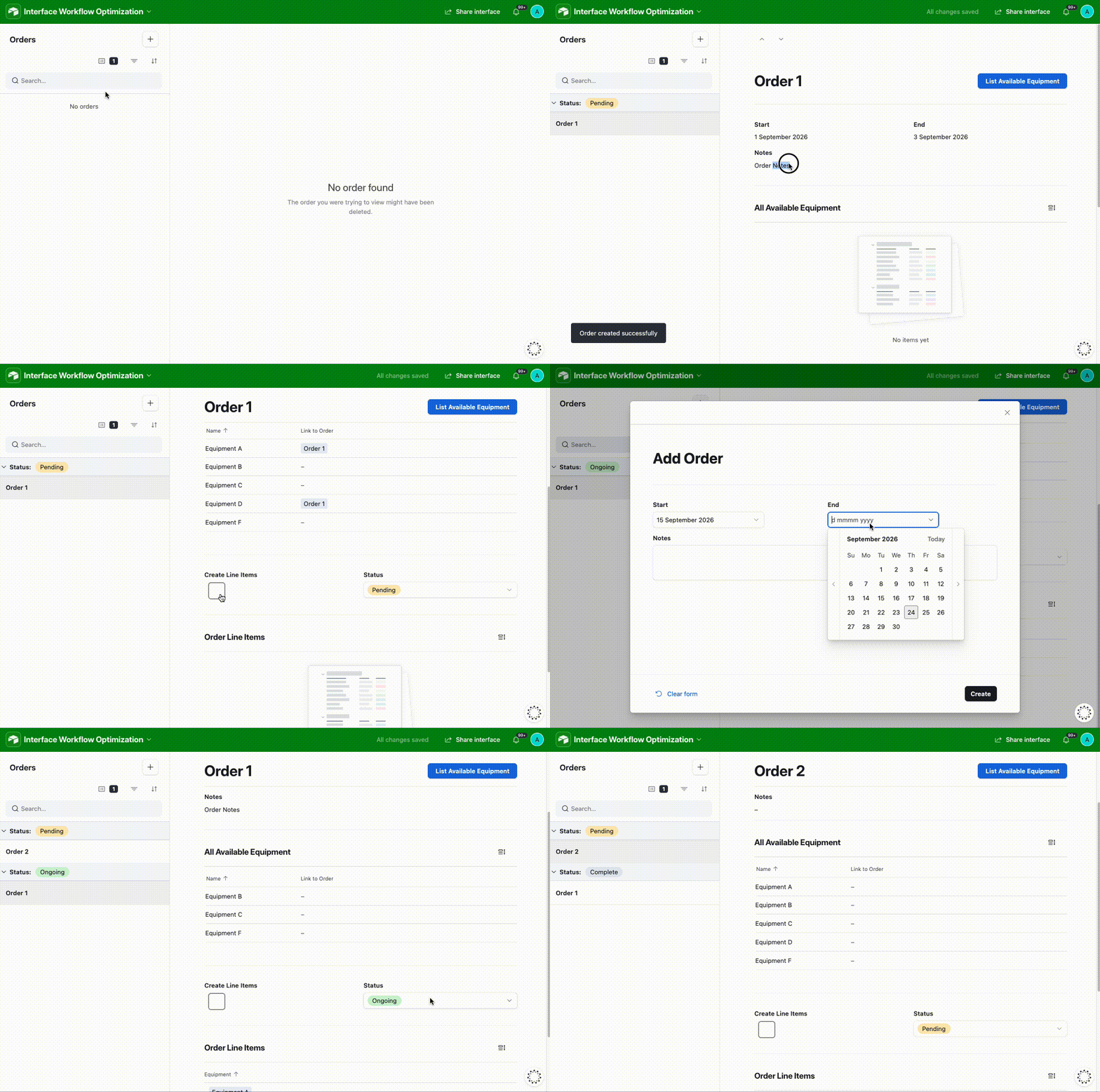
Hm I’m assuming all of your team have Airtable accounts?  If so, I’ve been able to make something similar with the Record Review layout (as long as a user can open a Record Details page this’ll work fine, so a List works too), but it does involve a fair amount of setup.  I’ve created it here for you to check out!

Explanation:

  1. We create a linked field to the ‘Equipment’ table called ‘All Available Equipment’ and we use an automation to find all available equipment and link it to this Order.  This lets us display all of them for the user to select from
  2. We then create another linked field to Equipment called ‘Selected’, and this is the users will populate to indicate that they’re linking this Equipment record to this Order
  3. The ‘Create Line Items’ checkbox then creates one ‘Order Line Item’ record per selected piece of Equipment
  4. We use lookups and filters on the List elements to ensure that the users only ever see items that are available.  In the gif you can see that Equipment A and D weren’t available for selection for Order 2, but once we updated Order 1 to be ‘Complete’ they became available

You can duplicate the base above to your own workspace to poke at it, and I’d also be happy to get on a quick free call to get this set up for you if you’d like!


Hello, I’d recommend creating separate Jobs and Equipment tables linked by a relationship field, then using an Interface record detail page to display the job information alongside all associated equipment.