
Question

Limit Record Selection & Other Basic Tasks AT cannot do....


Jasmine_Ruth1
Forum|alt.badge.img+9

There are many many frustrations since we’ve upgraded our Airtable, there are seemingly low level tasks that Airtable and Omni is unable to do, yet it boasts being able to build an entire base. Extremely annoying. I just wanted to list a few here.

  • Why can we restrict record selection on an interface for clients on a linked file but not on a single or multiple selection?
  • Why can’t we put a prompt into Omni to hide or show columns? This is very helpful if we need to add a same view to other like bases but it’s not able to hide or show columns? 
  • Why can’t we copy an interface and then change where the linked data is coming from? This is a HUGE problem that was misrepresented by Airtable. We thought we could make a linked base, and link the views so that all our clients could use this linked base. Only to find out I’d have to manually set up each interface one by one, over and over again because Omni does not work, and the option to change where the data is pulled form is greyed out
  • PORTAL users used to be able to @ tag other users, and Airtable took this away. This is not coming back and this means basically airtable forces all portal clients to now be collaborators at of course a premium cost. Just noting this here as an annoyance so other users know because it took months of me working with their tech support for them to admit this was a change that happened sometime in the last few months. 


11 replies

CaitlenBerg
Forum|alt.badge.img+8

I’m not sure about the rest of your points, but for the first issue regarding restricting a selection, can you explain a little more about what you’re looking to do? I think this should be possible, unless I’m misunderstanding your requirement.


Jasmine_Ruth1
Forum|alt.badge.img+9
  • Author
  • Known Participant
  • September 28, 2026

I’m not sure about the rest of your points, but for the first issue regarding restricting a selection, can you explain a little more about what you’re looking to do? I think this should be possible, unless I’m misunderstanding your requirement.

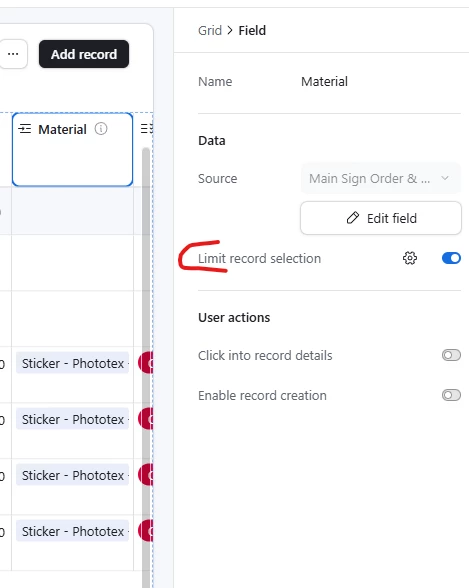
The “Limit Record Selection” is only available when it is a “linked” record. See below:

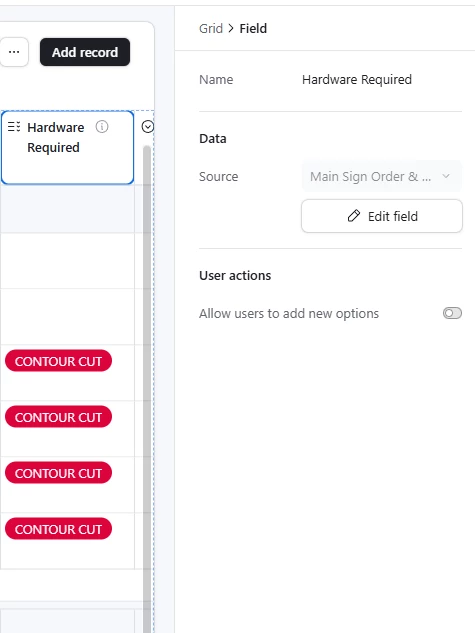
However for a single or multiple select, the “limit record selection” is not an option, so I cannot restrict which options an interface user can use. 


CaitlenBerg
Forum|alt.badge.img+8

This looks like a screenshot from the data layer of the base, but you mentioned that your clients are working from an interface, is that correct?


Jasmine_Ruth1
Forum|alt.badge.img+9
  • Author
  • Known Participant
  • September 28, 2026

This looks like a screenshot from the data layer of the base, but you mentioned that your clients are working from an interface, is that correct?

Yes the screen shot is to show how there is an option for “Limit Record Selection” on the linked file, but not on the single select file. No need to show client view in this case. This view is what sets up the interface. Based on how I set this up on the back end is what the client sees. The client is restricted to selecting only the options I allow for a LINKED record, but I can’t do anything to restrict on a single or multiple select. As you can see from the screenshot the “Limit Record Selection” simply is not there on the single/multi select.


CaitlenBerg
Forum|alt.badge.img+8

​@Jasmine_Ruth1 I checked a base of mine where I’ve restricted available selections and I could’ve sworn that it was a field native to that table, but I was wrong - it’s a linked field. I don’t know why that makes a difference to Airtable. I’m assuming you’re not able to change that field to a linked field.
Sorry I couldn’t be more helpful. 


anthonyXRay
Forum|alt.badge.img+6
  • Participating Frequently
  • September 29, 2026

The single/multi select in interfaces only has the “Allow users to add new options” toggle, so keeping that off (like in your screenshot) stops clients from inventing options, but there’s no per-interface limit on which existing options show up.

The usual workaround is to swap the select for a linked record to a small “Options” table (one row per option).  Then Limit record selection works, and you can filter it to a view so each client only sees the choices you allow.  You should be able to keep your existing select values by duplicating the field first, then changing the copy’s type to a linked record.  The downside is a bit more setup, but it gets you the control you’re after.


Jasmine_Ruth1
Forum|alt.badge.img+9
  • Author
  • Known Participant
  • September 29, 2026

The single/multi select in interfaces only has the “Allow users to add new options” toggle, so keeping that off (like in your screenshot) stops clients from inventing options, but there’s no per-interface limit on which existing options show up.

The usual workaround is to swap the select for a linked record to a small “Options” table (one row per option).  Then Limit record selection works, and you can filter it to a view so each client only sees the choices you allow.  You should be able to keep your existing select values by duplicating the field first, then changing the copy’s type to a linked record.  The downside is a bit more setup, but it gets you the control you’re after.

I do know I can do this but IMHO this should be a default feature on Airtable. Very silly that you can do it for linked items but not for single/multiple select and seems like an easy technical fix. Another thing I’d love to see is for them to make columns editable or NOT editable in the Grid interface view. I already have made many extra columns as you have suggested for this solution, because of this grid view restriction… for example wanting client to see a width/heigh column but not edit while still having a friendlier grid view where they can more easily copy/paste/drag/drop than the list view. I’ve put in requests for their IT but also just noting here for discussion.


DisraeliGears01
Forum|alt.badge.img+22

As ​@anthonyXRay mentioned, the answer is usually more tables (it is called Airtable after all haha).

That said you could also try to solve this via more fields and formulas. Have a single select with a limited set of options, then another with a different limited set, etc and then create a formula field that populates with whichever one is filled to essentially concatenate it all back together. 

Another option would be to use forms instead of a list/grid interface. Even in Airtable native forms you can remove single select options from the available list of selections (to say nothing of Fillout and such)


nroshak
Forum|alt.badge.img+11
  • Brainy
  • October 1, 2026

PORTAL users used to be able to @ tag other users, and Airtable took this away. 

Could you please say more about this? We have over a dozen portal users, all from the same external org, and none of them have told me that they can’t @ tag other users in their org, or in our org, any more. This would really hurt our workflow if it hit us.

I would love to hear more about what tech support told you on this: when did Airtable take it away, what are the undocumented limitations, and any other details you feel comfortable sharing, ​@Jasmine_Ruth1 ?

TIA - Natalka


Jasmine_Ruth1
Forum|alt.badge.img+9

PORTAL users used to be able to @ tag other users, and Airtable took this away. 

Could you please say more about this? We have over a dozen portal users, all from the same external org, and none of them have told me that they can’t @ tag other users in their org, or in our org, any more. This would really hurt our workflow if it hit us.

I would love to hear more about what tech support told you on this: when did Airtable take it away, what are the undocumented limitations, and any other details you feel comfortable sharing, ​@Jasmine_Ruth1 ?

TIA - Natalka

This depends fully on when your base was created as they made this change in June of this year, so if you made it before this change your base is grandfathered in and wont have this issue. If you create a new one you will.


We have a unique case where we make a full new Airtable base for each large event we work, and yes, everyone tries to suggest we have one base but our data is simply too large for one base so not an option for us currently. We noticed at some point some bases no one was able to @ tag each other, the portal users were not showing up at all when someone would go to @ tag. All Portal users now show up as an “unknown” user to other users. We had to argue with tech support and provide thorough data for them to reply after months of us reporting this issue and them saying “oh actually we changed something on the back end.” This change, makes it so anyone that finds portal users communicating through @tags will now have to upgrade all portal users to the more expensive collaborator level. Infuriating, and also with a response, nope we cant switch it back. I advised this should be an option if privacy is a concern, we should be able to determine if we want to hide other portals or not, instead they just made it so we have to pay more and upgrade them instead of making it an option. Why would they do this? GREED. Here’s their reply, clipped to remove some personal client info


The important piece I was missing is that Airtable's behavior changed after that. Engineering confirmed that code changes were made in June 2026 that affected notifications between portal users and external users. I was not aware of those changes when I was explaining the current behavior to you.

Why we made the change

Portals are built around one commitment: the people using your portal can't discover the identities of the other outside people and companies working in your base. On Katie's side that promise is kept everywhere: Jacqui doesn't appear in her collaborator list, and inside the product, comments from her show as an unknown user. A mention notification was the one place it broke: it would arrive in Katie's inbox as "Jacqui mentioned you in a comment…," attaching a name she can't see anywhere in the product. The June update closed that last gap.

Why we can’t switch it back for your account

For your team, the old behavior was genuinely useful. Jacqui and your portal users are collaborating on purpose, and there’s nothing sensitive between them. The difficulty is that this protection exists for the person receiving the notification, across every portal on every account. Airtable has no way to know which pairs of outside organizations are comfortable being visible to each other, so the protection has to hold by default rather than case by case.

The behavior I was describing in my previous responses was accurate for how the system works today, but it did not explain the behavior you were seeing in your older examples. I understand now why those answers were so frustrating, because you were telling us that this had worked previously and I was just telling you how it worked today.

When I was able to locate an example, I was able to accurately trace the logs of that particular comment. I know that does not undo the frustration this has caused, especially given the investment you've made in Airtable and the fact that you've been relying on our answers to explain the behavior to your clients. I'm sorry that it took this many rounds to get to an explanation that actually reconciles what you were seeing with what we were telling you.

Please let me know if you have any further questions.

Best,

Victoria
Lead Technical Support Specialist
Airtable Support


nroshak
Forum|alt.badge.img+11
  • Brainy
  • October 1, 2026

Thank you so much for sharing the details, ​@Jasmine_Ruth1 . This is really helpful to know. It must be so frustrating to you.

This really seems to contradict Airtable’s own documentation, which says that external collaborators from different orgs can see each other if you don’t turn on a specific setting:

https://support.airtable.com/articles/4255096925-managing-and-sharing-airtable-interfaces#setting-collaborator-visibility