
Solved

Selecting visible fields for "Click to see underlying records" in interface dashboard pivot table

  • April 22, 2026
  • 2 replies
  • 15 views

Forum|alt.badge.img+17

Hi,

How can I change which fields are visible in the “Click to see underlying records” drill-down in an interface dashboard pivot table?

Automatically I get “sum” and “link to cost centers” but I’d need to show something else.
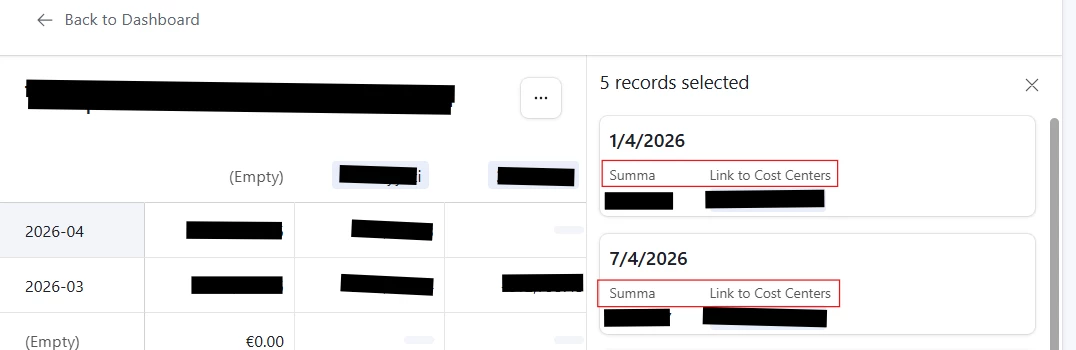


Airtable instructions claim that you should be able to do it, but I just can’t see where to do it.


“Underlying record details

In the User actions section of a dashboard visualization there is the option to allow end users to "Click to see underlying data" from the interface page. This option is per-visualization, meaning you as a builder have the granularity to toggle this on for individual dashboard insights. The option to turn this feature on can also be enabled by double-clicking on a visualization on the canvas.

The drill-down will only show the underlying records associated with the visualization and builders can configure:

  • Visible fields

  • Default sort

  • Record details for the records shown

  • Record details for foreign fields (This is available by clicking on the specific field header)

  • The option to allow end users to print”


Thanks for any insights!

Björn

Best answer by ScottWorld

Unfortunately, you can’t change that list of records that shows up in the right margin. 😕

This has been a very longstanding problem for my clients as well, so please be sure to report it as a feature request on this product feedback form.

Two years ago, I created a Loom video for the Airtable support team at this link, but still no fix for this problem yet — after 2 years. 😕

- ScottWorld, Expert Airtable Consultant


2 replies

ScottWorld
Forum|alt.badge.img+35
  • Genius
  • Answer
  • April 22, 2026

Unfortunately, you can’t change that list of records that shows up in the right margin. 😕

This has been a very longstanding problem for my clients as well, so please be sure to report it as a feature request on this product feedback form.

Two years ago, I created a Loom video for the Airtable support team at this link, but still no fix for this problem yet — after 2 years. 😕

- ScottWorld, Expert Airtable Consultant


Forum|alt.badge.img+17
  • Author
  • Known Participant
  • April 22, 2026

Thanks ​@ScottWorld  for this confirmation. Indeed it’s a big omission in the functionality. Especially since the documentation says it can be done 🤣. I’ll chip in my product feedback instantly.

Cheers,

Björn