Question

View only fields in interfaces or forms

  • February 19, 2026
  • 6 replies
  • 0 views

Forum|alt.badge.img+1

I’m making an Airtable project where I want to show prefilled form or prefilled interface page in form layout. I’m able to prefill both but I also want to have some fields to be non-editable. Is that possible in Airtable?


6 replies

  • New Participant
  • February 19, 2026

Hello!

In Airtable, you can prefill forms and interface pages, but only Interfaces allow fields to be set as read‑only. Prefilled form fields are always editable, so if you need non‑editable values, use an Interface in form layout where you can display prefilled fields as locked.


ScottWorld
Forum|alt.badge.img+35
  • Genius
  • February 19, 2026

@Tanmay Jain 

Airtable does not offer view-only fields on forms. (You can HIDE fields, but if you SHOW a field to the user, it will be editable by the user.)

To get view-only fields on a form, you would need to use Fillout’s advanced forms for Airtable.

Fillout is 100% free, and it offers hundreds of features that Airtable’s native forms don’t offer, including the ability to:

I show how to use a few of the advanced features of Fillout on these 2 Airtable podcast episodes:

Hope this helps!

If you’d like to hire the best Airtable consultant to help you with anything Airtable-related, please feel free to contact me through my website: Airtable consultant — ScottWorld


TheTimeSavingCo
Forum|alt.badge.img+31

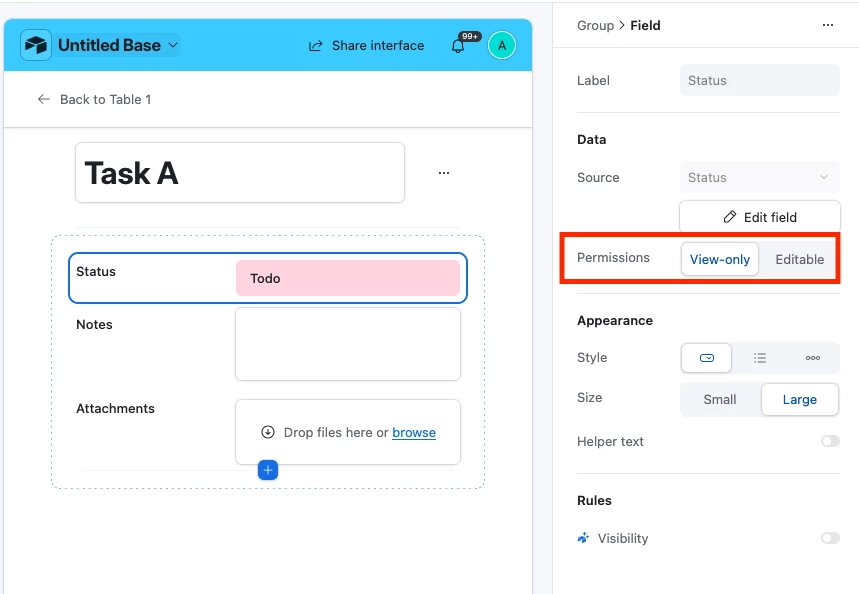
We’d have to use an Interface for this which means your users will all need paid accounts I’m afraid.  To do this, we select the field and set its permissions to either ‘View-only’ or ‘Editable’ like so:


If having paid accounts for every user isn’t possible then your next best bet would be using Fillout, and their free plan supports 1k submissions per month

If we really need to keep it in Airtable, we could create a new section in the form that says ‘For official use’ and prefill the fields there.  The idea is that we’d treat those fields as purely for display and ignore any data that gets submitted in those with the assumption that users might mess that up, does that make sense?


Forum|alt.badge.img+1
  • Author
  • New Participant
  • February 19, 2026

I don’t want to go outside of Airtable, means I don’t want to use any third party libraries. Also for making a field vie only, I need to use record details page which also I don’t want. I want a form layout as the main page. For example, using record picker to select a record and adding individual form fields. But there I can’t make field non-editable.


elijahcg
Forum|alt.badge.img+5
  • Participating Frequently
  • February 19, 2026

@Tanmay Jain Yeah the exact experience you want just isn’t supported natively in Airtable. I’d also vouch for Fillout as the best option. It integrates really seamlessly and I use it a lot when I need capabilities that don’t exist in the (pretty limited) Airtable forms tool.


Forum|alt.badge.img+1
  • Author
  • New Participant
  • February 19, 2026

I was trying to using Omni AI where I found custom interface. There I kind of make a field as non-editable but I have to manually select a record to be able to populate the fields. Is there any way that I can remove that dropdown and interface will directly show the prefilled data?