Button to Expand/Collapse all groups in view

  • June 19, 2017
  • 5 replies
  • 60 views

Forum|alt.badge.img

I think it would be incredibly helpful to have a button that automatically expands or collapses all groups in a particular view.

Currently, we use groups to separate out our different clients, types of content, clear next steps, and more, so we’re constantly expanding and collapsing a bunch of groups. On my own, I tend to keep the groups collapsed, but during our staff meetings we go through each project to get a broad overview of the status of things, so it’s helpful to expand everything and go through them one-by-one.

A button to automatically do this would make our lives easier!

5 replies

Forum|alt.badge.img+12
  • Inspiring
  • June 19, 2017

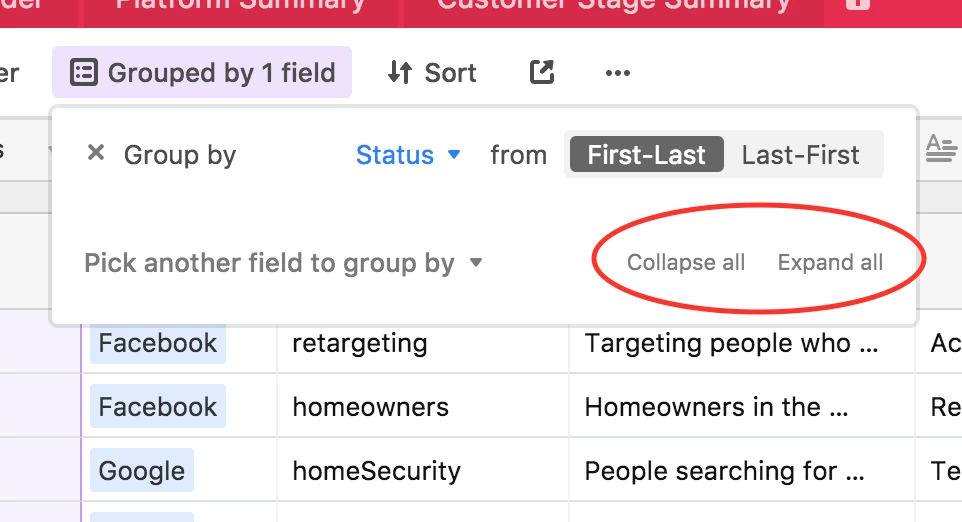
You can collapse or expand all groups from the Group menu:

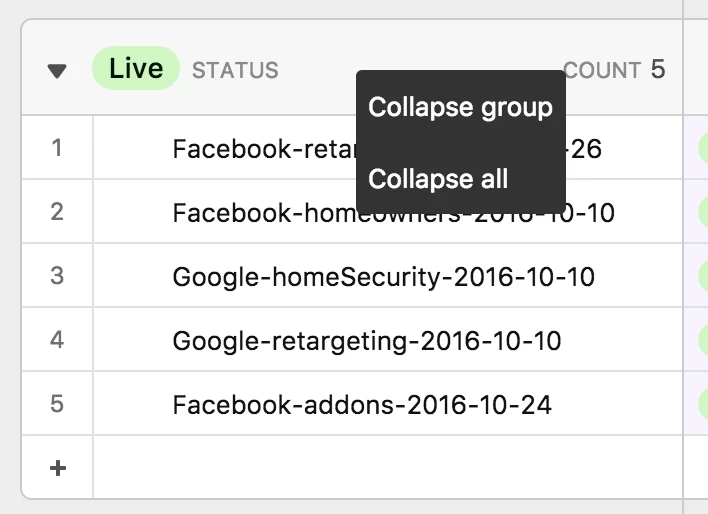
You can also collapse or expand all groups by right-clicking on a group header:


Forum|alt.badge.img
  • Author
  • New Participant
  • June 19, 2017

You can collapse or expand all groups from the Group menu:

You can also collapse or expand all groups by right-clicking on a group header:


What! How did I never see this? Thank you so much!


Forum|alt.badge.img+1
  • New Participant
  • July 22, 2023

@Matt_Bush is this feature on the mobile app version?


Forum|alt.badge.img+4

No. But we need it desperately. 


Forum|alt.badge.img+1
  • New Participant
  • November 25, 2024

When and where expandables are used, it is the great way to for readers to choose which question or information is most useful for them.

More Over: Youtube thumbnail Image View and Download

Along Side It is most like by people: Download Instagram Video - Instagram Downloader