
Empty option in single select - move to last

  • November 13, 2018
  • 3 replies
  • 49 views

When opening a single select, the first option is the blank cell.
As this is the usually the least useful option when you open the select dropdown it just takes up valuable space.

see image …
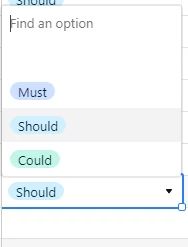
Can the blank option be moved to last please ?

Thanks!

3 replies

  • New Participant
  • January 25, 2019

Hey Kofifus. I just sent an email to airtable about this, but i noticed a soon as i send it, that this blank cell dissapears if you change the option of this cell to REQUIRED. Maybe you already know it, but I wanted to let you know just in case. TY!


  • New Participant
  • August 22, 2022

What do you mean by this?

I don’t see a “required” option in any of my “single select” columns. It says here that you can only make a cell required in a form. I tried adding a form view for my table, and making some of the selects required. But the blank option is still visible in the grid view.

Was this option previously available, and it has been removed? Is it only available to pro accounts?


Acabo de tener el mismo problema. Hice un campo de tipo Single Select y por más que intente hallar la forma de eliminar esa opción vacía, no la encuentro.