

Enable submission of forms from shared base link

  • September 15, 2018
  • 2 replies
  • 15 views

Forum|alt.badge.img+8

When using a shared base link it is currently not possible to submit a response to a form. When you navigate to a form page the following message pops up:
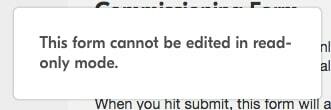
This means that instead of being able to provide a single shared base link, I need to provide a separate link to the form which creates a slightly confusing user experience.

Enabling submission of forms from shared base links makes it a very powerful tool for sharing information with and collecting information from a customer base.

2 replies

Forum|alt.badge.img+19
  • Inspiring
  • September 16, 2018

I understand where your frustration is coming from, but I believe the Form View from within the base is there for editing purposes only. You couldn’t submit a response from that view even with creator credentials.

What I do as a workaround is to embed the shared base on a website (we have it on our company intranet), and then embed the form underneath or next to the base as a separate element. This works well and we haven’t had any confusion from it yet! Good luck :slightly_smiling_face:


Forum|alt.badge.img+8
  • Author
  • Known Participant
  • September 29, 2018

I understand where your frustration is coming from, but I believe the Form View from within the base is there for editing purposes only. You couldn’t submit a response from that view even with creator credentials.

What I do as a workaround is to embed the shared base on a website (we have it on our company intranet), and then embed the form underneath or next to the base as a separate element. This works well and we haven’t had any confusion from it yet! Good luck :slightly_smiling_face:


Yes I realise, what I am saying is that in a read only version of the base why not make forms into accessible versions for submission purposes? Otherwise there is an editable version that can’t be edited, which is entirely redundant.