

Finding an Existing record - limited to one field search

  • January 3, 2019
  • 3 replies
  • 14 views

Forum|alt.badge.img+7

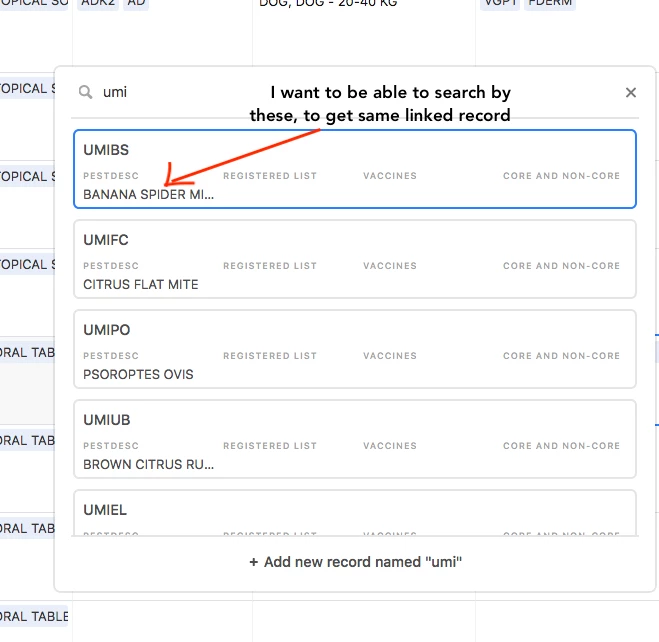
When I am searching for a linked record, I can only search if I know the first field (locked) for that table. However, when I start typing, I can see other fields listed in the options for each record that comes up.

I’d like to search by those other fields, that will still get me to that linked record, not by just the first field.

Example. Many of the linked records are listed like XMANS, XMAND, MANGS, UMIMG, UMIMA
I can’t remember all of these codes, but I know what I am searching for - so if I typed something like “Ear Mite” it would show me possible linked records to choose from, of which I would select UMIMG.

Hopefully that makes sense - will try to attach an image.

3 replies

Kai_Muscher
Forum|alt.badge.img+13
  • Known Participant
  • April 17, 2020

This would be more than useful!!! For example: When I have several hundreds of unique PO numbers (reference filed) for several article numbers and suppliers, it’s hard to find the right PO if you are not 100% sure about it.

To me an extended search option is a must.

Thanks & best regards,

K


Forum|alt.badge.img+7
  • Participating Frequently
  • February 15, 2022

Adding on to this comment! I’d love this as well!


Forum|alt.badge.img+7
  • Author
  • Participating Frequently
  • February 15, 2022

There is actually a simple work around that was suggested elsewhere.
Move your unsearchable field to any field but the first locked field.

Make the first locked field a formula that includes the field you want to search and any other fields.

Then when you are adding a record it will all be available as you type.
