Keyboard shortcut for delete record

  • October 3, 2016
  • 16 replies
  • 58 views

Forum|alt.badge.img+19

Subject says all. Would be a nice enhancement. Mousing around interrupts my flow.

Cheers, Arthur.

16 replies

William_Nutt
Forum|alt.badge.img+14
  • Known Participant
  • January 11, 2018

Agree majorly! This is critical to my workflow.


  • New Participant
  • April 28, 2018

I third that. Any staff member available to comment on the possible inclusion of this?


Forum|alt.badge.img+2
  • New Participant
  • August 4, 2018

This is super critical! A basic feature in Sheets and Excel. Airtable’s UI is super friendly. Good keyboard control is mendatory though.


  • New Participant
  • August 6, 2018

Nearly two years later and still no response from staff. Cmon Airtable, this is a really basic super user feature. :pray:


  • New Participant
  • June 12, 2019

Agreed. I can’t believe this doesn’t exist.


No keyboard shortcut yet?


  • New Participant
  • March 9, 2020

+1. Any updates on this?


  • New Participant
  • April 1, 2020

Also requesting this feature. Very inefficient managing hundreds of records by clicking a checkbox with a mouse instead of a quick hotkey to delete.


Justin_Barrett
Forum|alt.badge.img+21

Also requesting this feature. Very inefficient managing hundreds of records by clicking a checkbox with a mouse instead of a quick hotkey to delete.


There’s a faster way to select multiple records without using the checkboxes. Click in any field of any record. Shift-click into any other field of any other record. Airtable selects all fields (and records) between the two. Right-click anywhere in the selection, and choose “Delete all selected records.”


  • New Participant
  • June 17, 2020

I agree, makes me waste precious seconds. Come on Airtable !


Dear Airtable, please develop a Delete Record keyboard shortcut ASAP. This is an essential feature.
Thank you,
Michael Salafia


  • New Participant
  • September 9, 2020

Another ask for this, really important shortcut, please create!


  • New Participant
  • October 13, 2020

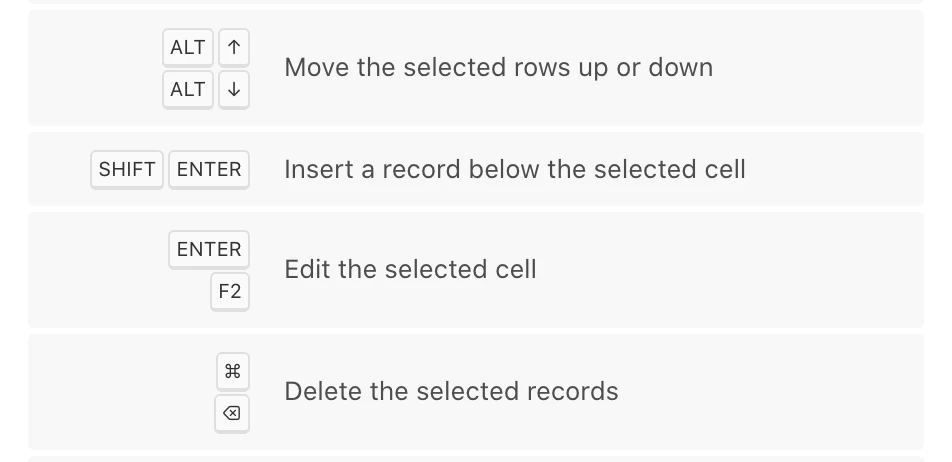
Been looking for a way to do that too, and after a lot of fiddling around I just found out that Cmd+Backspace will actually delete a record! Was that what you were all after?

Oh and while I’m at it, you can also move a record up and down using Option+Up/Down :raised_hands: I almost cried when I discovered that just recently haha I guess Airtable has been trying to hide those away from us, they’re not even listed in the help center article on keyboard shortcuts!


Forum|alt.badge.img+19
  • Author
  • Inspiring
  • October 14, 2020

Been looking for a way to do that too, and after a lot of fiddling around I just found out that Cmd+Backspace will actually delete a record! Was that what you were all after?

Oh and while I’m at it, you can also move a record up and down using Option+Up/Down :raised_hands: I almost cried when I discovered that just recently haha I guess Airtable has been trying to hide those away from us, they’re not even listed in the help center article on keyboard shortcuts!


:exploding_head: :partying_face:

Great stuff! What’s up Airtable!?

For others joining in, to move records around you first have to select the row (no shortcut for that?). :winking_face:


  • New Participant
  • October 14, 2020

Glad it helped :grinning_face_with_smiling_eyes:

So I kept investigating and… turns out there’s plenty more shortcuts listed in the keyboard shortcut help dialog (which you can toggle by hitting Cmd+/), and those I mentioned in my previous post are in there:

I can’t see any shortcut to bring the records into focus when you’re in unfocused state though, too bad :frowning:


Forum|alt.badge.img+19
  • Author
  • Inspiring
  • October 14, 2020

Glad it helped :grinning_face_with_smiling_eyes:

So I kept investigating and… turns out there’s plenty more shortcuts listed in the keyboard shortcut help dialog (which you can toggle by hitting Cmd+/), and those I mentioned in my previous post are in there:

I can’t see any shortcut to bring the records into focus when you’re in unfocused state though, too bad :frowning:


They need to update the help page though. Didn’t know about the existence of the help dialog either…