Product Suggestion: Text formatting in Page Designer

  • June 4, 2020
  • 5 replies
  • 40 views

Jen_Rudd
Forum|alt.badge.img+15

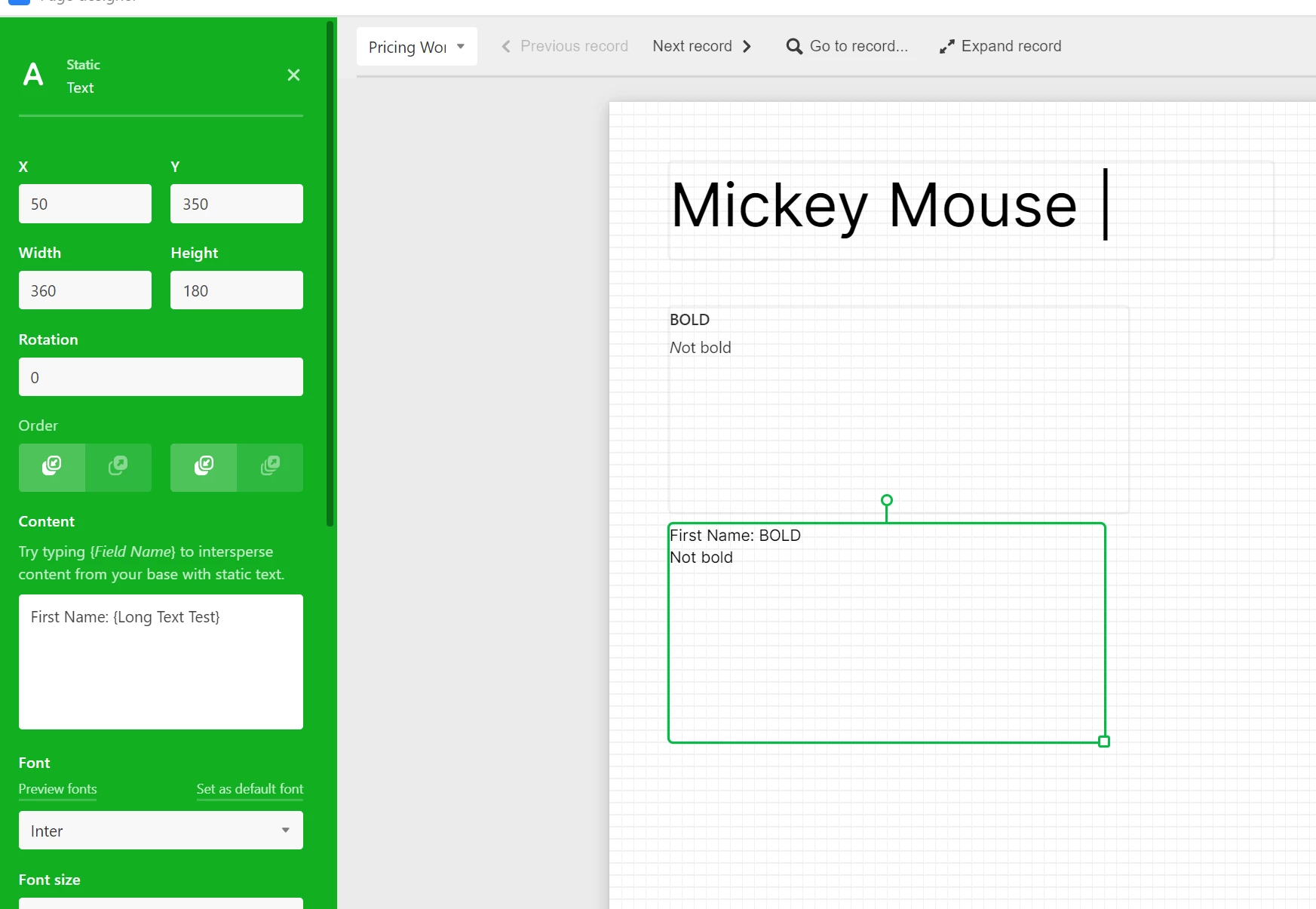
I have a feature request - to be able to have variable weight of font within a text box. This would allow me to have something like
First Name: {First Name}

Within the block. I use a mixture of static text and field variables and I would like to differentiate so the text flows nicely on the page and not have to move multiple pieces of information to make a page flow properly.

Thanks!

5 replies

Forum|alt.badge.img+20
  • Inspiring
  • June 4, 2020

Hi @Grow_With_Jen

Is this post for a product suggestion only, or for help with an issue, too?

If it’s both, you could copy this post and paste it into a new one and select “Product Suggestions”, then it will be seen as a suggestion.

If it’s just a “Product Suggestions”, only, then just change accordingly.

Just to let you know.

Thank you,
Mary


Jen_Rudd
Forum|alt.badge.img+15
  • Author
  • Inspiring
  • June 4, 2020

Hi @Grow_With_Jen

Is this post for a product suggestion only, or for help with an issue, too?

If it’s both, you could copy this post and paste it into a new one and select “Product Suggestions”, then it will be seen as a suggestion.

If it’s just a “Product Suggestions”, only, then just change accordingly.

Just to let you know.

Thank you,
Mary


Thanks, I moved it :slightly_smiling_face:


Kamille_Parks11
Forum|alt.badge.img+27

Long text fields have rich text formatting capability, the Page Designer Block should duplicate this functionality.


Jen_Rudd
Forum|alt.badge.img+15
  • Author
  • Inspiring
  • June 4, 2020

The long text does duplicate this BUT I am using the static text box to include static text and merge information, example

First Name {First Name from Airtable Field} and I want First Name to be bold and the airtable field to not be bold. I am not aware of a solution “out of the box” that combines both pieces of information in the long text box formatted to replace the static text in the text box.

If you look at the first block, that is the Long Text Test field, but when merged in a Static Text box, the formatting goes away.


Kamille_Parks11
Forum|alt.badge.img+27

The long text does duplicate this BUT I am using the static text box to include static text and merge information, example

First Name {First Name from Airtable Field} and I want First Name to be bold and the airtable field to not be bold. I am not aware of a solution “out of the box” that combines both pieces of information in the long text box formatted to replace the static text in the text box.

If you look at the first block, that is the Long Text Test field, but when merged in a Static Text box, the formatting goes away.


Right, that’s what I meant. The “Content” box should have the same capabilities as Long Text fields do so we could highlight bracketed (or non bracketed) text and make it bold, italic, etc.