Sorting Options in Single or Multiple Select Field

  • April 12, 2018
  • 4 replies
  • 35 views

I would like to have the ability to sort all of the options/values in a Single Select field. Then I could more quickly spot the one I want to select.


4 replies

Forum|alt.badge.img+18

Hi @Chuck_Hoffman

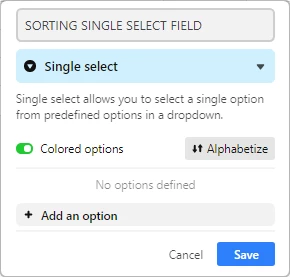
When you click on the arrow right to the field name, and select Customize Field Type, you see an Alphabetize funcion in the dialogue box. Because it is so obvious I just want to make sure if this is what you’re looking for.


Forum|alt.badge.img+5
  • Inspiring
  • April 12, 2018

In addition to what @Andre_Zijlstra mentions, you can manually order the options in a single-select field by dragging them (use the six-dot icon to the left of the option text as the ‘handle’ for dragging).


  • New Participant
  • July 6, 2018

Hi,
A) I too have the same request-- to alphabetize my options within a multiple drop-down field. I can find no “alphabetize” setting. Has this feature been removed?
B) also would be great to sort multiple drop down options by date (earliest to latest) or by value (lowest-highest). When building large option sets these do not always get entered in order.
Thanks.


  • New Participant
  • September 10, 2019

The alphabetize option only appears when you are using the program on a computer via the web, not on the iPhone or iPad versions.