

Question

Airtable MCP & Copilot Studio: Creating Records

  • July 7, 2026
  • 2 replies
  • 56 views

MikeBJr
Forum|alt.badge.img+2

Hey All,


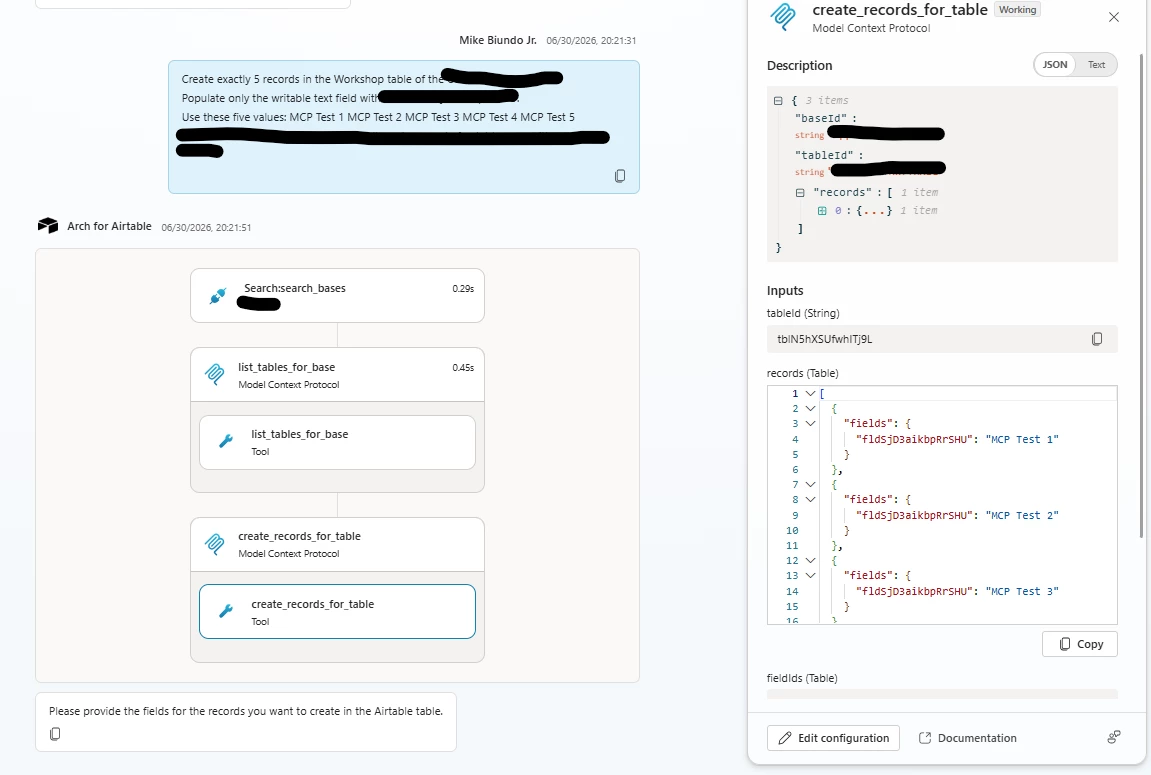
I have been working on building an agent in Copilot Studio that can operate within Airtable. I have been able to successfully connect the Airtable MCP into Copilot and most of the tools seem to be working well. However, whenever I attempt to prompt the agent to update or create a record, it will get stuck in a loop where it asks for the fields I wish to update. If you try giving it the fields it will ask again and eventually error out.

I am able to modify and create tables, create new fields, and update descriptions, but for whatever reason, I cannot seem to get it to create or update records.

I am not sure if anyone else has had success getting this to work. 

Looking forward to any insight you may have.
 

2 replies

MargeM
Forum|alt.badge.img+4
  • Known Participant
  • July 9, 2026

Hey! 

I’m not a Copilot Studio expert, but perhaps you can try changing the prompt to create records one by one instead of a bulk create (e.g., just "MCP Test 1"). If that works, your overall setup is completely fine, and you can fix the loop by going into the Edit configuration settings for the create_records_for_table step and changing the input from conversational mapping to a structured object/variable and see how it will work. 


MikeBJr
Forum|alt.badge.img+2
  • Author
  • New Participant
  • July 9, 2026

Hey! 

I’m not a Copilot Studio expert, but perhaps you can try changing the prompt to create records one by one instead of a bulk create (e.g., just "MCP Test 1"). If that works, your overall setup is completely fine, and you can fix the loop by going into the Edit configuration settings for the create_records_for_table step and changing the input from conversational mapping to a structured object/variable and see how it will work. 

Thanks for the reply! What I ended up discovering was that Copilot was delivering the payload to Airtable incorrectly. Specifically as it related to the request body. So, even though the tool showed the correct data, the way it was being sent was causing it to not be recognized by the agent.

How I ended up fixing it was by creating a second API connection and using a custom code transform on the custom connector to force Copilot to deliver the payload in a way Airtable could receive. 


So my setup ends up being:
Main agent using the MCP connection 

Sub-agent tasked with creating and updating records using modified REST API connection.