Question

Grant Balance Tracking

  • August 26, 2026
  • 9 replies
  • 167 views

Forum|alt.badge.img+1

I need to add a tab to the grant tracker that allows me to track the spenddown on each grant, preferrably by grant line. There is a transactions but it does not let me put negative only positive amounts so i can’t put a starting balance and then spend down the grant. Has anyone done this? Does anyone have suggestions?

9 replies

Tara_AIR
Forum|alt.badge.img+1
  • New Participant
  • August 26, 2026

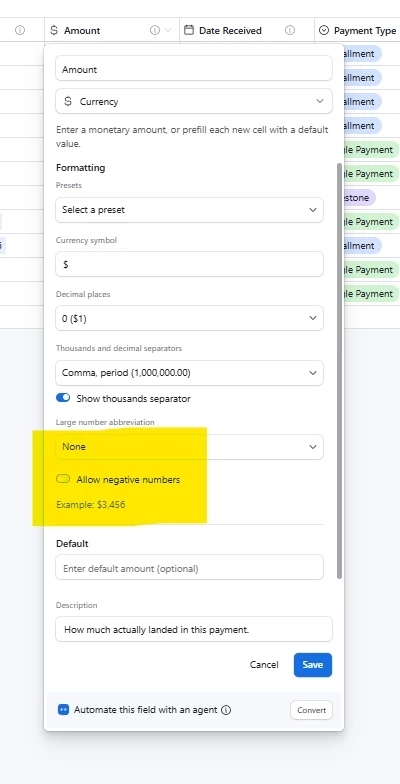
 I haven’t used the template much, so can’t speak to that, but to add negative numbers, toggle on “Allow negative numbers” as seen below:


Cherry_Yang2
Forum|alt.badge.img+14
  • Known Participant
  • August 26, 2026

I am assuming you have a Grants table and an Expenses table.

On the grants table., you can build a few fields:
1. Manual entry Numbers/Currency field for the value of the grant. (ex. $10,000)
2. Roll up field to sum together the expenses from your expenses table (ex. $4,000) - notice this is still a positive number.

3.Finally, a formula field that takes the grant value and subtracts the rollup field. (ex. $10,000 - $4,000 =$6,000) 
This should allow you to see the remaining value in the grant. 


Forum|alt.badge.img+1
  • Author
  • Participating Frequently
  • August 26, 2026

I am actually working in the one from the training


Cherry_Yang2
Forum|alt.badge.img+14
  • Known Participant
  • August 26, 2026

I am actually working in the one from the training

Awesome!


Forum|alt.badge.img+1
  • Author
  • Participating Frequently
  • August 26, 2026

Is there a way to add a transaction under a field with a balance and have that balance decrease? if that makes sense? I’m trying to picture how i would want to do this in real time


e2laurel
Forum|alt.badge.img+8
  • Known Participant
  • August 26, 2026

@Robin Roeser, can you send a screenshot of what you’re trying to accomplish? The rollup field summing your expenses should update automatically when you add new transactions.


DisraeliGears01
Forum|alt.badge.img+22

Is there a way to add a transaction under a field with a balance and have that balance decrease? if that makes sense? I’m trying to picture how i would want to do this in real time

I was going to suggest ​@Cherry_Yang2 layout. If you want to see the balance decrease on the transactions table, you can add a lookup of the “Current Balance” formula existing on Grants table.

Important to note though that the lookup will decrease when other transactions are added. If you want to freeze that figure (so you can see that Transaction 3 had the balance at $2,342, while Transaction 4 brought the balance to $2,134, etc) then you can add an automation that fires when the lookup field isn’t empty and the transaction field isn’t empty and write the value into a currency field.


Forum|alt.badge.img+1
  • Author
  • Participating Frequently
  • August 26, 2026

It’s starting to do what I want now that I’ve gotten some information from here and I think I have to play with it and do some research, get some refresher information. I would really love to figure out how to track the budget lines and I know if  classify an expense like we paid $240 in training supplies i can connect that to a training supplies line but i need to figure out what that looks like in tab itself. I feel like it appears as a header of the grant name etc. and each budget line below it if that makes sense and I have to figure out how to create that.


Cloudrocket
Forum|alt.badge.img
  • New Participant
  • August 29, 2026

Robin, for the budget-line part in your last message, add a Budget Lines table between Grants and Transactions. Make one Budget Line record for each line on each grant, for example Training Supplies - Grant A. Link each Budget Line to one Grant and give it Approved Amount, Spent, and Remaining fields.

For the simple case where each expense belongs to one budget line, have each Transaction link to one Budget Line and keep the ordinary expense amount positive. On Budget Lines, roll up the linked transaction amounts into Spent, then use {Approved Amount} - {Spent} for Remaining. On Grants, roll up the Budget Lines' Approved Amount, Spent, and Remaining values if you also want totals for the whole grant. For this spenddown model, the balance updates from the linked records; you do not need to type a running balance or enter ordinary expenses as negative amounts.

For the interface layout you described, use a Grant record detail page with a list of its linked Budget Lines showing Approved, Spent, and Remaining. When you open one line, show the linked Transactions underneath it. That gives you the grant as the header and the budget lines below it.

If one expense can be split across two budget lines, do not mix direct Transaction-to-Budget-Line links with a separate split method. Use an Allocations table for every assignment instead. Each Allocation links one Transaction and one Budget Line and stores Amount Assigned. An unsplit transaction gets one allocation for its full amount; a split transaction gets two or more allocations whose amounts add up to the transaction total. Budget Lines then roll up Amount Assigned from Allocations. On Transactions, roll up the allocation amounts and add a formula that flags any difference from the transaction amount.