Question

Airtable base limit? Need help


Forum|alt.badge.img+1

Hi guys, 

I am on the business plan of airtable and it shows that i can add 125,000 records in airtable.
But when i try to upload the cvs file containing 95k records, it shows me only 45k.

I tried to divide it into chunks and add it but still nothing, deleted the base and tried again, still nothing.
Whatever i do, it shows me 45k records only.

9 replies

TheTimeSavingCo
Forum|alt.badge.img+32

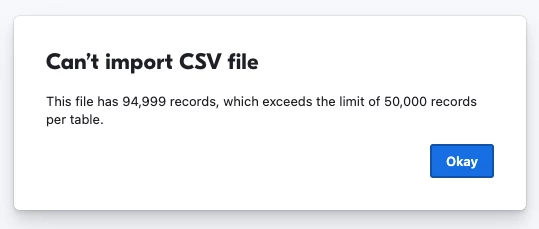
Hm, that’s really strange.  I ended up creating a CSV with 94,999 rows (missed the header row sigh) to try to test it and wasn’t able to replicate it (results below)

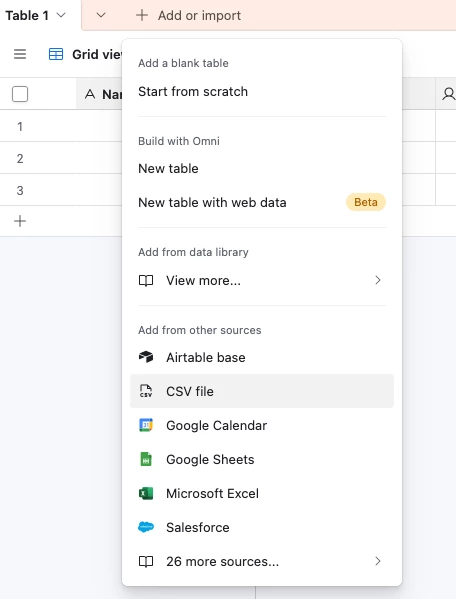
May want to open a support ticket with Airtable directly I think.  Could I also check how you’re importing this?  Is it via the ‘Add or import’ button followed by ‘CSV file’?


  1. Import the CSV into a Business base
    1. Works fine
  2. Import the CSV into a Teams base
    1. Get an error message saying it’s above the base limit
  3.  Import a >100mb file into a Business base
    1. Get an error message saying it’s above the 100mb limit


Forum|alt.badge.img+1

Yes, i am trying the csv file option, the one you showed me.
It doesnt show me any error, just shows me 45000 records, the file i am uploading has 95000.

Probably a glitch since i moved from team to business plan, how do i open a support ticket, do i use the chatbot on the bottom right corner in help page of airtable?


TheTimeSavingCo
Forum|alt.badge.img+32

Yeah the chatbot works, and you could also try support@airtable.com too

Hm, just for my own curiosity, do you think you could try creating a CSV file with 95k rows and one column that was just 1-95k and try uploading that?  I’m trying to rule out whether there’s something wrong with the CSV file you’re trying to upload

To do that I went into Google Sheets, created a sheet that had 95k row, and then used this:

=SEQUENCE(95000)

Forum|alt.badge.img
  • New Participant
  • October 5, 2026

A few checks that haven’t been covered yet (the earlier reply already covered Support and the clean SEQUENCE test):

1. Confirm the plan on this exact workspace. Plans are per workspace. Open your Airtable account overview → Workspace settings → open the workspace that owns this base → check the plan name and that base’s record usage. Business allows 125,000 records per base; Team allows 50,000. If this workspace still shows Team, or you upgraded a different workspace than the one holding the base, you will never get past that workspace’s cap.

2. Native CSV import vs the CSV Import extension. Add or import → CSV file is the native importer; Airtable’s docs cap it by file size (100 MB for CSV), not by a published row count. The separate CSV Import extension (Extensions) is capped at 25,000 rows and 5 MB. If any chunk went through the extension, switch to native import into one table (table name dropdown → Import data → CSV file) and watch the record count after each chunk.

3. Count logical CSV records, not editor row numbers. Quoted fields that contain line breaks make a file look like ~95k lines in a spreadsheet while a real CSV parser sees far fewer records. Outside Airtable, parse the file with a CSV-aware reader (not a plain text editor or line counter) and check the record count; compare that to what Airtable shows. If the parser already reports ~45k, Airtable imported what the file actually contains.

4. After the clean 1–95k test: if the clean file imports fully, the original CSV’s structure is the culprit (step 3). If the clean file also stops near 45k with no error, send Support both outcomes—that is a clear Team→Business upgrade bug report.

Also make sure the grid has no filter on, and read the base’s record count from workspace usage, not only from a filtered view.

Disclosure: I'm on the Duaer team; this was drafted with AI help and checked against Airtable's support docs.


Forum|alt.badge.img+1

Thank you team, let me try those ideas.

Also, i went from team trial plan to business plan annual, could that be a reason for this issue?


Forum|alt.badge.img+1

So i took the original file that had more than 110k contacts and around 200 custom fields
and i removed all of columns except for the “names” and i tried to upload again, and it shows me all of the records


TheTimeSavingCo
Forum|alt.badge.img+32

Yeah seems like something’s wrong with your CSV then!  I’d try uploading halves of the columns in the CSV until I identified the one that’s causing issues and diagnose that I reckon


Alexey_Gusev
Forum|alt.badge.img+25

Hi,
try to use any chatbot, upload your csv and complain about same problem.
Sometimes it can “see” something we cannot, like “your text contains %bad% chars at the line XXXX that cannot be parsed in a proper way”


Forum|alt.badge.img
  • New Participant
  • October 6, 2026

Your names-only test answers the plan question too: if the plan cap were the cause, the names-only file would have stopped at the same point. Business allows 125,000 records per base, counted across all tables in the base, so 110k fits, but clear out any test tables or partial imports in that base first.

Since only the full-width file loses rows, look for a column where a cell has a stray double quote or line breaks inside it. A CSV parser then reads everything up to the next quote as one cell, so many rows can merge into one record without any error.

If you can run Python, this prints the record count and flags the suspect columns in one pass:

import csv, sys
csv.field_size_limit(10**9)
with open(sys.argv[1], newline='', encoding='utf-8-sig') as f:
rows = list(csv.reader(f))
header, data = rows[0], rows[1:]
print("records:", len(data))
bad = [i for i, r in enumerate(data, start=1) if len(r) != len(header)]
print("records with wrong column count:", len(bad), bad[:5])
for c, name in enumerate(header):
vals = [r[c] for r in data if c < len(r)]
nl = sum(1 for v in vals if '\n' in v or '\r' in v)
longest = max((len(v) for v in vals), default=0)
if nl or longest > 5000:
print(f"{name}: {nl} cells with line breaks, longest cell {longest} chars")

Save it as check_csv.py and run: python3 check_csv.py yourfile.csv

I tested it on a 1,000-row file with one unclosed quote in a "notes" cell: it reported 801 records and flagged notes with a 5,609-character cell, which is the swallowed rows. Once you find the column, remove the stray quote/line breaks in it (or leave that column out of the import) and import again. Splitting the columns in halves, as suggested above, also works; this just saves a few rounds.

Disclosure: I'm on the Duaer team; this was drafted with AI help and checked against Airtable's support docs.