Question

Airtable lagging

  • Nov 3, 2026 4:53 PM UTC
  • 9 replies
  • 66 views

Forum|alt.badge.img+6

I’m experiencing a lag in airtable. Is this an airtable issue or my computer? It only showed up in the last few days, and it’s only happening in airtable, not in other tabs on the same browser or other apps on the same computer. There’s a 5+ second delay whenever I click something, for that click to take effect. 

9 replies

VedaSync_Aziz
Forum|alt.badge.img+2
  • Participating Frequently
  • Nov 3, 2026 7:11 PM UTC

Airtable’s status page shows no incidents this past week, though that doesn’t fully rule it out. People have reported slow days with no incident listed. Here’s a quick way to narrow it down:

  1. Open a different base, or a new empty one.
    • If clicks are fast there, the slow base is the problem.
    • If it’s slow there too, go to step 2.
  2. Try a private window with browser add-ons off.
    • If it’s fast there, an add-on or your browser’s saved data is the likely cause. Turn add-ons back on one at a time, or clear your cache and cookies.
    • If it’s still slow, try another browser or network. If that doesn’t help, contact Airtable Support with the base ID and when it started.

If it’s just one base, what changed in the last few days?

  • An automation, sync or integration updating lots of records
  • Lookups, rollups or formulas passing data between linked tables
  • Formulas using NOW()
  • Extensions left open on the base’s dashboard

Is it every base, or just one?


Forum|alt.badge.img+6
  • Author
  • Inspiring
  • Nov 3, 2026 7:17 PM UTC

Thanks so much this is helpful ​@VedaSync_Aziz 

It is just one base, so it must be a slow base problem. I have recently added a few automations. Do I need to ditch some automations to get the speed problem fixed?


VedaSync_Aziz
Forum|alt.badge.img+2
  • Participating Frequently
  • Nov 3, 2026 7:26 PM UTC

Glad it helped! You probably don’t need to delete anything. First, check if the new automations are really the cause:

  1. At a quiet time, turn them off for 15 minutes. Anything that happens while they’re off may not trigger them later.
  2. Click around the base. If it’s fast again, turn them back on one at a time to find the slow one.

If one is the cause, try changing “When a record is updated” to “When a record matches conditions”, so it runs less often. If it’s still slow with them off, keep them and look at recent formulas, lookups or syncs.

Two quick questions so we can narrow it down: roughly how many records are in the base, and what triggers the new automations?


Forum|alt.badge.img+6
  • Author
  • Inspiring
  • Nov 3, 2026 7:38 PM UTC


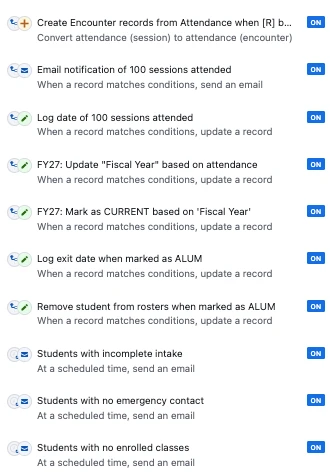
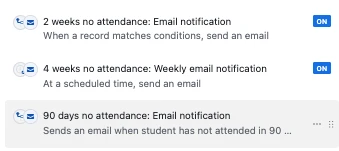
 ​@VedaSync_Aziz thanks! I’ll give this a try in the evening. There are 353 records in the largest table in this base. There are a few different automations, attaching screenshots that show them.  


VedaSync_Aziz
Forum|alt.badge.img+2
  • Participating Frequently
  • Nov 3, 2026 8:23 PM UTC

You are welcome ​@rcode, that helps! 353 records is small, so size isn’t the cause, and your automations look light, so I wouldn’t ditch any. You could switch two of them to formulas, though: FY27: Update “Fiscal Year” and FY27: Mark as CURRENT. A formula can work those out without an automation updating records, so that’s less for the base to do.

Here’s what I’d check next:

  1. Open the field manager and look for broken calculated fields.
  2. In your 80+ field table, see how many are formulas, lookups or rollups. If it’s a large share, that’s the first place I’d look.
  3. Close any open extensions, and hide fields you don’t need in that view.
  4. Try a private window with browser add-ons off.

If it’s still slow, I’d contact Airtable Support with the base ID, because a 5 second delay is a lot for a base this size. Is it slow for anyone else, or just you?


Forum|alt.badge.img+1
  • New Participant
  • Nov 3, 2026 8:47 PM UTC

Thanks, that makes sense. I have a handful of questions--


There are many rollups and a good number of lookups too. Were you suggesting that they might be slowing things down in and of themselves, or only if they happen to be broken? I am not seeing any broken calculated fields in the field manager. (broken fields would be flagged with a red triangle, right?)

The lag is actually something I’m mainly noticing in the field manager. Would it make a difference in lag time, to hide fields in this case? And does that info give any useful hints?

Curious, how did you know my table has 80+ fields?


Lastly, I do still experience the lag in a private window with no add-ons, so it looks like I might be heading toward contacting airtable support. Thanks so much for helping me troubleshoot


VedaSync_Aziz
Forum|alt.badge.img+2
  • Participating Frequently
  • Nov 3, 2026 9:07 PM UTC

Happy to help, and yes, Support looks like the right next step!

Rollups and lookups: Both add some load, even when working. With only 353 records though, I doubt they're causing a 5 second delay.

Broken fields: Showed a red triangle by the field name in grid view, so it's worth a look there too.
 

Field manager lag: Great clue! Hiding fields won't help, since it lists them all anyway. If your grid view feels fast, it may just be that screen.

80+ fields: You mentioned it in your field mapping thread 😄!

For Support: click the question mark on your home screen, then Message support. Mention your base ID, when it started, and that it still happens in a private window.

How's your grid view: fast or laggy? If it's still lagging after Support, I'm happy to take a quick look on a short screen share, no charge.


TheTimeSavingCo
Forum|alt.badge.img+32

As a datapoint, bases with hundreds of thousands of records don’t have any lag for me!  I also tested the field manager on a table with 488 fields and that was really smooth too

Any chance you can test it on another computer and connection?


Forum|alt.badge.img+6
  • Author
  • Inspiring
  • Nov 4, 2026 3:01 PM UTC

​@VedaSync_Aziz Thanks so much, I reached out to support and hoping they’ll be able to help but I’ll be back to this thread if still having issues

​@TheTimeSavingCo Thanks that is helpful. I’ll see if a coworker can test it. The fact that it’s only for field manager on one specific table in a base of multiple tables makes me think it’s something about that table though. Glad to rule out the fields, since it would be concerning if AT glitched at ~80 fields.