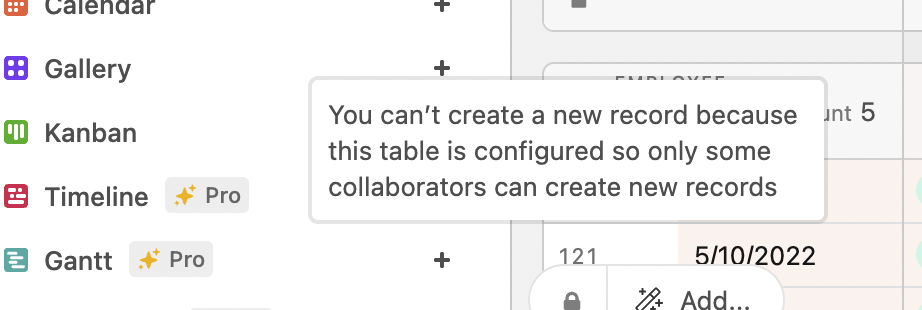
Hi, we have a new collaborator that can’t add or edit any airtabels in the workspace.
He has creator and editor permissions.
Very frustrating, how do we fix it?
We’ve tried logging in and out, as well as adding and removing him as a creator.
Thank you!
Best answer by kuovonne
@stanley_chen You still haven’t checked your table permissions, as @kuovonne stated above. You’ve only checked your user permissions so far:
Bases in free workspaces cannot set table permissions.
There is a small chance that table permissions were set when the base was in a pro workspace and then the base was moved into a free workspace, but that is unusual.
we use the free version, and he is set to a creator in the base
Are other collaborators able to add records?
How many records already exist in the base? Are you at or near the 1200 record limit? Be sure to count records across all records, not just in that one table.
How many records already exist in the base? Are you at or near the 1200 record limit? Be sure to count records across all records, not just in that one table.
@stanley_chen You still haven’t checked your table permissions, as @kuovonne stated above. You’ve only checked your user permissions so far:
@stanley_chen You still haven’t checked your table permissions, as @kuovonne stated above. You’ve only checked your user permissions so far:
Bases in free workspaces cannot set table permissions.
There is a small chance that table permissions were set when the base was in a pro workspace and then the base was moved into a free workspace, but that is unusual.
Bases in free workspaces cannot set table permissions.
There is a small chance that table permissions were set when the base was in a pro workspace and then the base was moved into a free workspace, but that is unusual.
Wow, I did not know that! Thanks! They are very clever about giving people all the perfect reasons to upgrade from Free to Pro.