Date field inserts wrong time

  • November 21, 2018
  • 3 replies
  • 40 views

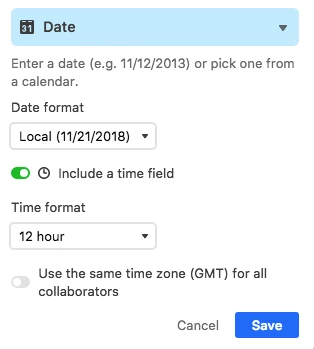
Hi, I have a column of type Date. “Include a time field” is checked. But I noticed that this inserts the wrong time. It inserts the time 1 hour earlier than the system time. How can I fix this so that the correct time is inserted?


This topic has been closed for replies.

3 replies

Forum|alt.badge.img+18

Do you have the “Use the same time zone…” option checked?

That would make a difference.

Other than that, it could be a bug.


  • Author
  • New Participant
  • November 21, 2018

No. It wasn’t checked. I checked it and tried but same thing happened. This may be related to Daylight Savings Time. Here in Turkey we don’t switch anymore. Do you think it has something to do with this?

Also I guess there is no Settings page to set things like this.

Thanks for your help.


Forum|alt.badge.img+18

No. It wasn’t checked. I checked it and tried but same thing happened. This may be related to Daylight Savings Time. Here in Turkey we don’t switch anymore. Do you think it has something to do with this?

Also I guess there is no Settings page to set things like this.

Thanks for your help.


If this was a recent change, and Turkey does not yet have a dedicated timezone in ISO or web standard parlance, then that could very well be the case.