Question

Email - management of incoming and outgoing items

  • September 8, 2026
  • 8 replies
  • 153 views

Alexandra
Forum|alt.badge.img+1

Hi, I need help!


For my project, I want to email volunteers—selecting specific groups associated with each project (i had de volunteers and the project in airtable allready) and receive their replies in the same place. What is the best way to manage this in Airtable while keeping costs and complexity low?


8 replies

DevonK
Forum|alt.badge.img+18
  • Inspiring
  • September 9, 2026

We use a similar approach with Outlook, but I believe you can do it with Gmail as well. It only requires two Airtable automations:

1. Send the email

  • Trigger: Whatever fits your process. For example, if users check a "Send Email" box, use When record matches conditions where that field is checked.

  • Action: Outlook > Send Email. Populate the To field from the email addresses stored in the Airtable record.

2. Capture responses

  • Trigger: Outlook > When a new email is received. Create an Outlook rule that moves replies into a dedicated folder, then monitor that folder with the automation.

  • Action: Either create a new record in an Email Log table or update the original project/volunteer record with the response details. I suggest the email log, as it might get messy to update the original record in case there are multiple responses.


TheTimeSavingCo
Forum|alt.badge.img+32

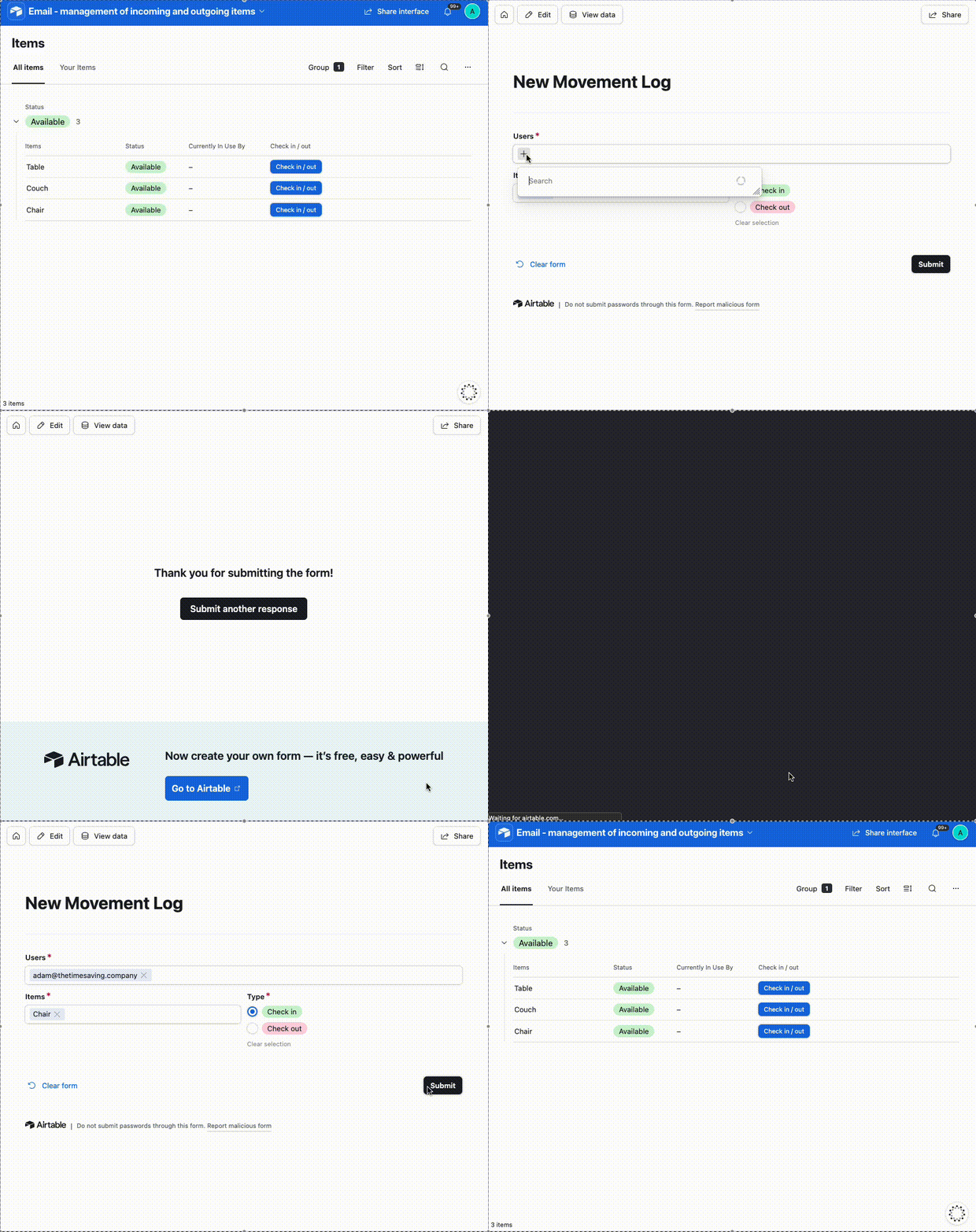
How does this look?  I’ve set it up here for you to check out!


The idea is you can invite all the Volunteers as read-only users to this Interface, which would be free

Whenever a Volunteer wished to update an item, they would click on the ‘Check in / out’ button to open the form, select who they are, and then set whether they were taking or returning it

If you don’t want Volunteers to be able to see each other’s email addresses that’s fine too, you’d replace the ‘Users’ linked field with a text field for users to key in their email addresses instead


---

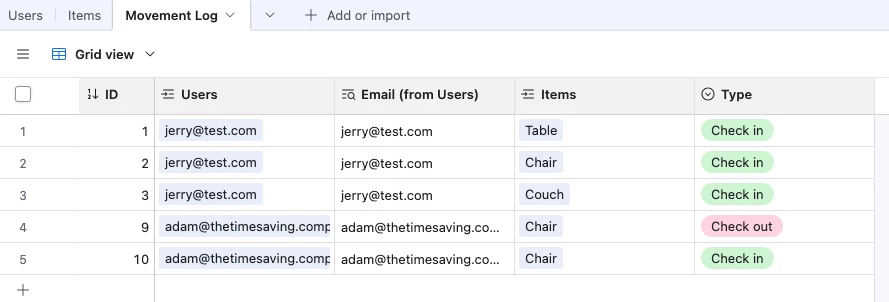
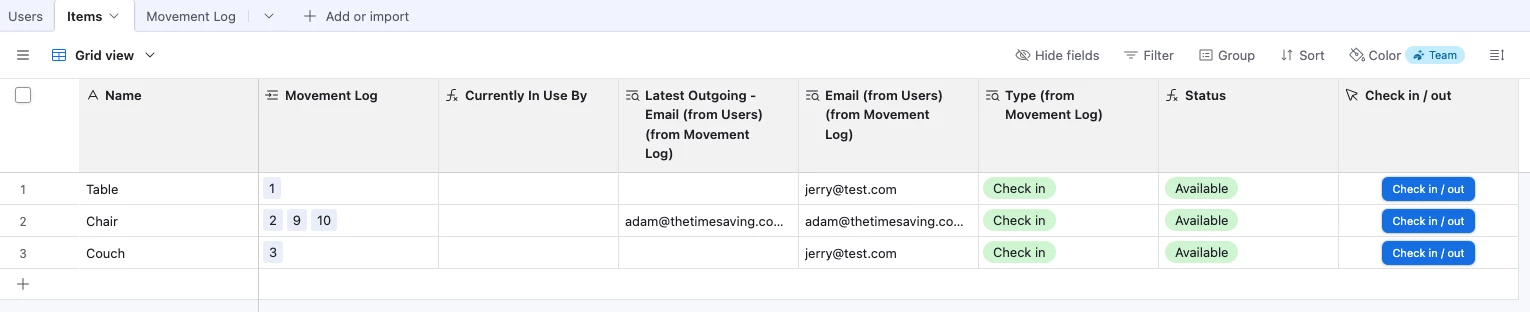
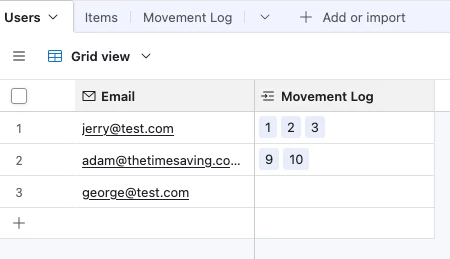
Data wise, we have 3 tables:

  1. Users (with their email addresses)
  2. Items 
  3. Movement Log
    1. Each record here represents an item being checked in / out

Note that this doesn’t prevent users from checking out the same item twice.  I think the easiest way to handle that might be to just create two forms, one for check in and one for check out, and then update the ‘Check in / out’ button output the appropriate form link depending on the item’s Status


omf
Forum|alt.badge.img+6
  • Participating Frequently
  • September 9, 2026

This might be a little too complex (and does require a secondary platform), but if you just need a quick confirmation and no other details, you can add into the body of the email step a html button, with a link to a webhook.

When the volunteer clicks the button, the webhook send that to your automation platform (for example, Make or Zapier) which then updates the airtable record with their response.


Here’s the button html:

<a href="WEBHOOK LINK?recID=DYNAMIC FIELD, SELECT AIRTABLE RECORD ID" style="background-color: #HEX CODE FOR COLOR; text-decoration: none; color: #HEX CODE FOR COLOR !important; padding: 10px 20px; text-decoration: none; border-radius: 5px; display: inline-block; font-family: 'avenir', Helvetica, Arial, sans-serif;">BUTTON TEXT</a>


The webhook link would be created in your automation platform.

The airtable record ID would be added in as a dynamic field, and you’d select the record id of the trigger record.


Then you’d create the automation in your automation platform to receive the webhook, then pass the record id to the next step which would be an “Update Record” airtable module or similar. You can configure the module to update the record with “confirmed” or whatever you like.


Note: This is assuming the automation is looping through each volunteer’s record, so that you can have their record be updated in a particular field with “confirmed.”


Matt_Shepherd
Forum|alt.badge.img+2
  • Participating Frequently
  • September 9, 2026

Can I just clarify, are you looking for the email replies themselves to be loaded onto Airtable? Or are you aiming to capture some kind of specific info from them? 


TheTimeSavingCo
Forum|alt.badge.img+32

​@omf This is a really neat idea!  I’m thinking using Airtable’s webhook automation trigger would let us do this without the secondary platform too


Matt_Shepherd
Forum|alt.badge.img+2
  • Participating Frequently
  • September 9, 2026

​@omf This is a really neat idea!  I’m thinking using Airtable’s webhook automation trigger would let us do this without the secondary platform too

Unfortunately you need something that sits in the middle as Airtable’s webhooks can’t receive url parameters via a GET request, so something needs to translate the url to a POST request.

There is a tool that does this.for free.


DisraeliGears01
Forum|alt.badge.img+22

Some of these suggestions (while cool!) I think might be overkill for what you’re needing to do. Presuming this relates to the other forum thread you made, it might be helpful to provide a bit more clarification in your actual build (what are these volunteers doing? how tech proficient are they? how does the current system work? etc)

In my mind, the simplest thing is to use Airtable’s email automation action. You’ve already got them grouped to projects, the question becomes what emails are you sending? Are they extremely repetitive (deadline reminders or something) or are they semi-unique? If they’re semi-unique, then you need to create a table to contain your email builds (assuming you don’t want to be in automations editing all the time) but if they are reminders you can set a trigger, use the find records action to create the list of recipients, then use a recurring action field to send each person the email (I prefer that to CCing myself). 

With the in-built Airtable automations, you can set a return address, so anyone who responds to your automated email gets sent to the inbox you choose. This might be enough for you, or you could set a new O365/Gmail account to receive the emails, or figure out an Outlook rule to sort responses into a folder. 


ScottWorld
Forum|alt.badge.img+35

I agree with ​@DisraeliGears01 that you should start with Airtable’s built-in automations. Then, if you need more advanced automations than what Airtable offers, you can always monitor & control your emails using Make’s Outlook automations or Make’s Gmail automations or Make’s email automations.

All of my clients who are doing advanced email automations are using Make.

- ScottWorld, Expert Airtable Consultant