Get rid of rounded rectangles around entries

  • March 10, 2018
  • 7 replies
  • 85 views

Hi!

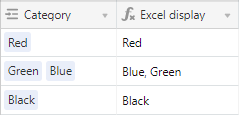
I was wondering if there is a way to display entries in Single select, Multiple select, Link to another record fields without rounded rectangles and shading around them. I really want to have a plain look similar to an Excel table.

If that is possible, I would be very grateful if you could tell me how to do it.

Thank you!

This topic has been closed for replies.

7 replies

Forum|alt.badge.img+18

As far as I know every link to another field will have the rectangle.
However, if you insist on avoiding that kind of view, you can create a formula field that refers to this first field. The formula field will have an “Excel” display.


  • Author
  • New Participant
  • March 11, 2018

As far as I know every link to another field will have the rectangle.
However, if you insist on avoiding that kind of view, you can create a formula field that refers to this first field. The formula field will have an “Excel” display.


Thank you very much for you suggestion, Andre! However, I wanted to be able to work directly with field entries without those ugly rectangles. I know it’s a matter of taste, but I prefer a pure clean look. Those rectangles just distract me. Instead of focusing on the necessary columns my eyes jump straight to rectangles. I wish I have a choice to emphasize only those thing I chose to emphasize. Glad it’s at least possible to turn off the colors.

Again, thank you for your help!


  • New Participant
  • March 14, 2018

i would add to your request, that even with colored fields, it would look nicer if the Air table would allow to choose to fill the entire cell with the color instead of creating rectangular shapes within the cell


Forum|alt.badge.img+17

You could use Style Bot extension with this code:

div.foreign-key-blue {
    background-color: #ffffff;
}

Link: https://chrome.google.com/webstore/detail/stylebot/oiaejidbmkiecgbjeifoejpgmdaleoha


  • Author
  • New Participant
  • March 18, 2018

Hi Elias!

Thank you for the suggestion - it worked! The rectangles around linked records disappeared!!!

Do you by any chance know the Style Bot code for removing rectangles from Single select and Multiple select fields?

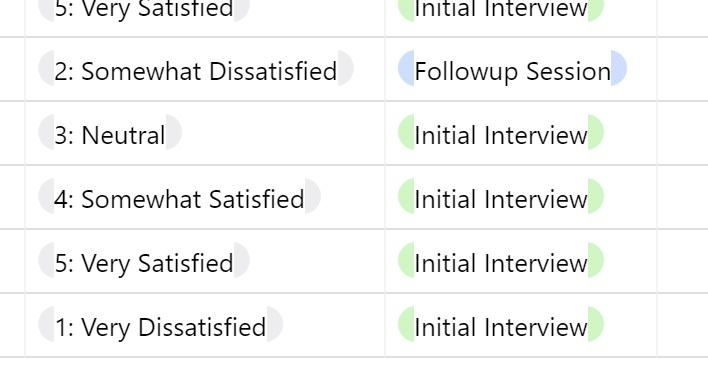
I tried playing with Style Bot, but still get rounded sides of rectangles left over.

Thank you very much!!!


Forum|alt.badge.img+17

Hi Elias!

Thank you for the suggestion - it worked! The rectangles around linked records disappeared!!!

Do you by any chance know the Style Bot code for removing rectangles from Single select and Multiple select fields?

I tried playing with Style Bot, but still get rounded sides of rectangles left over.

Thank you very much!!!


You could use .pill.

Maybe is better use the transparente value as a color than #ffffff.


  • Author
  • New Participant
  • March 19, 2018

It works! I used this code:

span.border-box.truncate.pill {
background-color: transparent;
}

Muchas gracias, Elias!