Question

Groups based on linked record field not sorting correctly by date

  • May 26, 2026
  • 3 replies
  • 19 views

William1985

Hi everyone,

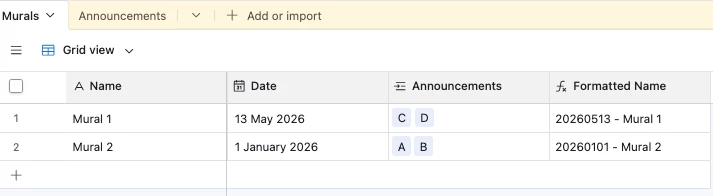
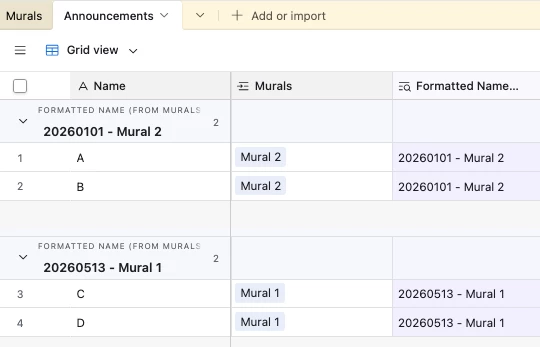
I'm having an issue with group sorting in a Grid view. I have two tables: Murals and Announcements. The Announcements table has a linked record field pointing to Murals, and my view is grouped by that linked field.

The problem: When I set "Order groups by" to any date-based field (lookup or formula), the groups don't sort correctly by date. The groups seem to ignore the sorting criteria entirely.

What I've tried:

  • Using a Lookup field (type Date) from the Murals table as sort criteria
  • Creating a Formula field with DATETIME_FORMAT({FECHA INICIO (de Mural)}, 'YYYYMMDD') and sorting by that
  • Renaming the Mural records so the name starts with the date in YYYYMMDD format and sorting alphabetically A→Z
  • Sorting by the Mural name field A→Z

None of these approaches work. The groups always appear in the wrong order regardless of the sorting configuration.

Expected behavior: Groups should sort by the start date of the linked Mural record.

Question: Is there any reliable way to sort groups by date when the grouping field is a linked record? Is this a known limitation?

Thanks!

3 replies

Forum|alt.badge.img+6
  • Participating Frequently
  • May 26, 2026

Unfortunately this is a known limitation with Airtable’s group sorting.  Group sorting with linked record fields only works reliably when sorting by the primary field of the linked table, alphabetically.


The YYYYMMDD rename approach that you tried is actually the right idea, though it needs to be applied to the primary field of your Murals table and not a separate field.  If your Mural primary field starts with a YYYYMMDD date format, sorting groups A-Z would give you the correct chronological order.


If you are unable to change the primary field, one workaround is to prefix the Mural name with the date (ex. “20250601-Mural Name”) so alphabetical sorting doubles as a date sort.


Not the most elegant solution but currently the most reliable option for linked record group sorting in Airtable.


ScottWorld
Forum|alt.badge.img+35
  • Genius
  • May 27, 2026

No, you don’t need to change the primary field in your linked table. You can just change the display option for your linked record field to show you whichever field you would like to see. You can also just use a lookup field, as long as you’re looking up a field in the YYYY-MM-DD format.

- ScottWorld, Expert Airtable Consultant


TheTimeSavingCo
Forum|alt.badge.img+32

re: Renaming the Mural records so the name starts with the date in YYYYMMDD format and sorting alphabetically A→Z

Hm this should work; could you provide some screenshots for troubleshooting?

Here’s a base where I set it up and it sorts by date if that helps