
How to duplicate multiple cells with different header names in the same table

  • June 15, 2018
  • 2 replies
  • 40 views

I’ve having trouble figuring out how to have 1 particular cell be duplicated to another cell (or two) that has a different field name. Here’s an example:
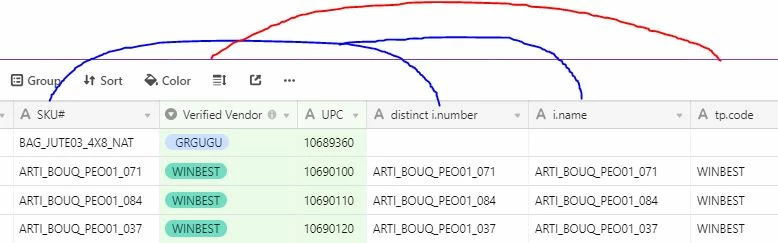
Any advice on how to automate the first SKU# cell to be in 2 cells? And Verified Vendor in the i.name cell?

Thanks!

This topic has been closed for replies.

2 replies

Forum|alt.badge.img+17

You can just make the “duplicated fields” to be Formulas, and make it to be just the name of the original field.

But, why do you want to do that? :thinking:


  • Author
  • New Participant
  • June 15, 2018

You can just make the “duplicated fields” to be Formulas, and make it to be just the name of the original field.

But, why do you want to do that? :thinking:


Ah! Thank you! It wasn’t working out for me before since I thought I has to add + to the formula.

We have a Master Data base that has information needed for importing to other systems. Thus, having this automatic on several fields is a huge time saver.