How to remove an option to the menu on the Form

  • October 3, 2024
  • 4 replies
  • 39 views

Forum|alt.badge.img+1

Hi guys,

I'm creating a escape room form, so the group can select the room and time they want to play.
There are 3 rooms (each one with 5 different times to play).

When a group select the room/time (example: Room 1 - 20h) this room can't appear on the form anymore.
How can I do that?

I read in other message here to create a new table with all the possibilities (I already did that), and created a link to another record in the main table (which is used to create the form).
I tested it but it didn't work.

If anyone could help me, I appreciate it! Thanks

4 replies

ScottWorld
Forum|alt.badge.img+35
  • Genius
  • October 4, 2024

I give a demonstration on how to do this on this Airtable podcast episode.

Hope this helps!

- ScottWorld, Expert Airtable Consultant


TheTimeSavingCo
Forum|alt.badge.img+31

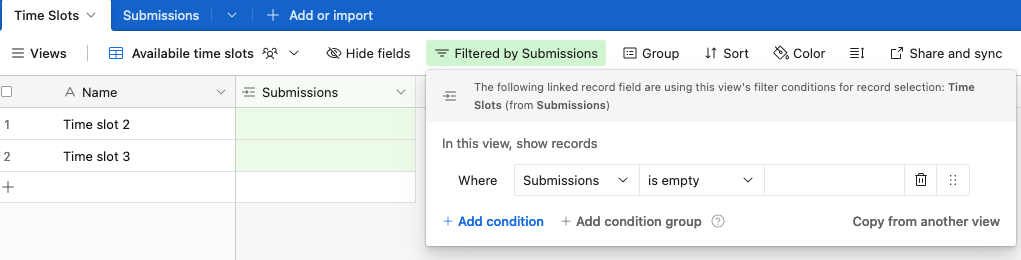
Hmm, try setting up a view that only shows available time slots like so:

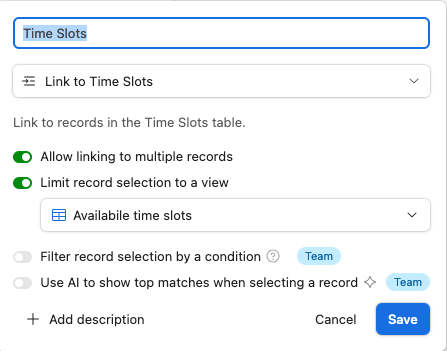
Then, in your form table, limit the record selection to that view:

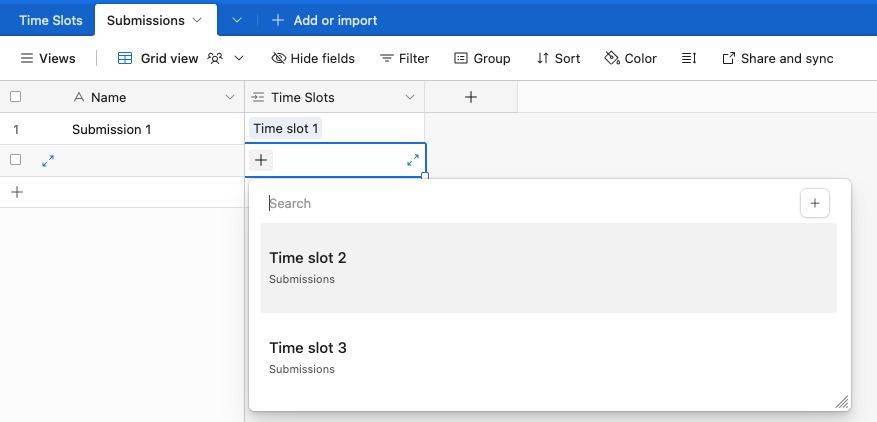
After you've done that it'll only show records that aren't linked to any existing submissions:


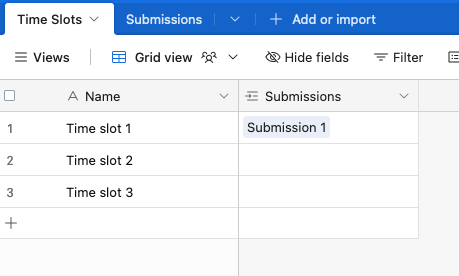
And this is my data:

Link to base

If you've got a teams plan you can just use the "Filter record selection by condition" option too!


Forum|alt.badge.img+4

I give a demonstration on how to do this on this Airtable podcast episode.

Hope this helps!

- ScottWorld, Expert Airtable Consultant


THANK YOU!!!

I did it!!


ScottWorld
Forum|alt.badge.img+35
  • Genius
  • October 7, 2024

You're welcome! Glad I could help! 🙂