Month to Date and Year to Date help for graph block

  • March 9, 2020
  • 4 replies
  • 62 views

Forum|alt.badge.img+8

Hi there. I’m trying to set up a graph that would only show the transactions that have closed up to the day but within the current month only so MTD.

I’d also like to be able to set up a graph that would show Year to Date or YTD for transactions that have closed from Jan 1st of the given year or this year.

Thanks in advance!
Troy

This topic has been closed for replies.

4 replies

Mohamed_Swella1
Forum|alt.badge.img+17

Hi @Troy_Gamble,

I have the following suggestions:

  1. Create a new View with a filter that contains the argument you want (for example Transaction Date is after March 01, 2020)

  2. Create a Chart Block using this view. This will hide the items that are not in the filter.

  3. For the Year to date, instead of March 1, use January 1.

Hope this is what you are looking for.

BR,
Mo


Forum|alt.badge.img+8
  • Author
  • Inspiring
  • March 11, 2020

Hi @Troy_Gamble,

I have the following suggestions:

  1. Create a new View with a filter that contains the argument you want (for example Transaction Date is after March 01, 2020)

  2. Create a Chart Block using this view. This will hide the items that are not in the filter.

  3. For the Year to date, instead of March 1, use January 1.

Hope this is what you are looking for.

BR,
Mo


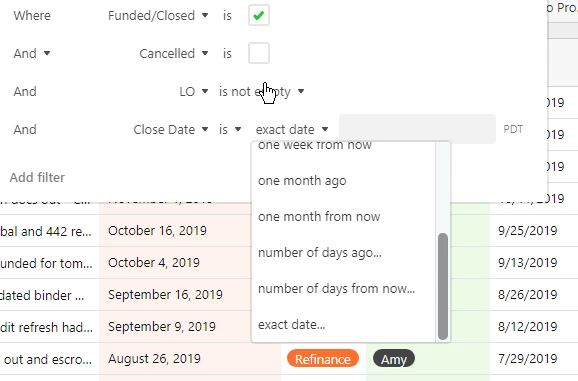
Thanks so much for the reply. The issue I have is that I’m not seeing the option to set the argument for an “after this date” in the drop down of the filter?


Mohamed_Swella1
Forum|alt.badge.img+17

Thanks so much for the reply. The issue I have is that I’m not seeing the option to set the argument for an “after this date” in the drop down of the filter?


Hi @Troy_Gamble,

The option is in the “is” drop down menu not in the “exact date” drop down menu.

BR,
Mo


Forum|alt.badge.img+8
  • Author
  • Inspiring
  • March 11, 2020

Hi @Troy_Gamble,

The option is in the “is” drop down menu not in the “exact date” drop down menu.

BR,
Mo


Oh……genius! Thank you!