Need help with formulas and due date calculation

  • September 11, 2019
  • 2 replies
  • 64 views

Hello!

I need to know if this is possible. I have a table that lists projects, with two different “priorities”, so to speak. One we need to meet on every 7 days, one we need to meet only once per month. I can add in our most recent meeting date, and then calculate a date from that. It’s simple…until I need to calculate the next meeting due date based upon priority. This probably doesn’t make sense, sorry.

I tried nesting the dateadd within an if then statement, but I kept getting an error.

Writing it out, this is what I need:

If priority = A, then due date is most recent meeting plus 7 days
Else due date is most recent meeting plus 30 days

Right now, I just have the two project types in different tables to keep the calculations simple, but I’d like them all in one table. Ideas??

Thanks!!

This topic has been closed for replies.

2 replies

Forum|alt.badge.img+19
  • Inspiring
  • September 12, 2019

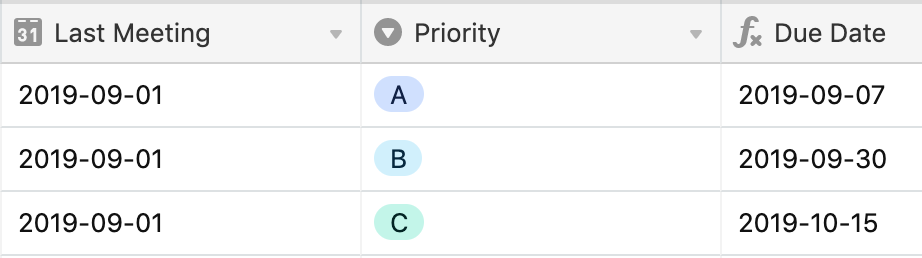
This is three priorities - +7, +30, and +45 days…

The formula uses simply nested IF() logic. IMPORTANT - the – else – lines are inserted to help you understand the logic - these are not part of the formula.

IF({Priority} = "A", DATEADD({Last Meeting},7,'days'),

– else –

IF({Priority} = "B", DATEADD({Last Meeting},30,'days'),

– else –

DATEADD({Last Meeting},45,'days')))

Complete Formula

IF({Priority} = "A", DATEADD({Last Meeting},7,'days'), IF({Priority} = "B", DATEADD({Last Meeting},30,'days'), DATEADD({Last Meeting},45,'days')))


Forum|alt.badge.img+17
  • Inspiring
  • September 12, 2019

Given you have only two cases – 7 days and 30 days – a single IF function will take care of it, as @Bill.French pointed out. Here’s a different way to state the formula, which takes advantage of the fact that you’re working solely with days as the unit:

DATEADD( {Last Meeting} ,
	IF( {Priority} = "A" ,
		7,
		30),
	'days'
)

If you ever find yourself needing more priority levels, you can try the SWITCH function, which was designed to handle a large number of “options”. Here’s Bill’s example with three priority levels, this time using the SWITCH function:

DATEADD( {Last Meeting} ,
	SWITCH(	{Priority} ,
		"A", 7,
		"B", 30,
		45),
	'days'
)