Question

Portal - Read Only count against Guest Paid Seats?

  • March 13, 2026
  • 6 replies
  • 65 views

Jasmine_Ruth1
Forum|alt.badge.img+9

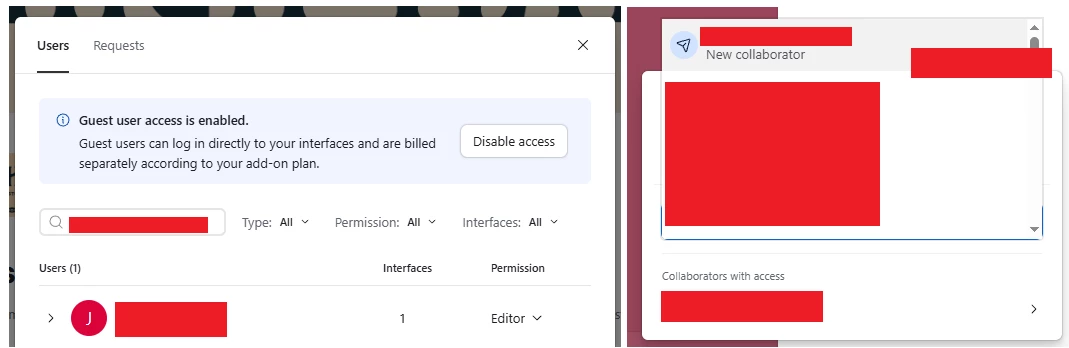
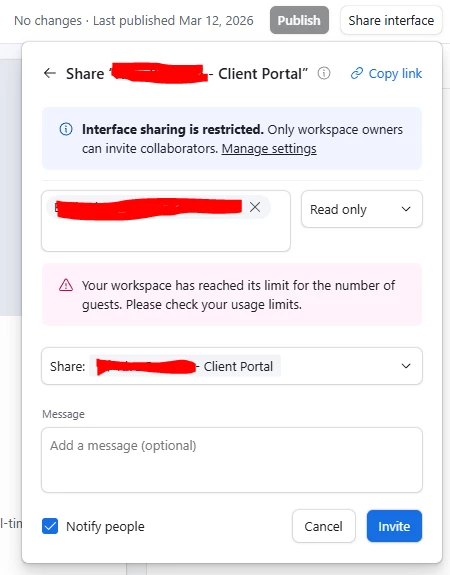
Any clue why when trying to add a read only seat that I’d get this error about reaching the limit for number of guests? If they are read only I thought they didn’t count against anything?

 

6 replies

TheTimeSavingCo
Forum|alt.badge.img+31

Interesting!  The docs don’t indicate anything about there being a read-only seat limit for Portals and so this should be fine.  I was pretty curious about this and so opened a support ticket, will let you know if I find out more!

Out of curiosity, do you still get that error if you try to invite people as read-only users to the Interface, i.e. not as a read-only Portal user?


TheTimeSavingCo
Forum|alt.badge.img+31

Update:

Support confirmed that there aren’t any limitations / caps for read-only Portal guests and suggested the following:

  1. Refresh my browser / clear my cache / try it again in incognito
  2. Provide them with the base ID where this issue is occurring so they can investigate
  3. Provide them with the number of read-only users already added to the portal

I’m not really sure why refreshing the page etc would help, and if there’re no caps on read-only Portal guests then the number of existing read-only guests shouldn’t matter either, but that’s what I’ve got back from support for now


Jasmine_Ruth1
Forum|alt.badge.img+9
  • Author
  • Known Participant
  • March 13, 2026

Interesting!  The docs don’t indicate anything about there being a read-only seat limit for Portals and so this should be fine.  I was pretty curious about this and so opened a support ticket, will let you know if I find out more!

Out of curiosity, do you still get that error if you try to invite people as read-only users to the Interface, i.e. not as a read-only Portal user?

No I don’t but I have a specific reason for wanting to add them as a read-only guest user, b/c when I upgrade their seat to editor, I want them to be a guest editor, not interface editor. 


Also, another concerning thing that seems related… this is regarding an INTERFACE - EDITOR user… this person already has access to several interfaces,  yet when I’m trying to add him to another interface it’s acting as if he’s going to be added as a new billable collaborator. How do we know we aren’t being double charged? I triple checked that there’s no error in the spelling or anything different about their address. I also opened a ticket with support on both of these issues.


Mike_AutomaticN
Forum|alt.badge.img+28

Hey ​@Jasmine_Ruth1,

Not sure how deep you’ve gone on your airtable portal build, but you might want to check a look at Zite as an alternative. I started taking it seriously only about a month ago and have been really really impressed.

Regardless of whether you decide to move forward with it or not, I do suggest taking a look at it.
 

Mike, Consultant @ Automatic Nation 
YouTube Channel 


Philip_Ade
Forum|alt.badge.img+3
  • Participating Frequently
  • March 14, 2026

Read-only users still count as guests in the workspace, so they do count toward the guest limit. If your workspace has reached the guest cap, you won’t be able to add additional read-only seats until a guest is removed or the plan limit is increased.


Jasmine_Ruth1
Forum|alt.badge.img+9
  • Author
  • Known Participant
  • March 15, 2026

Read-only users still count as guests in the workspace, so they do count toward the guest limit. If your workspace has reached the guest cap, you won’t be able to add additional read-only seats until a guest is removed or the plan limit is increased.

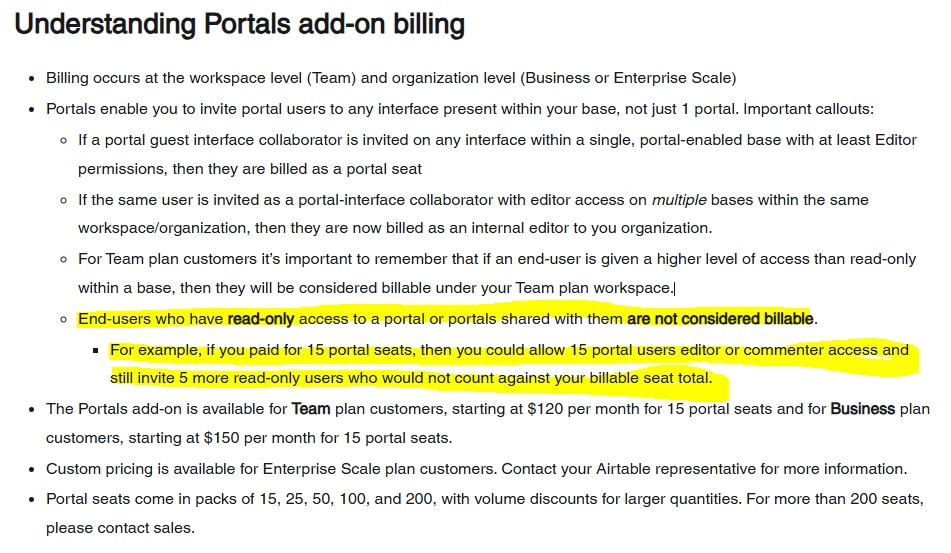
Not according to Airtable…. snip below pulled from this link: https://support.airtable.com/docs/using-airtable-portals-for-external-collaborators