

Hi all,
I’ve been struggling with the SET_TIMEZONE feature for about 20 minutes now and frankly I’m over it, so I’m coming to you all.
I’m trying to display the times that some orders were made in the local time zone of the person that made the order. I have three columns: Time Zone (which is the local time zone of the buyer), Order Time & Date (CET) (which is my time zone. all time stamps arrive in CET), and Order Date & Time (Local) (which is the field I am trying to calculate).
I have set the following formula in the last column:
IF({Time Zone}="Alaska",SET_TIMEZONE({Order Date & Time},'America/Juneau'),IF({Time Zone}="Hawaii",SET_TIMEZONE({Order Date & Time},'Pacific/Honolulu'),IF({Time Zone}="Eastern",SET_TIMEZONE({Order Date & Time},'America/Kentucky/Louisville'),IF({Time Zone}="Pacific",SET_TIMEZONE({Order Date & Time},'America/Los_Angeles'),IF({Time Zone}="Central",SET_TIMEZONE({Order Date & Time},'America/Mexico_City'),IF({Time Zone}="Mountain",SET_TIMEZONE({Order Date & Time},'America/Boise'),{Order Date & Time}))))))
This formula is intended to display the time the order was made in the local timezone of the buyer based on the option selected in the Time Zone column.
However this does not work. I even tried removing the whole formula and just using a simple SET_TIMEZONE({Order Date & Time},‘America/Boise’) to test, and it still doesn’t work.
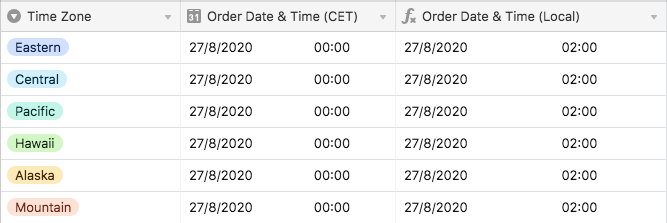
What happens is, no matter what time zone I set the resulting formula is always 2 hours ahead.. I’ve included a screenshot of this as well
I would greatly appreciate any help you can give me on this issue!

